Help text is grayed out after first paragraph #437

Description

First Check
- I added a very descriptive title to this issue.
- I used the GitHub search to find a similar issue and didn't find it.
- I searched the Typer documentation, with the integrated search.
- I already searched in Google "How to X in Typer" and didn't find any information.
- I already read and followed all the tutorial in the docs and didn't find an answer.
- I already checked if it is not related to Typer but to Click.
Commit to Help
- I commit to help with one of those options 👆
Example Code
# test.py
import typer

app = typer.Typer(rich_markup_mode="rich")

@app.command()
def test() -> None:
    """
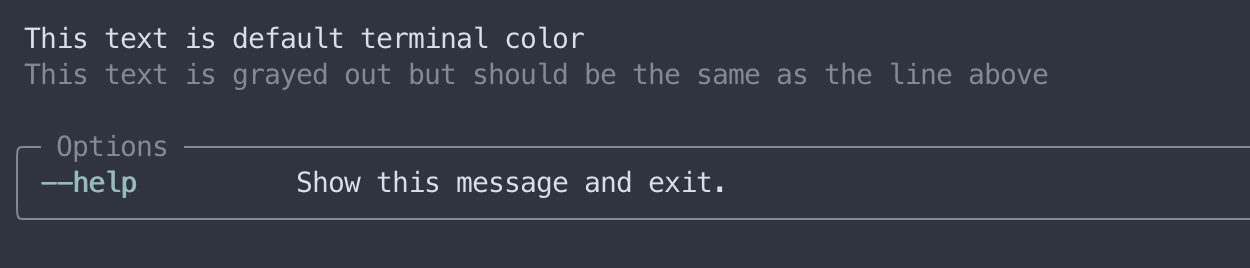
    This text is default terminal color

    This text is grayed out but should be the same as the line above
    """
    typer.echo("hello world")


@app.command()
def blue() -> None:
    """
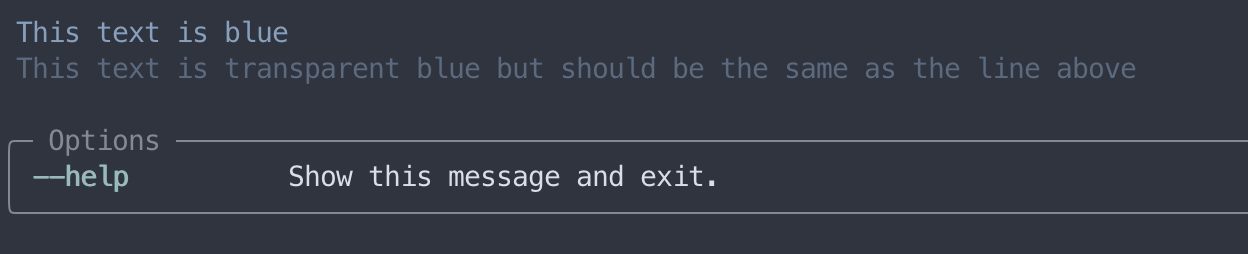
    [blue]This text is blue[/blue]

    [blue]This text is transparent blue but should be the same as the line above[/blue]
    """
    typer.echo("hello world")

---------------------
$ test.py test --help
$ test.py blue --help
Description
Problem statement
Help text printed from a command's docstring prints in two text colors in the terminal. This first paragraph is always the default text color for the terminal. Subsequent paragraphs are grayed out.
Expected result
All help text should be the same color unless specified by using rich style tagging
Operating System
macOS
Operating System Details
Attaching screenshots of results:

Typer Version
0.6.1
Python Version
3.10.5
Additional Context
No response