feat: added toolbar in multimeter #1348
Merged
Conversation
This file contains hidden or bidirectional Unicode text that may be interpreted or compiled differently than what appears below. To review, open the file in an editor that reveals hidden Unicode characters.
Learn more about bidirectional Unicode characters


 abhinavraj23
changed the title
abhinavraj23
changed the title

Member
Author
|
@cweitat @CloudyPadmal @harsh-2711 @Avjeet Please test the apks in your devices and let me know if there is any issue in the UI w.r.t screen-sizes |
abhinavraj23
requested review from
Avjeet and
cweitat
and removed request for
woshikie
abhinavraj23
changed the title

cweitat
approved these changes
Aug 9, 2018
Contributor
 cweitat
left a comment
cweitat
left a comment
cweitat
left a comment
There was a problem hiding this comment.
Working for me but want to know why it cannot access the menu via hamburger icon like at the instruments page?
Member
Author
|
@cweitat it is the a separate toolbar made for the multimeter instrument so that we can add data-recording feature in multimeter, it is not the same toolbar used in the instrument activity. I will add the data recording feature in my subsequent PRs. |

CloudyPadmal
requested changes
Aug 9, 2018
|
|
||
| private ScienceLab scienceLab; | ||
|
|
||
| @BindView(R.id.accel_toolbar) |
Collaborator

There was a problem hiding this comment.
View looks ok in my device. Why is this referring to accel_toolbar?

Member
Author
|
@CloudyPadmal Changes done 👍 |
CloudyPadmal
approved these changes
Aug 10, 2018


Sign up for free
to join this conversation on GitHub.
Already have an account?
Sign in to comment
3 participants


Add this suggestion to a batch that can be applied as a single commit.
This suggestion is invalid because no changes were made to the code.
Suggestions cannot be applied while the pull request is closed.
Suggestions cannot be applied while viewing a subset of changes.
Only one suggestion per line can be applied in a batch.
Add this suggestion to a batch that can be applied as a single commit.
Applying suggestions on deleted lines is not supported.
You must change the existing code in this line in order to create a valid suggestion.
Outdated suggestions cannot be applied.
This suggestion has been applied or marked resolved.
Suggestions cannot be applied from pending reviews.
Suggestions cannot be applied on multi-line comments.
Suggestions cannot be applied while the pull request is queued to merge.
Suggestion cannot be applied right now. Please check back later.
Fixes #1293
Changes: [Add here what changes were made in this issue and if possible provide links.]
Added toolbar in multimeter to further have data recording feature implemented in multimeter.
Screenshot/s for the changes: [Add screenshot/s of the layout where you made changes or a
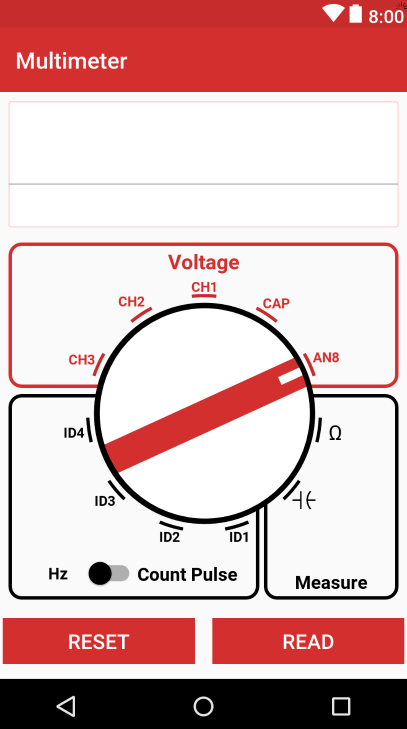
*.gifcontaining a demonstration]Checklist: [Please tick following check boxes with
[x]if the respective task is completed]strings.xml,dimens.xmlandcolors.xmlwithout hard-coding themstrings.xml,dimens.xmlorcolors.xmlAPK for testing: [Compress the
app-debug.apkfile into a<feature>.raror<feature>.zipfile and upload it here]multimeter_toolbar.apk.zip