

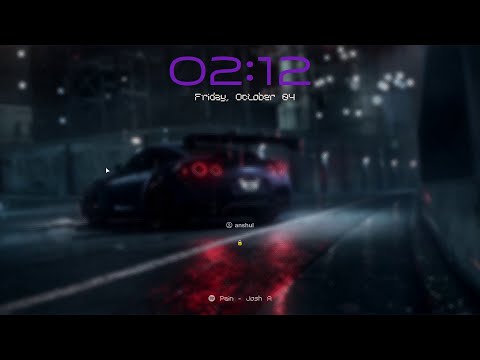
This repository provides multiple Hyprlock styles and includes three versions of an installation script:
- Basic Installer
- Installer with Preview
- Advanced Installer
Note: Dynamic wallpaper style works best on Hyde project
These scripts allow you to apply different styles to your Hyprlock configuration with options to preview styles before applying them.
Before using the scripts, ensure the following packages are installed on your system:
-
Hyprlock (Hyprland's simple, yet multi-threaded and GPU-accelerated screen locking utility.)
- Install via (For Arch based systems):
pacman -S hyprlockoryay -S hyprlock-git(for latest version) - For other Distro: hyprlock-github
- Install via (For Arch based systems):
-
fzf (For interactive style selection)
- Install via:
sudo pacman -S fzf(Arch-based systems) orsudo apt install fzf(Debian-based systems)
- Install via:
-
chafa (For displaying previews in the terminal)
- Install via:
sudo pacman -S chafaorsudo apt install chafa
- Install via:
-
fc-cache (For managing font cache)
- This is typically included in font management packages like
fontconfig, which is installed by default in most Linux distributions.
- This is typically included in font management packages like
-
Kitty Terminal (for certain preview features)
- Install via:
sudo pacman -S kittyorsudo apt install kitty
- Install via:
-
Optional: Imagemagick (for converting image formats)
- Install via:
sudo pacman -S imagemagickorsudo apt install imagemagick
- Install via:
-
Optional feature (for enabling dynamic wallpaper on hyprlock)
- This installer works best on Hyde project
- Check the Hyde project here
ORIf you have a directory where all the dynamic wallpapers are kept in apngonly format you can specify the path in thehyprlock.conffile ofStyle-wallpaperdirectory
-
Clone the repository to your local machine:
git clone https://github.com/Anshul-007/HyprLock_installer
cp -r HyprLock_installer/Hyprlock-Styles/ ~/.config/Hyprlock-Styles
cd ~/.config/Hyprlock-Styles
-
Choose your installer:
- Basic Installer:
basic_installer.sh - Installer with preview:
installer_with_preview.sh(Recommended) - Installer with delete feature:
advanced_installer.sh(To Delete Style Collection)
Make the desired script executable:
chmod +x installer_with_preview.sh # Replace with your chosen script - Basic Installer:
-
Optional feature for dynamic wallpaper
- For those who are not on Hyde project need to make a directory where all wallpapers are dynamically changed and stored and then link that path to hyprlock.conf file in Style-wallpaper folder
This script will apply the selected style to your Hyrplock configuration. It doesn't offer preview functionality:
./basic_installer.shThis version allows you to see a preview of the styles before applying them:
./installer_with_preview.shThis version allows you to preview and delete a style permanently:
./advanced_installer.shYou will be prompted to select a style using fzf. If you are using the preview script, chafa will display the style preview in your terminal and this works best on kitty terminal.
Update: All installers are packaged with cache functionality
WARNING: If you have your hyprlock.conf file in ~/.config/hypr directory please back it up as this script may delete if ran more than one time.
NOTE: To test the hyprlock press y when prompted or you can explicitly type hyprlock in terminal
If the style contains fonts, the installer will automatically copy them to your local fonts directory ($HOME/.local/share/fonts/) and update the font cache using fc-cache
In case of any erroneous fonts you can explicitly install the required fonts for that style
Feel free to to contribute to this repository by submitting issues or pull requests. Any contributions, whether bug reports, code improvements, or new styles, are welcome.
-
If you want to add new styles, please ensure that:
- The style has a proper preview image (
preview.png) if applicable. - Fonts are included in the
Fontsfolder, if required by the style. - The style works with the existing Hyprlock configuration
- The style has a proper preview image (
-
The structure of Style-
Ndirectory should be of this structure:.config/Hyprlock-Styles/Style-N ├── hyprlock.conf ├── hyprlock.png ├── preview.png ├── Scripts │ └── songdetail.sh └── user.jfif .config/Hyprlock-Styles/FONT_DIR └── A_Font_directory_without_spaced └──font.ttf
- This project is possible by all the open source projects and big thanks to Mr. Vivek Rajan for all the styles.
- Also check out Khurasan for awesome fonts.
This project is licensed under the GPL-3.0 License, since some of the style are derived from other GPL-licensed repositories.
