Added code for simplified and fused assembly export to STEP #1261
Conversation


|
@adam-urbanczyk @lorenzncode I'm still writing the docs, but feel free to critique the code. I'm planning to do a full test run of the fused export method with the KiCAD generator before taking this out of draft. |

|
TBH I think that the fused method should not use cut. You don't even need to fuse to be able to add colors to faces. |

|
Is there a way to implement color-preserving fuse without the cut? |
|
@kliment the first question is: why do you think you need a fuse to add colors to subshapes? |
|
The requirement that Jeremy's work is based on was for turning an assembly of different-colored parts into a single compound which preserves face colors. I believe a fuse is required for this. Obviously it's much easier to add colors without fusing, but this doesn't meet the single compound requirement. |
|
For reference, this requirement is coming from the KiCad library team, as we're looking for a replacement for the export method we use in FreeCad, which uses FreeCad's color-preserving fuse operation. |
|
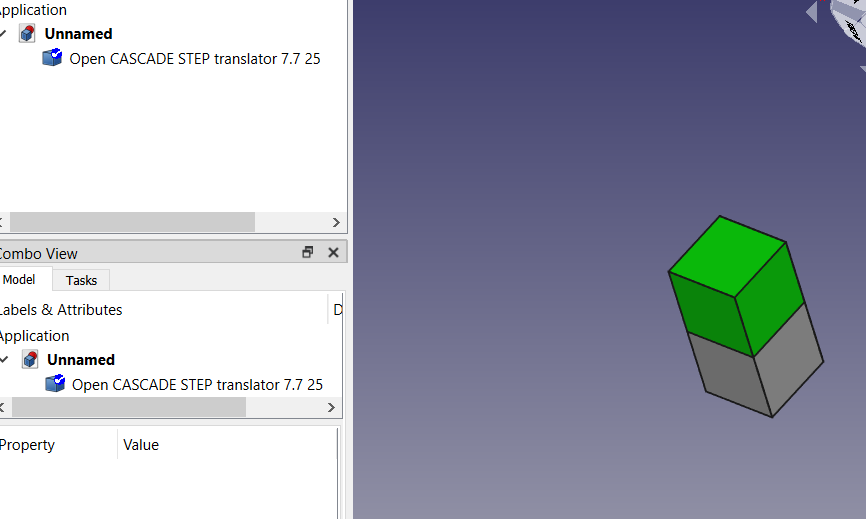
As I wrote above, you can add colors to a compound and fusing is not needed to have a single compound... E.g. I can get this without fusing:
|
|
If someone can present a fuse-with-colors method that does not need the cut and also works reliably, I'm interested in it. I tried several things and this was the only method that would do what was needed. I may be missing something though as I have trouble following everything that FreeCAD is doing with their export. |
|
@adam-urbanczyk Can you post the code you used to get the result in the screenshot above? |
|
There you go: from OCP.Quantity import Quantity_Color, Quantity_TOC_RGB
from OCP.TopoDS import TopoDS_Compound
from OCP.STEPControl import STEPControl_Writer, STEPControl_AsIs
from OCP.BRep import BRep_Tool, BRep_Builder
from OCP.TCollection import TCollection_ExtendedString
from OCP.TDocStd import TDocStd_Application, TDocStd_Document
from OCP.XCAFDoc import XCAFDoc_DocumentTool, XCAFDoc_ColorType, XCAFDoc_ColorGen
from OCP.STEPCAFControl import STEPCAFControl_Writer
from OCP.XSControl import XSControl_WorkSession
from OCP.TDataStd import TDataStd_Name
import cadquery as cq
# Build a simple assembly
assy = cq.Assembly()
box1 = cq.Workplane().box(10, 10, 10)
assy.add(box1, color=cq.Color(1, 0, 0))
box2 = cq.Workplane().center(0, 10).box(10, 10, 10)
assy.add(box2, color=cq.Color(0, 1, 0))
##############################
## EXPORT ####################
##############################
# The document
app = TDocStd_Application()
doc = TDocStd_Document(TCollection_ExtendedString("BinXCAF"))
app.InitDocument(doc)
# The shape and color tool
shape_tool = XCAFDoc_DocumentTool.ShapeTool_s(doc.Main())
color_tool = XCAFDoc_DocumentTool.ColorTool_s(doc.Main())
# Set up the compound
comp = cq.Compound.makeCompound(
assy.toCompound().Solids()
)
# Compound assembly type
top_lbl = shape_tool.AddShape(comp.wrapped, False, True)
# NB I just assign random colors here, this should be based on a mapping to the original assy
for f in comp.Solids()[0].Faces():
cur_lbl = shape_tool.AddSubShape(top_lbl, f.wrapped)
color_tool.SetColor(cur_lbl, assy.children[1].color.wrapped, XCAFDoc_ColorGen)
# Export to STEP
session = XSControl_WorkSession()
writer = STEPCAFControl_Writer(session, False)
writer.Transfer(doc, STEPControl_AsIs)
status = writer.Write("xde_step_export_test.step") |
|
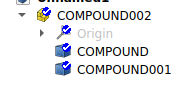
@adam-urbanczyk I can only get your result when I check
I don't think this is what we want because FreeCAD is artificially merging the compound and not showing the hierarchy that is actually in the file. I think the only way to do this without a cut is to walk through all the faces of the compound and check if they are within the bounds of a face from the original assembly. I'm guessing OCCT has a way to check that, but I'm not sure what it is yet. For reference, here is an explanation of why this fused method is important to KiCAD users. And here is a follow-up comment to that one. |
|
Fair enough, not using fuse is not an option, but it has nothing to do with colors. On avoiding cut: If you want to map faces of the arguments of an OCCT operation to faces of the result, you can use the |
|
@adam-urbanczyk @kliment There is still some clean-up to do, but the |
|
Looks like the appveyor builds are failing because of a code style issue |
|
@kliment Yeah, I'm still doing full runs of the KiCAD generator and tweaking |


…face addition for now
|
@lorenzncode what is the status here? Still adding some tests? AFAICT they are quite extensive as-is. |

|
Agreed, the tests are probably sufficient to catch most regressions. I wanted to get a better idea of the performance. Experimenting with fuse op |

I'd say no, it should be generic by default. |

|
What is the preferred argument name for the "export mode" of method edit: That is - change the docs or change the argument name? Note that the other arg names of this method use underscore, e.g. "fuzzy_tol". |

* Correct the export mode keyword arg name in example
* Include example of exporters.export opt dict
|
For now, I've updated the doc examples to correct the export mode argument name (with regards to the current code). |
|
I think |
Indeed, but in this particular case I'd propose to use just |
|
I made that change, and even though the tests still pass, it broke the fuse mode so that the setting seems to be ignored now. I may just revert the change and let you guys set it to what you think is best. |
|
Hm, AFAIR the tests check the number of resulting solids. How did you conclude that your change is not working? |
|
The problem ended up being that I didn't get the parameter name changed everywhere in the KiCAD generator. |
|
OK, so are we good to merge this? |
|
+1 to merge |
|
I like the |

|
Merged, thanks for all the hard work @jmwright and @lorenzncode ! |
|
Thanks for all the feedback @adam-urbanczyk and @lorenzncode |


This PR adds two new modes for STEP export.
1. Simplified STEP - Keeps the hierarchy to one level but will have multiple shapes, uses the names set for the assembly components as the shape names, and preserves colors.2. Fused STEP - Will only have one shape when the solids in the assembly can be fused, otherwise will have a one-level hierarchy. Preserves colors by adding the faces of the assembly's solids as subshapes to the STEP document.