Conversation


 taooceros
changed the title
taooceros
changed the title

|
Question: Maybe this should be a global setting? |
 jjw24
added
enhancement
jjw24
added
enhancement

I think this can be a global setting. This basically allows the user to open the containing folder using another program other than Windows explorer right? This can be useful for Explorer plugin as well. |
|
hey in the code 'Explorer' has a typo in several places. Can you see if there is something in SharedCommands class that you can use rather than hardcoding the word in. |
On second thought, maybe no need for global, leave this to the individual plugin to implement, because not all plugins do this. |
|
True, but I think program plugin, explorer, and potential everything plugin may use the same setting? Though I think setting them seperately is not hard. |

|
hey @taooceros just made a couple minor changes, let me know if it is all good |

 taooceros
left a comment
taooceros
left a comment
taooceros
left a comment
There was a problem hiding this comment.
I plan to add the customized args aligning with what I have done in the Everything plugin, by adding the default args with select,[path], and allows users to use %s and %f to customize their selection for the containing folder.

| Main.StartProcess(Process.Start, new ProcessStartInfo(Package.Location)); | ||
| Main.StartProcess(Process.Start, new ProcessStartInfo( | ||
| !string.IsNullOrEmpty(Main._settings.CustomizedExplorer) ? Main._settings.CustomizedExplorer:Settings.Explorer, | ||
| $"{Main._settings.CustomizedArgs} \"{Package.Location}\"".Trim())); |

There was a problem hiding this comment.
does UWP work with Args? Since "/select,%f" is now the default init
There was a problem hiding this comment.
Well...That's an issue... Let me take a look on solution.
There was a problem hiding this comment.
i got it working by removing CustomizedAgs, if it doesnt work at all for UWP, perhaps remove it?
| <system:String x:Key="flowlauncher_plugin_program_customizedexplorer">Customized Explorer</system:String> | ||
| <system:String x:Key="flowlauncher_plugin_program_args">Args</system:String> | ||
| <system:String x:Key="flowlauncher_plugin_program_tooltip_customizedexplorer">You can customized the explorer used for opening the container folder by inputing the Environmental Variable of the explorer you want to use. It will be useful to use CMD to test whether the Environmental Variable is avaliable.</system:String> | ||
| <system:String x:Key="flowlauncher_plugin_program_tooltip_args">Enter the customized args you want to add for your customized explorer. %s for parent directory, %f for full path (which only works for win32). Check the explorer's website for details.</system:String> |
There was a problem hiding this comment.
sorry i am not too across how the %s and %f option can be used. Could you give me an example?
There was a problem hiding this comment.
%s is the parent directory and %f is the file path (.exe, .lnk, etc.) I get the idea from the everything plugin which can select the file while opening the parent directory. However, that seems may work not good for uwp.
There was a problem hiding this comment.
oh ok so this option allows for win32 programs to open both file and parent directory when using 'open containing folder' ?
There was a problem hiding this comment.
Yes, let me think how I can fix that. If I can't, I will remove that
no logic changes
…d make code more readable
…r into CustomizeExplorer
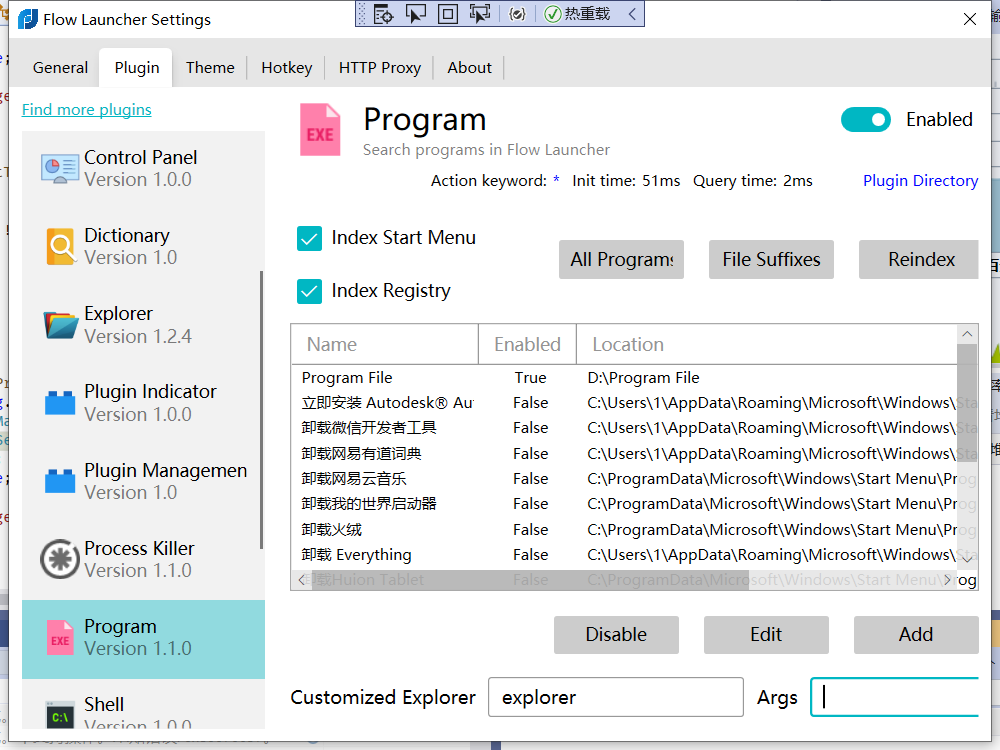
Oh that's strange. Maybe you can reduce the width of the CustomizeExplorer textbox a little bit. I was trying to align them up with the others. |
|
Once uwp is sorted we can get this in |
Oh sorry I forget to mention, it has been solved by moving the default to %s. |
hey I just tested it out, UWP still not working... |
Hey I have tested, too, it works....... Which explorer and args are you using? |
Strange. I just remove roaming profile then start, using the default, which is %s for args |
Sorry I have found the issue; I will fix that soon. It works fine for me before is because I clear the args box.......😅 |
jjw24
removed
the
review in progress

2 participants


Link to #193
This is only for program plugin for now.