Enhancement to Simplified Shading#9404
Conversation


 yujiex
added
NewFeature
yujiex
added
NewFeature

 shorowit
left a comment
shorowit
left a comment
shorowit
left a comment
There was a problem hiding this comment.
This is a nice enhancement that some users will greatly appreciate! Thanks for working on this.
|
|
||
| ## Approach ## | ||
|
|
||
| With the added *WindowMaterial:SimplifiedShade* object, users will be able to input a fractional adjustment α between 0 and 1, either as a constant value or as a schedule. The fractional adjustment will be multiplied to the solar transmittance (`state.dataMaterial->Material(MaterNum).Trans`) and visual transmittance (`state.dataMaterial->Material(MaterNum).TransVis`) of the corresponding windows before entering heat balance calculation. The solar transmittance and visible transmittance of the *WindowMaterial:Glazing* object is from the input fields “Solar Transmittance at Normal Incidence” and “Visible Transmittance at Normal Incidence”. For *WindowMaterial:Glazing:RefractionExtinctionMethod* object, the solar and visible transmittance is derived from user input thickness, solar and visible extinction coefficient, and refraction. For the simple glazing object, the adjustment will be applied to the Solar Heat Gain Coefficient and the Visible Transmittance. |
There was a problem hiding this comment.
I have a question about this language: "For the simple glazing object, the adjustment will be applied to the Solar Heat Gain Coefficient and the Visible Transmittance."
I'm not sure that I understand what this means exactly. Can you confirm that these adjustments would not result in the same effect as if someone had adjusted the inputs to the WindowMaterial:SimpleGlazingSystem object in the same way? I primarily want to make sure that different angular properties or solar correlations, derived using SHGC, will not be chosen for the window simply based on whether this shading object is used.
I also wonder why this approach is suggested for the simple glazing system. Is it not possible to modify solar/visible transmittance directly, as is done for detailed windows?
There was a problem hiding this comment.
Thanks for the feedback :)
My understanding is that if the adjustment factor is 0.5, the SHGC and U-value from user input are both 0.7, then the actual SHGC and U-value in downstream heat balance calculation will be 0.35 and 0.7. It will function the same way as if users input 0.35 and 0.7 as the SHGC and U-value, without configuring the simplified shading.
It is possible to make the user directly modify the U and SHGC inputs in WindowMaterial:SimpleGlazingSystem, but maybe a more unified shading object is a bit more direct when they model the shading device?
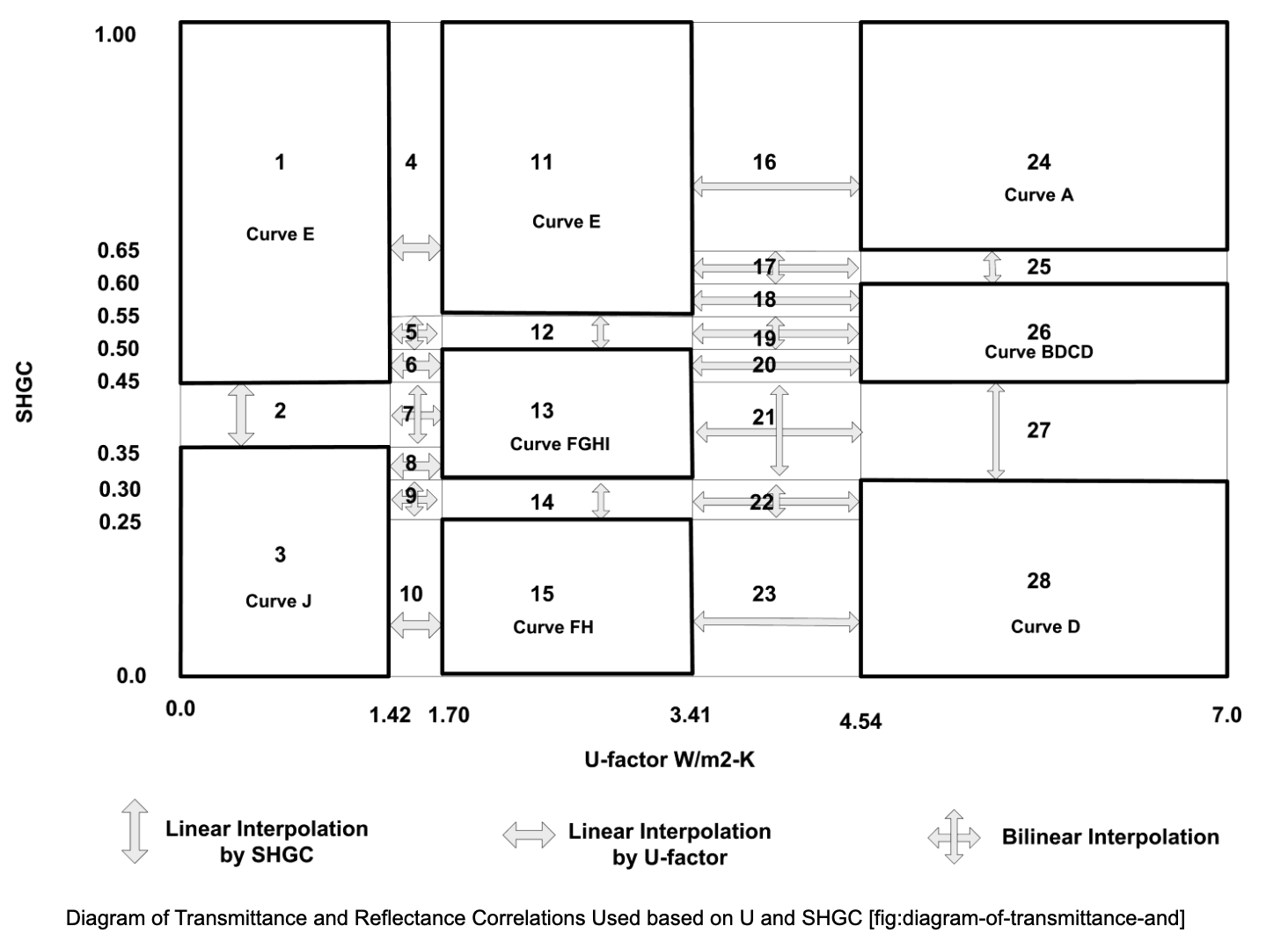
As for the angular properties, I haven't thought of this before. But if we want to maintain the correlation curve, we could keep track of the information and use the correlation curve from the un-adjusted U-value, SHGC combination. With the above example, we'll use curve E instead of curve J in the following diagram. What do you feel about this approach?
There was a problem hiding this comment.
My understanding is that if the adjustment factor is 0.5, the SHGC and U-value from user input are both 0.7, then the actual SHGC and U-value in downstream heat balance calculation will be 0.35 and 0.7. It will function the same way as if users input 0.35 and 0.7 as the SHGC and U-value, without configuring the simplified shading.
My point is that I don't think it should behave the same way, because it can result in different detailed window properties being used. I assume the detailed window properties should remain the same whether this shading object is used or not.
As for the angular properties, I haven't thought of this before. But if we want to maintain the correlation curve, we could keep track of the information and use the correlation curve from the un-adjusted U-value, SHGC combination. With the above example, we'll use curve E instead of curve J in the following diagram. What do you feel about this approach?
Angular properties are just one example. See the description of the simple window model. For example, I assume the layer solar transmittance, layer solar reflectance, and layer visible properties would also need to use the unadjusted values. It feels like trying to use the unadjusted values everywhere they should be used is a risky approach, in that some may be missed. I can't help but wonder if there's a simpler implementation approach (like simply reducing the direct/diffuse solar that the window sees), but I say this without any knowledge of the code. Perhaps @EnergyArchmage or @nealkruis has an opinion here.
There was a problem hiding this comment.
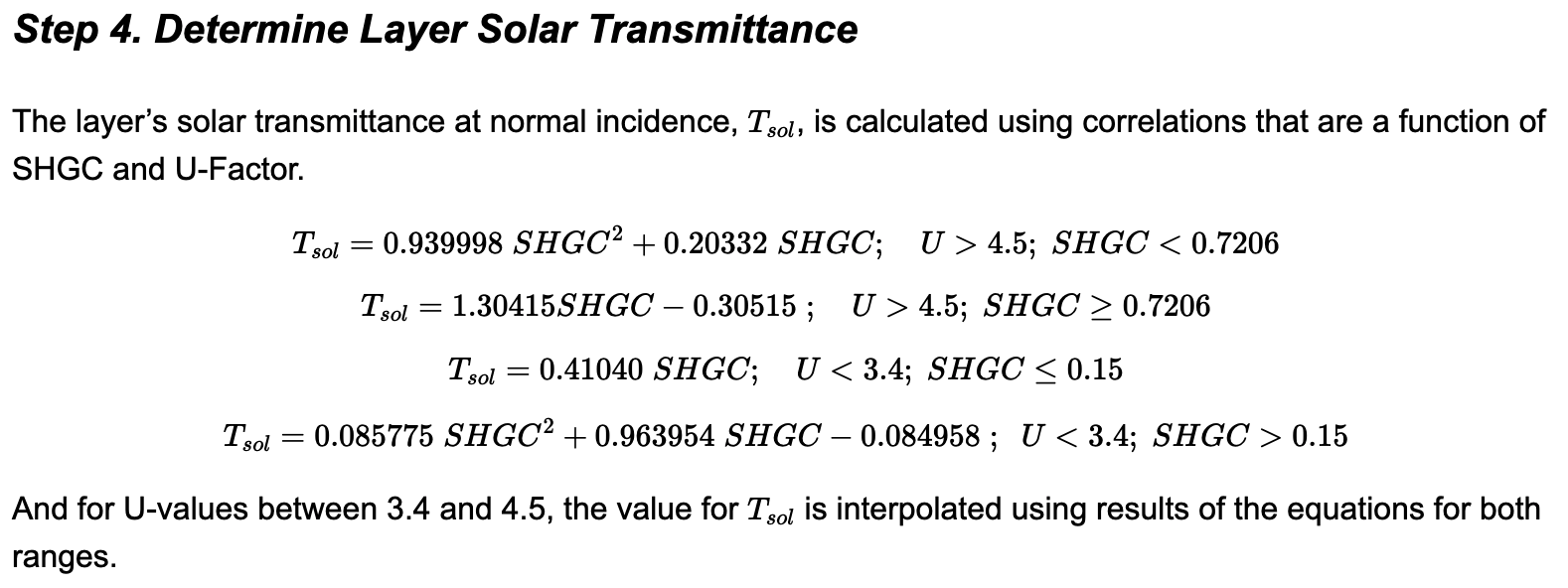
Maybe we will just adjust the

|

@nealkruis When organizations like RESNET and Building America require interior shading multipliers, do you really think they intend for the solar to be absorbed and not reflected? My assumption is that they have set the shading multiplier to account for how much solar energy is transmitted and absorbed, though I've never been able to track down where these factors originated. I would be shocked if any software tool is assuming that the solar not transmitted by shades is absorbed rather than reflected. |
|
These are very hypothetical shading devices. I'm not sure where the assumptions in RESNET / BA originated, though I suspect they largely come from the limitations in modeling approaches in DOE-2. In reality, I imagine most shades are more absorptive than reflective, and I don't think it hurts to be able to specify both. It only adds flexibility. |
|
I agree that the flexibility doesn't hurt. Just wanted to make sure we're on the same page about how software are currently using the simplified interior shading multipliers, which is driving the motivation here. Sounds like we are. |

|
I believe the intent is that WindowShadingControl would have no impact. Also, I presume this would not apply to the EquivalentLayer windows. I also assume this cannot be combined with traditional WindowMaterial:Shade, WindowMaterial:Blind, WindowMaterial:Screen. I'm not sure about WindowMaterial:SimpleGlazingSystem. What ever the restrictions, they should be made clear in the NFP. Many, many references to "shade" or "shading" are in the IOref (although many of those don't apply to windows) but I hope as part of this work some review would be made and documentation updated in a few key places to explain whether this new input object applies or not. In addition, I would recommend new errors or warnings should be added when this is attempted to be used with something WindowShadingControl or other input objects related to more detailed window shading. |

|
This big beautiful message says it all, at least I hope it says it all. |

Right, a constant schedule should cover the constant value case. I felt it's more of a design choice. |
I guess we could add in the reflectance adjustment as well. If users don't want to adjust it, the default value of 1.0 will be used. |
Yes, WindowShadingControl will not take effect on this simplified shading.
Yes, EquivalentLayer windows already has built-in shadings, so the adjustment in this proposed feature will not apply.
Yes, it is not combined with any existing shading objects.
Right, I'll add notes to the NFP that if there's already some other WindowMaterial:Shade or blinds defined for the window, don't use the simplified shading on it.
Good point, I'll make sure to clarify in the documentation, which part this new simplified shading applies.
I'll add warnings or error messages regarding the compatibility of this shading object and other shadings or windows. |

|

|
Prompted by @shorowit comment here, I did some testing on SurfaceProperty:LocalEnvironment "External Shading Fraction Schedule Name". It wouldn't be right for this feature, because it has limitations noted here. Ultimately this feature should reduce the incident solar after sunlit fraction has been accounted for by the shadow calculations. But I might still suggest that this feature be something like SurfaceProperty:SimplifiedWindowShade that could be applied to a single fenestration surface, or possibly groups of fenestration surfaces (just to make life interesting, similar to the way SurfaceProperty:ConvectionCoefficients:MultipleSurface can be applied to AllExteriorWindows, for example. |
Very good point. It does seem difficult to directly adjust window properties. We'll need to adjust some downstream quantities which are updated at every timestep, as you suggested below.
Maybe we can discuss this more in the technicality meeting? I'm not sure if adding adjustments for transmittance, reflectance, and conductance will make the object too complicated, which defeats the purpose of the simplification.
Indeed. This is the closest to our intential to discount solar heat gain with a fraction schedule.
Em, maybe we could also discuss about it in the meeting. Not sure if we want to perfectly match the DOE-2 behavior, or what do people think about having a conductance here or let users use the regular shading inputs instead.
"Shading Multiplier Input Method" is intended to guard against the case when both a value and a schedule are given. |
Yeah, I guess this reference should not be here, as the WindowShadingControls shouldn't apply here. |
This is probably a good way to approach this. We could also discuss it in the meeting. |

|
Excellent comments, folks. Talk to you soon at the technicalities call. |
|
I mentioned this on the Technicalities call, but just wanted to write down that we're essentially trying to replace our current approach for modeling simple shading multipliers, which involves:
This gives us the desired effect, but it's 1) complicated for a user to implement, and 2) introduces runtime impacts because of all the additional shadowing calculations. |
|
Ah, my memory has failed me. I conflated two different things. It turns out that we use a fixed schedule (not EMS actuated schedule) for the shading surface transmittance, that's why we don't hit the above issue. But then we use EMS to actuate the View Factor To Ground that the window sees, in order to also adjust the solar reflected from the ground. We've performed tests to verify that we get identical results to using an EPW file with modified solar radiation. (In our general use case, we can't rely on modifying the EPW solar radiation values to achieve the desired result because we need to support different shading multipliers for different windows.) So this might be another nuance to consider in the implementation of this feature. To be clear, we would like the total solar radiation (direct, diffuse, and ground reflected) seen by the window to be adjusted by the user input. |
Thanks for the notes. Yes, the intention of this feature would be to not create a physical layer but achieve the desired outdoor-indoor solar gain discount.
Yes indeed. This would mean all windows have the same shading, which is not what we wanted. But good as a testing mechanism: we could compare two cases, one with a simplified shading multiplier, one without the shading multiplier but with modified solar radiation in the epw file.
Yes, this is my current understanding too. |
|
Thanks for all the comments in the technical call and the comments in the PR. Regarding the issues touched, I summarized a few points here
|
Presuming that this input object does not represent a physically possible system, the use of the term "simple" is misleading since it implies that it is good for users that are beginning to use EnergyPlus and don't have all the input required for a different input object. In this case, conceptually this is not simple at all since it is modifying something that might not be even physically possible. Instead of the user being able to use this input object with a "simple" mental model of what is going on they actually need a deeper understanding than a typical user. I would recommend getting rid of the words "simple" or "simplified" completely in the name of the input object and in this pull request title and just use the term "Multiplier". You might also consider the term "ResearchSpecial" as part of the name of the input object just to discourage its use like we have with other input objects that we are only adding for a special case. |

|
I would suggest using two simplified glazing systems, one with shade deployed and one without the shade. And then interpolating between them as is done for switchable electrochromic glazing modeling. |
|
Is this intended to be used only with WindowMaterial:SimpleGlazingSystem? Or any type of window construction? |
|
I would hope that it can be used with any window construction. |

| Real64 GndSolarRadInc = max(state.dataEnvrn->BeamSolarRad * state.dataEnvrn->SOLCOS(3) + state.dataEnvrn->DifSolarRad, 0.0); | ||
| for (int SurfNum = 1; SurfNum <= state.dataSurface->TotSurfaces; ++SurfNum) { | ||
| state.dataSurface->SurfSkySolarInc(SurfNum) = state.dataEnvrn->DifSolarRad * state.dataSolarShading->SurfAnisoSkyMult(SurfNum); | ||
| Real64 SurfIncSolarMultiplier = GetSurfIncidentSolarMultiplier(state, SurfNum); |

There was a problem hiding this comment.
Is the multiplier 1.0 for all surfaces other than exterior windows? In that case, you probably don't want to call this function for every surface. What you want to do is have an array initialized to 1.0 for every surface and then at the beginning of every time step, call this function only for exterior windows and overwrite their entries with the scheduled value.
There was a problem hiding this comment.
Is the multiplier 1.0 for all surfaces other than exterior windows?
Yes. That's the intention. Only for exterior surfaces with user-defined incidentSolarMultiplier object can equal to values other than 1.0.
I will rearrange the code and overwrite the values for exterior window instead of calling this function on all surfaces.
- put surface location and type check before material group about presence of
  other shading
- split error message to surface type (window, wall, etc.) and location
  (ext, interior), adjust unit test
- when the schedule index is not found but the input field is not empty
- Also fixed a typo in the name checking part
Query incident solar multiplier for a surface only once every timestep
iteration, instead of querying whenever a SurfNum is encountered
also moved check for typo in schedule name at the beginning of filling in the data
|
Hi, @EnergyArchmage would you be available to look at whether the incident solar multiplier implementation makes sense? Sorry for tagging you so late. |

| \type real | ||
| \units dimensionless | ||
| \minimum 0 | ||
| \maximum 1 |

There was a problem hiding this comment.
I know this project started out as providing a simplified shading solution. But the final approach is fairly general and it could be used to amplify incident solar as well as reduce it. It seems to me that the maximum limit of 1.0 is a bit arbitrary. If you want to allow magical reduction of solar, why not allow magical increases as well? E.g. users could quickly see what would happen if the windows transmitted 20% more solar. Or maybe they know a neighboring building is reflecting a ton of solar during certain times.
|
I have studied the code and don't see any problems with the implementation. |
|
Thanks Brent for your review and comments. Very appreciate it. |

 Myoldmopar
left a comment
Myoldmopar
left a comment
Myoldmopar
left a comment
There was a problem hiding this comment.
In general this looks good, and ready. But I'm holding back on marking it approved until I hear back about the > 1.0 comment. There's a tiny conflict that I can resolve locally during testing if no other changes end up being needed.
| } | ||
| for (int SurfNum = 1; SurfNum <= state.dataSurface->TotSurfaces; ++SurfNum) { | ||
| state.dataSurface->SurfSkySolarInc(SurfNum) = state.dataEnvrn->DifSolarRad * state.dataSolarShading->SurfAnisoSkyMult(SurfNum); | ||
| auto const &SurfIncSolarMultiplier = state.dataSurface->Surface(SurfNum).IncSolMultiplier; |
There was a problem hiding this comment.
state.dataSurface->Surface(SurfNum).IncSolMultiplier is just a float right? If so, we for sure don't need the auto shorthand. And I don't think we really want it to be a reference either. I guess neither of these are really functional changes, so I don't think it's worth holding this up. I'll keep moving.
There was a problem hiding this comment.
Yes. It is just a real number. Should just use Real64 instead of the ref. I'll change it now.
There was a problem hiding this comment.
Thanks, there was also something in the Clang-Format test, so get that fixed up too and this could be ready assuming the >1 comment is resolved.
| \type real | ||
| \units dimensionless | ||
| \minimum 0 | ||
| \maximum 1 |
There was a problem hiding this comment.
@EnergyArchmage you had suggested we could go higher than 1.0 for some interesting simulation studies. Should this be > 0? I haven't seen whether the schedule in the next field allows for > 1 or not, but the comment suggests it should be 0 < x < 1.

There was a problem hiding this comment.
@EnergyArchmage @Myoldmopar An interesting and constructive comment on the multiplier value being greater than 1 to allow other use cases. Indeed it is possible but it stretches the original design purpose which is to simulate a simplified shading effect for windows. I suggest we keep it as it is and come back in future to expand it for other use cases including Brent's mentioned case, shading for opaque walls or special dynamic coating for surfaces etc.
There was a problem hiding this comment.
I don't recall that multiplier = 0.0 would be a problem in the code. Could be useful for elimination parametric studies.
There was a problem hiding this comment.
0 and 1 should both be inclusive. 0 corresponds to a full-shading case and 1 corresponds to no shading.
There was a problem hiding this comment.
multiplier = 0 should be allowed to model special cases such as 'opaque' windows or windows covered by aluminum foil.
There was a problem hiding this comment.
@Myoldmopar I didn't find the comment suggesting the incident solar multiplier greater than 0 (not inclusive). Could you please point me there? I'll change it to inclusive.

|
To do:
|
|
Thanks @yujiex ! It looks like everything is resolved. I'm going to pull in develop since I just merged a PR and test locally now. |
Thanks, @Myoldmopar. Ben and I are doing some local testing on the shading multipliers by comparing this feature branch with some basecases one with a EMS actuator controlling ground view factor, and one that modifies the .epw weather input solar radiation value. Since neither of the base cases are perfect: the EMS one had some issue of incident solar component not adding up to total incident solar, the epw-modifying one differs with this feature branch in wall and roof incident solar as well (ideally we want them to differ only in window incident solar), the differences shown with these verifications might not indicate a problem in the implementation. Do you think we can merge in the current state of the feature branch and if we later find better testing base cases, or fixed the EMS one and if the better testing basecases show some problem in the implementation, we could open up another PR to fix the issue? The idd part probably does not need to be modified in that case. |
|
@yujiex @Myoldmopar Since Brent also reviewed and confirmed the implementation is fine, let us merge in the code. If later we confirm and need to fix any issues, we can post a CR. The EMS exercise has taken quite some time and it may take additional weeks or months. |
|
Everything tests fine here, merging this one, and yes, if there is any follow-up stuff, that's fine. Thanks all. |


| for (int SurfNum = 1; SurfNum <= state.dataSurface->TotSurfaces; ++SurfNum) { | ||
| state.dataSurface->Surface(SurfNum).IncSolMultiplier = GetSurfIncidentSolarMultiplier(state, SurfNum); | ||
| } |

There was a problem hiding this comment.
I know this has been merged, but I'm noticing this as I resolve conflicts over in the space heat balance branch. There should be a global flag for AnySolarMultipliers that can be used to skip this entire loop if they are not being used (which is the common case).
Also, I would assume these apply only to exterior windows? If so, the loop can be for(int SurfNum : state.dataSurface->AllExtSolWindowSurfaceList).
There was a problem hiding this comment.
Make sense. I'll add in a global flag to skip the whole loop, and also restrict the looping to within state.dataSurface->AllExtSolWindowSurfaceList
| state.dataSurface->SurfSkySolarInc(SurfNum) = state.dataEnvrn->DifSolarRad * state.dataSolarShading->SurfAnisoSkyMult(SurfNum); | ||
| Real64 SurfIncSolarMultiplier = state.dataSurface->Surface(SurfNum).IncSolMultiplier; | ||
| state.dataSurface->SurfSkySolarInc(SurfNum) = | ||
| state.dataEnvrn->DifSolarRad * SurfIncSolarMultiplier * state.dataSolarShading->SurfAnisoSkyMult(SurfNum); |
There was a problem hiding this comment.
Instead of introducing an extra multiplication for every surface, why not move the GetSurfIncidentSolarMultiplier to be after this loop and modify the final results instead, and only if there are AnySolarMultipliers, then this function could be renamed ModifySurfIncidentSolar and just apply the corrections as needed. I'm not sure if this can be done everywhere this is being applied, but we want to limit as much extra computation as possible for the common case which has no multipliers.
There was a problem hiding this comment.
It is written this way so that it is easier for me to keep track: whenever a surface has something computed using state.dataEnvrn->DifSolarRad, state.dataEnvrn->BeamSolarRad, or state.dataEnvrn->GndSolarRad, the multiplier is applied when the surface has an incident solar multiplier defined. Now that hopefully I've captured all the places where the multiplier needs to be added. I can certainly make the modification and move the solar adjustment to after the loop. I'm not sure if directly modifying GetSurfIncidentSolarMultiplier would work, as different variables are adjusted in different places the multiplier is used. But at least I can do something like this. What do you think? @mjwitte
if (state.dataGlobal->AnySolarMultipliers) {
  for (int SurfNum : state.dataSurface->AllExtSolWindowSurfaceList) {
    Real64 SurfIncSolarMultiplier = state.dataSurface->Surface(SurfNum).IncSolMultiplier;
    variableToAdjust *= SurfIncSolarMultiplier;
  }
}
There was a problem hiding this comment.
@yujiex Yes, that's what I was suggesting. I'll leave it to you to evaluate the best approach.
There was a problem hiding this comment.
A similar approach is used for things like TDD diffuser and dome in other parts of the code, if I remember correctly.
There was a problem hiding this comment.
Thanks for the pointer. I'll check out the TDD diffuser and dome code.

There was a problem hiding this comment.
Not sure the local variable helps here since it's used only once. Just use a 1-liner.
variableToAdjust *= state.dataSurface->Surface(SurfNum).IncSolMultiplier;
There was a problem hiding this comment.
There should be a few more terms to adjust (didn't list them all here), so I assume with a temp variable saves a little time in retrieving the multiplier value
|
I just did an experiment to see the impact of the multiplication of the SurfIncSolarMultiplier, using the The following is the t-test result. The difference between the average run time with and without the multiplication terms is not statistically significant. The following is a quantile comparison Is this type of performance difference critical? When I am actually trying to make the rearrangement, it seems kind of error-prone: previously I just needed to keep track of three terms, in the modified case, I will need to keep track of all downstream terms computed from the three solar components and remember to adjust all of them. Any thoughts? @mjwitte @Myoldmopar |
|
Linux CI is several commits away from reporting the "official" performance measure for this, so it's hard to know if there's a significant impact. How about a compromise? For loops that have more than a few instances of |
I'll try to do it this way. Thanks for the suggestion. Although do you think the compilers will already do a simplification like this one you mentioned? Do you think the compiler might already optimize it (like this one: https://en.wikipedia.org/wiki/Common_subexpression_elimination) and store the result of |
16 participants


Pull request overview
Currently, EnergyPlus models shading devices in WindowMaterial:Shade and WindowMaterial:ComplexShade. Even for the non-complex shade, users need to specify at least nine input fields including solar and visible transmittance and reflectance, infrared hemispherical emissivity and transmittance, thickness, conductivity, etc. This level of complexity could hinder the application of the shading model in EnergyPlus: when the required input fields are difficult to acquire, users might choose to not model shading devices at all. One such case could be converting models from other simulation tools with less detailed shading methods. The omission of shading devices could lead to an overestimation of cooling loads in the summer and an underestimation of the heating load in winter.
The proposed new feature will enable a simplified way to specify the properties of a shading device with a multiplier applied to the incident solar radiation. The multiplier can be a single fixed value or a schedule of values. An idd object
SurfaceProperty:IncidentSolarMultiplierwill be added for users to specify the multiplier to discount the incident solar, and as a result discount the transmitted solar from the outside to the inside. This multiplier resembles the shading-fraction in DOE-2, which can adjust the solar heat gain through windows with a multiplier schedule.This post on unmethours.com shows a need for such a simplified shading method in EnergyPlus: https://unmethours.com/question/342/what-assumptions-do-you-make-for-modeling-blinds/
Main Approach
The
state.dataEnvrn->BeamSolarRad,state.dataEnvrn->DifSolarRad, andstate.dataEnvrn->GndSolarRadare multiplied by the incident solar multiplier for the corresponding surface. The multiplier is one for most surfaces, except for the ones with definedSurfaceProperty:IncidentSolarMultiplierand non-default multiplier values.For example, originally, the sky incident solar is computed like this
In this feature branch, it is computed with an additional term
where mult(SurfNum) is the surface-dependent incident solar multiplier. In the code, it is called
SurfIncSolarMultiplierThe multipliers are applied in the calculation of the following quantities. Generally, when there is a
SurfNumspecified, the multiplier is applied. TheSurfNumwill decide the value of the multiplier.Visualization of the results
A new test file "1ZoneEvapCooler_4Win_incidentSolarMultiplier.idf" is created to examine the effect of applying the incident solar multiplier. The model is adapted from 1ZoneEvapCooler, with 4 additional windows. The "Sun Exposure" of the roof is changed to "NoSun". The solar reflectance of the wall and roof surfaces are all set to 100%. These intend to facilitate comparison by directly adjusting the .epw
The following plot compares the model outputs of the "1ZoneEvapCooler_4Win_incidentSolarMultiplier.idf", with different shading multiplier values in the object
SurfaceProperty:IncidentSolarMultiplier. The output variable compared here is the three components of the incident solar: ZN001:WALL001:WIN001:Surface Outside Face Incident Beam Solar Radiation Rate, ZN001:WALL001:WIN001:Surface Outside Face Incident Ground Diffuse Solar Radiation Rate, and ZN001:WALL001:WIN001:Surface Outside Face Incident Sky Diffuse Solar Radiation Rate, and the total incident solar, ZN001:WALL001:WIN001:Surface Outside Face Incident Solar Radiation Rate per Area (the bottom right facet in the following figure).The transmitted solar radiation for different incident solar multiplier values is shown in the following figure. The variables plotted in the three columns are:
ZN001:WALL001:WIN001:Surface Window Transmitted Beam Solar Radiation Rate [W] (Hourly),
ZN001:WALL001:WIN001:Surface Window Transmitted Diffuse Solar Radiation Rate [W] (Hourly),
and ZN001:WALL001:WIN001:Surface Window Transmitted Solar Radiation Rate [W] (Hourly)
The following plot shows the zone sensible cooling energy for different multiplier values as well as directly reducing epw solar radiation input to half.
NOTE: ENHANCEMENTS MUST FOLLOW A SUBMISSION PROCESS INCLUDING A FEATURE PROPOSAL AND DESIGN DOCUMENT PRIOR TO SUBMITTING CODE
Pull Request Author
Add to this list or remove from it as applicable. This is a simple templated set of guidelines.
Reviewer
This will not be exhaustively relevant to every PR.