listWorksheetInfo method counts rows with empty strings #3255

Description

This is:
- [ ] a bug report
- [ ] a feature request
- [ ] **not** a usage question (ask them on https://stackoverflow.com/questions/tagged/phpspreadsheet or https://gitter.im/PHPOffice/PhpSpreadsheet)
What is the expected behavior?
When reading an XLSX file, ignore rows with empty strings
What is the current behavior?
I am trying to read the data of a XLSX file and import them into DB. Until now, I produced excel files using my LibreOffice and everything works fine. However, when I created the same Excel file with the same data in Google Docs I realized that google docs create rows with empty strings. The problem comes when the listWorksheetInfo method calculates the total number of rows.
I noticed that while it's reading the file and storing the total numbers of rows, it jumps suddenly from the "real" total number of rows to a "magic" number of rows.
Please find below a file example with this problem.

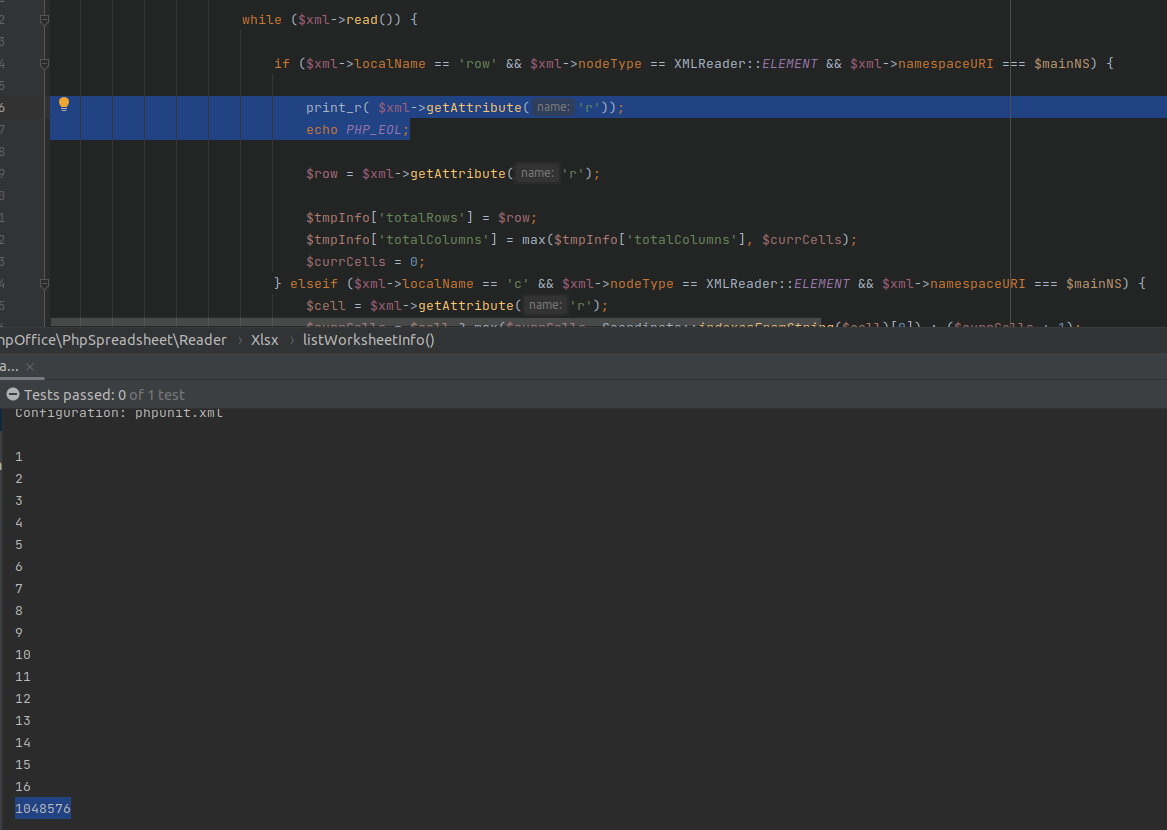
Does anyone have an explanation about this? Or how can I manage it in order to ignore these empty lines?
Is it possible to set a counter about the total number of rows instead of reading $xml->getAttribute('r') ?
What features do you think are causing the issue
- Reader
- Writer
- Styles
- Data Validations
- Formula Calculations
- Charts
- AutoFilter
- Form Elements
Does an issue affect all spreadsheet file formats? If not, which formats are affected?
Only detected with XLSX.