Row block in plane demo incorrect location after connecting #3639


Description

Describe the bug
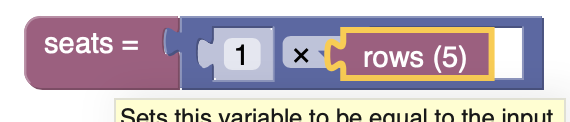
When you try to connect the row block in the plane demo it doesn't have the correct location.
This only happens when a user drags directly from the toolbox. If you drop the block on the workspace and then connect it will work as expected.
To Reproduce
- Go to plane demo
- Drag out a multiplication block
- Drag out a row block and try to attach to multiplication block
Steps to reproduce the behavior:
Expected behavior
Screenshots
Desktop (please complete the following information):
- OS: [e.g. iOS]
- Browser [e.g. chrome, safari]
- Version [e.g. 22]
Smartphone (please complete the following information):
- Device: [e.g. iPhone6]
- OS: [e.g. iOS8.1]
- Browser [e.g. stock browser, safari]
- Version [e.g. 22]
Stack Traces
Replace with error stack trace.
Additional context