FieldMultilineInput can overflow the page #4695

Description

Describe the bug
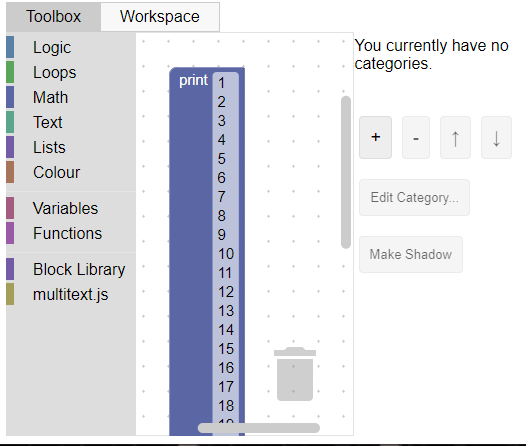
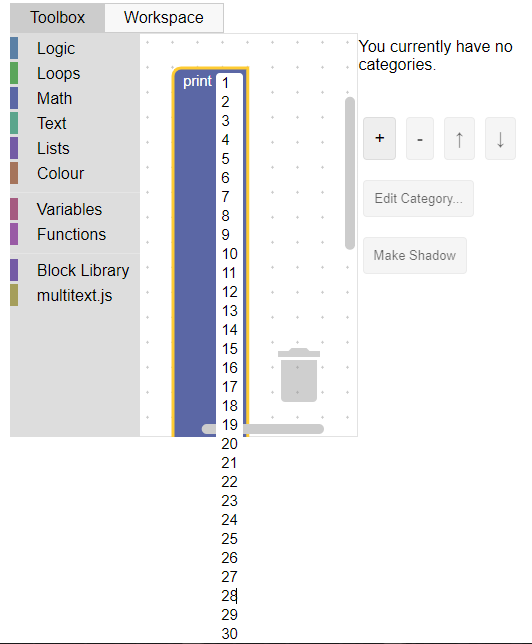
When a FieldMultilineInput has too many paragraphs of text, the block grows very large, and when editing it's value the input box may overflow the page.
To Reproduce
Steps to reproduce the behavior:
- Go to https://blockly-demo.appspot.com/static/demos/blockfactory/index.html
- Click on 'Workspace Factory'
- Import Custom Blocks > From Javascript
- Create and select the file with these contents:
Blockly.Blocks['multiline'] = {
  init: function() {
    this.appendDummyInput()
        .appendField("print")
        .appendField(new Blockly.FieldMultilineInput("default"), "NAME");
    this.setColour(230);
 this.setTooltip("");
 this.setHelpUrl("");
  }
};
- Add the multiline block
- Add lines ultil text overflows the workspace/page
Expected behavior
I expected this to be handled in a cleaner way, perhaps a limit of lines in the input and a scrollbar if that limit is exeded.
Right now this issue can break the layout of pages that integrate blockly and use the multiline.
Screenshots
Block getting large when multiple lines are added:
Input overflowing the workspacce and breaking the page:
Desktop:
- OS: Windows
- Browser: Chrome
- Version 88
Stack Traces
Not aplicable
Additional context