io.FileIO with mode w+ destroys the flash storage contents on Raspberry Pi Pico on version 6.2.0 beta 2 #4279

Description

Foolishly, was trying to save a file to the internal storage of the Raspberry Pi Pico.
Upon running the following code (WARNING: you WILL lose all your Raspberry Pico Pi contents!):
import io

f = io.FileIO("/file.txt", "w+")
f.write("bye flash\n")

f.close()
I get this message:
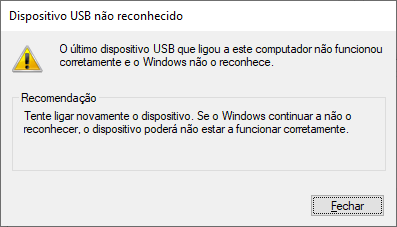
Translation:
- USB Device not recognized
- The last USB device you've connected to your computer hasn't worked properly and Windows doesn't recognize it
- Recommendation
- Try to reconnect the device. If Windows continues to do not recognize, the device may not be working properly.
Sadly, I was caught offguard and reminded to backup, backup, backup and backup :(
Additionally, this also causes an USB descriptor failure:

If you find yourself in this situation, try to download this: https://www.raspberrypi.org/documentation/rp2040/getting-started/static/6f6f31460c258138bd33cc96ddd76b91/flash_nuke.uf2
Just do it like you would do to any other uf2 file (hard to do with just 2 hands, but doable).
Wait a few seconds and your internal storage will be clean and working again.
You can check how it happens on here: https://streamable.com/wmnxyb
(You can also see that just nuking the flash makes it functional again)