Improve error syntax highlighting colors#6943
Conversation


The highlighter recognizes comment tokens, but these are never emitted
unless the Lexer is constructed with commentToken=true. Enable
commentToken=true.

|
Thanks for your pull request, @CyberShadow! Bugzilla referencesYour PR doesn't reference any Bugzilla issue. If your PR contains non-trivial changes, please reference a Bugzilla issue or create a manual changelog. |

|
Current colors (no change): |

|
Cyan: |

|
Magenta: |

|
Green: |

|
Yellow: (scroll down, more options below) |


|
Why are the user-defined names colored? Typically in my syntax highlighters, the user-defined symbols are not colored like the keywords. I realize they are colored differently, but in some cases, you can't even tell (e.g. yellow on the white background). |
The lexer distinguishes things only up to what is an identifier, keyword, etc., so all identifiers are highlighted in the same way, user-defined or not. Are you asking why identifiers are given a color at all, instead of using the default black or white color? If so, then I believe the answer is so that it's clear where the boundary lies between the error message text (in English) and the quoted code (in D). Previously, those were (inconsistently) indicated by quotes, but with syntax highlighting those become redundant. |

|
Is it intentional that the color of |
|
Yes, as per goal 2 in the PR description. The original color was also bad (too dark on Windows). |
|
Which code did you use to produce the those example? I would like to see how it looks in my terminal. For reference, iTerm with solarized dark and light [1]. |
|
stable...CyberShadow:error-colors - run Edit: the scripts to capture/collate the screenshots: https://gist.github.com/1b278bbdefaf7b8e245646203bd32236 |
Yes. Here is how github highlights your code: string s = "foo";
void fun(int i);I wouldn't expect the lexer to be as clever to highlight All the other colorations look fine, it's just that there should be some text that isn't modified in the line of code. The examples are also quite short, I can imagine a wall of template instantiation being much less attractive with all the colorations.
This is also solvable by coloring the error message, probably the same color as the message type ( |
I think in the great majority of cases, the highlighted parts are going to be very short. Just look at any of the diffs in the test suite of the PRs enabling syntax highlighting.
Although I haven't actually tried it, I'm fairly certain it is going to look pretty terrible, not to mention very unlike any other language toolchain. |
|
Well, this is truly a subjective matter. And luckily this is almost literally bikeshedding :) Changing later if it doesn't look good will be trivial. I just don't have a vote, because I don't like any of the options 😄 |
I wanted to actually see how it looks. Here's how it looks on my dev terminal (urxvt): Yep, pretty terrible :) |

Technically it's not identified as a keyword, it's identified as a built-in alias. It's used for aliases like
The identifier in function, class and struct declarations are usually specifically identified in TextMate as an entity name. The TextMate bundle is used by GitHub to do syntax highlighting for D. But GitHub uses its own theme to colorize the text, so it's up to them which colors to choose. For example, in TextMate, function identifiers have a color very similar to keywords, but struct and class identifiers have the regular text color but with the underline style enabled. |
Agreed 😄 |
|
Off: |


|
This is about the only thing that was left when I applied the most important ones of the rules that I proposed on the NG to the 16 base colors: The most important aspect is probably the only one not directly related to the syntax highlighting - having separate style for message text and code. Not reusing warning/error colors or those that are barely visible then mostly only left the dark cyan color for punctuation, which improves readability of the text parts within the code. The punctuation itself is usually of secondary concern when scanning the text, so having the readability slightly impaired is presumably not as critical as for identifiers or keywords. edit: the error/warning/deprecation colors are not accurately represented in the and were intended to resemble the current status quo (emphasized red, yellow and blue) |
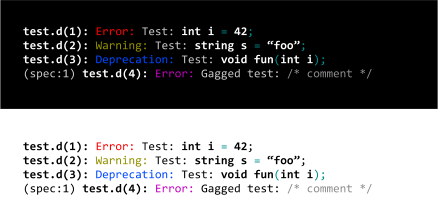
|
For reference, here are pint screens for solarized dark and light on iTerm: Green: Magenta: Yellow: I have to admit, I like the blue color originally used for |








Implemented & rendered: Not too bad! |


I asked my parter who is a bit more on the creative side. She initially preferred the cyan from the original set, but ultimately opted for this one. When it came down to it, all the other examples posted here are just too noisy (visually). This one is the least disruptive, and easiest to read. However, she was very vocal about the use of blue for speculative errors, suggesting that we use magenta instead, so at least it is readable on all three consoles (which I assume are OSX, Ubuntu, and Windows). |
Yep, the blue sucks, but really it doesn't matter because speculative errors are not something 99% of D users have to worry about. I'll probably change it to dark red. |

|
Is this ready @CyberShadow? |
|
Whoops, give me a minute :) |
The blue color used for the deprecation label was not as legible on
Windows and some terminal emulators.
Allows specifying the color plus its brightness as a single value,
e.g. for the HIGHLIGHT enum.
- Avoid using blue, as it is too dark on Windows and some terminals
- Avoid using overly bright colors, as they are too distracting with
  light-on-dark color schemes
- Avoid reusing the same colors as for the message labels

This implements Sönke Ludwig's proposal from
dlang#6943 (comment).
 CyberShadow
force-pushed
the
error-colors-rel
branch
from
CyberShadow
force-pushed
the
error-colors-rel
branch
from
1cd32b9 to
b8b9898
Compare
|
Updated with Sönke's proposal - it got We can always tweak things later or make the colors configurable, of course. |


7 participants


To quote @WalterBright:
This is a PR for tweaking the color scheme of the new syntax highlighting in DMD error messages. However, since it's likely there's not going to be consensus on which color scheme is best, I'm going to post a few options, each in their own comment, and let GitHub votes (# of thumbs up) decide on the one to go with.
My goals for choosing colors were:
In all screenshots, the terminals are (in order): macOS Sierra (10.12) Terminal.app; Ubuntu 16.04 default terminal; Windows 10 console.
If anyone has specific color suggestions, I can render previews and put them up here for voting.