Build Action support for designer's AndroidRuleSet #4046
Conversation


Support has been added for lint configuration files for android layouts in the designer code base.
This adds build action support for the new "AndroidRuleSet" item.
https://github.com/xamarin/designer/blob/8b01a63b3ecd494d65001cf1f74239a7db2a3db9/Xamarin.Designer.Android/Xamarin.AndroidDesigner/MSBuildConstants.cs#L52

| <AvailableItemName Include="AndroidJavaLibrary" /> | ||
| <AvailableItemName Include="AndroidJavaSource" /> | ||
| <AvailableItemName Include="AndroidLintConfig" /> | ||
| <AvailableItemName Include="AndroidRuleSet" /> |

There was a problem hiding this comment.
We also have some kind of lint support in the build system via $(AndroidLintEnabled): https://github.com/xamarin/xamarin-android/blob/f7ea4a3db003da7be85d34eff4813c6052368e90/src/Xamarin.Android.Build.Tasks/Xamarin.Android.Common.targets#L1097-L1111
Does this need to be incorporated here?
There was a problem hiding this comment.
Our stuff isn't really exposed outside of our immediate designer space right now. But, this may be a good future thing.

 jonpryor
left a comment
jonpryor
left a comment
jonpryor
left a comment
There was a problem hiding this comment.
Please update Documentation/guides/BuildProcess.md and provide documentation for the new Build action.
Please add a new Documentation/release-notes/4046.md file and provide release notes for the new build action.
@brendanzagaeski: Would you be able to provide a template for the release notes?

If this is a feature that users might want to enable in their builds, the release note can start with something like: If appropriate, the note can link to https://developer.android.com/studio/write/lint. If the feature is indeed something users might want to enable in their builds, then it would be helpful for the release note to include a sentence about when to use this The entry in Other questionsOne question might be whether this property will only every be used for lint rule sets for layout files? If so, then for closer resemblance to the other existing Is this indeed a different rule set than would be specified as a |
|
@jonpryor @brendanzagaeski @jonathanpeppers (/cc @garuma) For right now this is an android layout/designer only feature. We have implemented our own analyzers and fixers (currently disabled) and tied it into the android designer editors. It might be nice to expose this as a cmdline tool at some point. Another thought, this is layout only, but it might be worth extending this to resource and android manifest files? Maybe even extending to source files too? If all that happens, it might be worth combining all the lint conf build actions? Our lint.xml file currently models very closely to the Android lint.xml. The difference is in some of the issue ids. The value of adding the BuildAction is so that it shows up in the properties window in the IDE.
Thoughts? |


|
Where does the Would there value in the lint rules failing on CI systems? If so, it seems like we should make a way for the existing |
|
@jonathanpeppers the lint.xml or really AnyThing.xml as long as it has a build action of It is currently connected to our layout editor. So, currently it isn't usable outside of the layout editor currently. |
|
I added some documentation. If someone would like to review it, that'd be great. |
|
Are there maybe any user story work items, draft IDE release notes, or draft blog post paragraphs for this feature that I could skim?
Is the linting in the designer not related to the open source If it's a totally separate tool, then I think it might be advantageous to draw a sharper distinction between them. There is the Android lint from Google, and then maybe if I'm understanding correctly, the Xamarin designer has its own separate set of checks. Could these Xamarin designer checks perhaps be considered similar to the errors and suggestions available for XAML files? Example XAML error: Example XAML lightbulb suggestion: |
Ah ha, I see there are indeed: https://dev.azure.com/devdiv/DevDiv/_workitems/edit/522460. At first skim, it looks like maybe the current set of analyzers are written in C# and are technically separate from the upstream Android Is that rough summary approximately accurate? |

|
@decriptor any reason why you can't just use the |
More or less correct. A couple years ago I attempted to just use the upstream |
I'd prefer not to reuse |
|
Perfect. Thanks for the sanity check and the additional info! Updated suggestions for release notes and documentation: Given the additional info, my current vote would be to avoid the term "lint" entirely in the user-facing documentation or release notes for this feature. Since the config file only "somewhat" honors the upstream lint config file format, this particular file type for the designer can have its own dedicated page on docs.microsoft.com that describes how to use it. The release notes can then link to that page instead of the upstream Android lint documentation. Tangent idea about maybe using .editorconfig instead: This might be too much bikeshedding, but one other thought I had is that perhaps these designer messages could instead use the .editorconfig mechanism that is currently only available for C# code analysis messages. To get a sense of how this mechanism works, I tried some testing with a familiar C# compiler message: I noticed a few interesting things:
(There are several ways to change the severity of C# code analysis messages, but the one that looks best suited for non-C# files is the .editorconfig mechanism.) |
|
@decriptor so will this new item be of any use to external users? If not is there any way we can not show it in the final product? Can we hide this behind a feature flag? I want to try to avoid confusion for the end user, even if we have docs that say its internal only, someone will try to use it. |

|
Chiming in this discussion mostly to highlight all the other good points already raised. As @decriptor mentions this is to support a feature that, albeit similar to Google's lint right now, is not meant to be compatible per-say with Lint (i.e its configuration format, user extensions, ...). It's also not destined to be swapped with Lint itself. On the configuration front, @brendanzagaeski raised a good idea that .editorconfig could also ultimately be a good medium for doing this as well (I see it as an additional way though not a replacement the same way Roslyn diagnostics can be configured in multiple fashion). Supporting the baseline of the Lint format offers us a good migration path to start and some other interesting capabilities (e.g. NuGet/global provided ruleset) but we don't have to stop there. We are also not aiming to have this currently be usable outside the IDE or with other resource types than layouts. Ultimately both of those things though are worthy goals however. In essence, the only goal of this PR is to make that item type visible to the IDE (at least in VS it's required to have the items property grid work) to avoid having to manually edit a .csproj (which would work fine otherwise). Since it won't be usable outside of the IDE context, it might indeed not be useful to prominently show it in the Xamarin.Android documentation beyond a note of what's it's for. |
|
Cool point about being able to include configuration files from NuGet packages. Maybe it's interesting to jot down some notes about I noticed at least 4 limitations of
Limitation #1 about having just one active config file raises a potentially useful question. If a project has two With On a different topic, for the name of the new MSBuild item, maybe expanding it with another word to something like |
|
I chatted with Stephen about this item more today, and I realized that the designer side of this feature has already been cherry-picked to the d16-5 designer branch and is already included in the latest Visual Studio 2019 version 16.5 Internal Preview. So it might be best to keep the finishing touches as small as possible for now. Given that, I think for right now the only things I'd keep for consideration from my earlier comments are:
Other notes: I learned today that some of the Android designer analyzers were already present in Visual Studio 2019 version 16.4. The new thing for this PR is just about configuring severities. Perhaps there has already been user feedback from Visual Studio 2019 version 16.4 asking for a way to change the analyzer result severities. I haven't yet had a chance to try the config file workflow with the Internal Preview myself. For some reason in my environment, the designer extension isn't loading because it can't find the |
|
@brendanzagaeski my issue with In 16.4 we voluntarily enabled only a small subset of analyzers because of that lack of configurability, in 16.5 we have enabled them all because it can now be configured via that file mechanism. |
|
Good idea! I ended up with "Designer" in the name because I was initially thinking of In fact, as I'm thinking about it again today, |
|
What about Or should it be the full |
|
Is there another similar MSBuild item or property you have in mind (maybe for another project type) that uses "Diagnostics" that would be an inspiration to use that term in this item? |
|
@brendanzagaeski that is the term we used in our code base for this. |
|
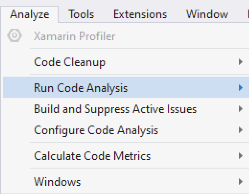
Ah cool, I see. I think my personal vote would still be for "Analysis" over "Diagnostics" in this context since the name will be part of the public user interface of the feature (as opposed to an underscore-prefixed MSBuild item only used internally by the tooling). Putting myself in the shoes of an existing user, "AndroidDiagnostics" makes me think of: Whereas one thing "Analysis" makes me think of is the items under the Analyze menu: I think those might be close in spirit to what this feature provides? Maybe some day some of the items in that menu will even be applicable to this feature? |


|
As per call with @garuma and @brendanzagaeski on 2020-01-20, we'll use |
 decriptor
force-pushed
the
designer-androidruleset-buildaction
branch
from
decriptor
force-pushed
the
designer-androidruleset-buildaction
branch
from
337a305 to
c70cf07
Compare

 brendanzagaeski
left a comment
brendanzagaeski
left a comment
brendanzagaeski
left a comment
There was a problem hiding this comment.
Looks good!
Little wording ideas:
-The Build action `AndroidResourceAnalysisConfig` enables an xml configuration
-file to be used by the new Xamarin Android Designer layout diagnostics tool.
-This is only used by the layout editor.
+The Build action `AndroidResourceAnalysisConfig` marks a file as a severity
+level configuration file for the Xamarin Android Designer layout diagnostics
+tool. This is currently only used for IntelliSense messages and not for build
+messages.

See the [Android Resource Analysis documentation](https://aka.ms/androidresourceanalysis) for more details.
(Feel free to take or adapt any of those little wording ideas, if any of them sound good.)
For reference (no need to adjust anything with these in this PR unless you want to), a couple tiny things I'll adjust when syncing the docs for publication:
-
Move the
AndroidResourceAnalysisConfigsection to be afterAndroidNativeLibraryinBuildProcess.mdfor alphabetical ordering. -
The original template I suggested for the release notes ended up being mismatched with the real feature because back then I didn't realize this analysis/diagnostics is always enabled and the build action is just for configuring the results. So I'll plan to adapt the wording a little when I put the release notes all together, to be something like:
-Adds a new build action to inspect Android layout files using the new
-Xamarin Android Designer diagnostics tool. To enable this option, set the
-configuration file build action to `AndroidResourceAnalysisConfig`.
+Adds a new build action to allow configuring message severity levels in the
+Xamarin Android Designer diagnostics tool. To use this in your project,
+add an XML configuration file that follows the format described in the
+[Android Resource Analysis
+documentation](https://aka.ms/androidresourceanalysis) and set the build
+action to `AndroidResourceAnalysisConfig`.
This adds the build action for the new Android diagnostics tool that the
Android designer team created to analysis layout files.

Currently the aka.ms link in the documentation doesn't work, but will
once it has been written.
decriptor
force-pushed
the
designer-androidruleset-buildaction
branch
from
c70cf07 to
ec0d072
Compare
|
@brendanzagaeski I think I applied all of your suggestions |
|
Looks great. That'll make the docs publishing even easier. Thanks a bunch! |
|
As a side note the aka.ms link works, but is just currently pointing at the Xamarin.Android Designer doc landing page |

Add an `AndroidResourceAnalysisConfig` entry to `@(AvailableItemName)`,
allowing users to use the `@(AndroidResourceAnalysisConfig)` build
action on files within a project.

Files with the `@(AndroidResourceAnalysisConfig)` build action
configures message severity levels produced by the Xamarin Android
Designer diagnostics tool, and must follow [the documented schema][0].

[0]: https://aka.ms/androidresourceanalysis


Support has been added for lint configuration files for android layouts in the designer code base.
This adds build action support for the new "AndroidRuleSet" item.
https://github.com/xamarin/designer/blob/8b01a63b3ecd494d65001cf1f74239a7db2a3db9/Xamarin.Designer.Android/Xamarin.AndroidDesigner/MSBuildConstants.cs#L52
https://github.com/xamarin/designer/pull/2709