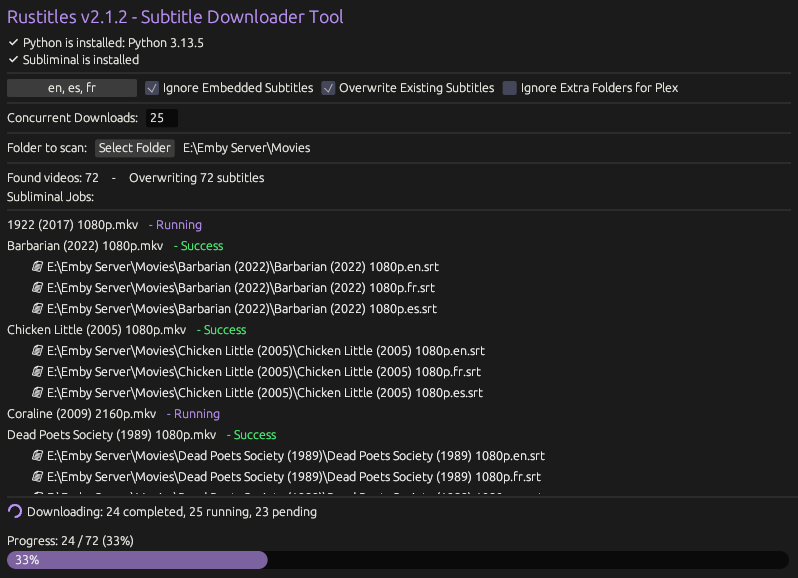
Rustitles will scan a given folder and automatically download subtitles in the selected language(s). It will scan recursively in the given folder for all video files, if missing subtitles are found, it will download them. This is built with media servers in mind, so if you have a large library of movies/tv-shows, just select the root folder used for your media server and wait for it to complete. This is a portable cross-platform application.
- Download and install the latest version of Microsoft Visual C++ Redistributable
- Download the latest release of Rustitles
- Save rustitles.exe somewhere memorable, or just run it from your downloads folder.
- Download the latest release of Rustitles
- Save rustitles.AppImage somewhere memorable, or just run it from your downloads folder.
- Make it executable. Example:
chmod +x rustitles.AppImage
- Once open, click "Install Python" if you do not have Python installed (only required on first run)
- Follow the on screen prompts & wait for Rustitles to install Python and Subliminal (this only happens on the first run of Rustitles)
- Select your desired language(s)
- Set your maximum concurrent downloads or leave this number as default. This is the amount of subtitles that will be downloaded at the same time. (More concurrent downloads = more Python processes = more RAM used)
- Select the folder with your movies/tv-shows that you want subtitles for
- Wait for the processes to complete
- Certain OpenGL calls can cause issues in Windows VMs. Mesa 3d (an open source implementation of OpenGL) can be used to fix this issue on certain VMs, this fix works for me in VirtualBox. Just download mesa3d-25.2.1-release-mingw.7z or mesa3d-25.2.1-release-msvc.7z from https://github.com/pal1000/mesa-dist-win/releases unzip, and then run
systemwidedeploy.cmdas admin, selecting "1. Core desktop OpenGL drivers".
I spent about 45 minutes of my life trying to find a GUI utility for windows that would automatically scan a folder and download subtitles. All of the programs I found were either paid, did not work, confusing and bloated, or a command line tool. I then found Subliminal, and had the idea to create a simple GUI to accomplish basic tasks. I am teaching myself rust, so I decided to code in that language as a personal challenge.
This tool is here for the "me" of yesterday (you) who was trying to find a tool exactly like this lmao
Rustitles will automatically install Python & Subliminal, but if you'd prefer to do that manually:
Windows: Download the latest version of Python and select "add to path" when installing. After this, open cmd or powershell and enter pip install subliminal. Additionally, make sure the latest version of Microsoft Visual C++ Redistributable is installed.
If you are unaware of Subliminal, it is a command line tool that uses python to find and download subtitles. If you prefer a CLI, just use Subliminal.
I've tested for Windows Defender false postives in a virtual machine, and nothing was detected. However, any app that is not codesigned has a chance of tripping your antivirus (codesigning is very, very expensive). If this happens, add "rustitles.exe" or the folder therein as an exclusion for your antivirus.
How to set exclusions for Windows Defender
VirusTotal scans:
Any detections seen can be assumed as false positives due to the app checking for and installing python if needed. That being said, ALWAYS be cautious when running scripts or .exe's from random people on GitHub.
If you'd prefer to build the .exe yourself:
- Download Visual Studio Community Installer and select "Desktop development with C++" in the installer.
- Download and install Rust
- Clone or download this repository. (Unzip if you used this download link)
- Open Command Prompt or Powershell
- cd to rustitles-main e.g.
cd "C:\Users\Foster\Downloads\rustitles-main\rustitles-main" - enter
cargo build --release - You'll find your newly built .exe at
\rustitles-main\target\release\rustitles.exe
Without any changes to \src\main.rs or Cargo.toml this will be identical to the official release. Just leaving this method here in case anyone feels more comfortable building themselves, or wants to tinker and make some changes.
If you have any issues, create an issue from the Issues tab and I will get back to you as quickly as possible.
If you'd like to support me, follow me on twitch: https://www.twitch.tv/fosterbarnes
or if you're feeling generous drop a donation: https://coff.ee/fosterbarnes
