Add support for project-based workflows#927
Add support for project-based workflows#927isc-bsaviano merged 18 commits intointersystems-community:masterfrom
Conversation


 gjsjohnmurray
left a comment
gjsjohnmurray
left a comment
gjsjohnmurray
left a comment
There was a problem hiding this comment.
@isc-bsaviano I really like what you've done in this PR and the replated Server Manager one. I've added a few inline comments and suggestions arising from my initial playing with it.
I had a problem with a project that contained a CSP file. When I used Server Manager to add it as a workspace root it resulted in isfs://server:ns/?project=X but the absence of a csp=1 queryparam meant that the CSP member of the project didn't appear under the root. I tried adding it to the .code-workspace file but this had no effect. I read in your doc pages that the presence of project=X means any other params get ignored.
Given how isfs roots are either CSP or non-CSP but can't currently be both, perhaps when I use the "Edit Code in Project" pencil from a project under a namespace in Server Manager you need to create a csp=1 workspace folder if the project contains CSPs, a regular folder without csp=1 if it contains non-CSP items, and two folders if it is a mix.
If we use this approach, a project that initially didn't contain CSPs but later had them added to it (e.g. via ObjectScript Explorer, or outside VS Code) would need a second isfs root folder added to the workspace.
| // This project item no longer exists on the server | ||
| // Ask the user if they would like to remove it from the project | ||
| const remove = await vscode.window.showErrorMessage( | ||
| `Document '${fullName}' does not exist on the server. Remove it from project '${project}'?`, |
There was a problem hiding this comment.
I've been seeing this occur unexpectedly. Here's a screenshot example:
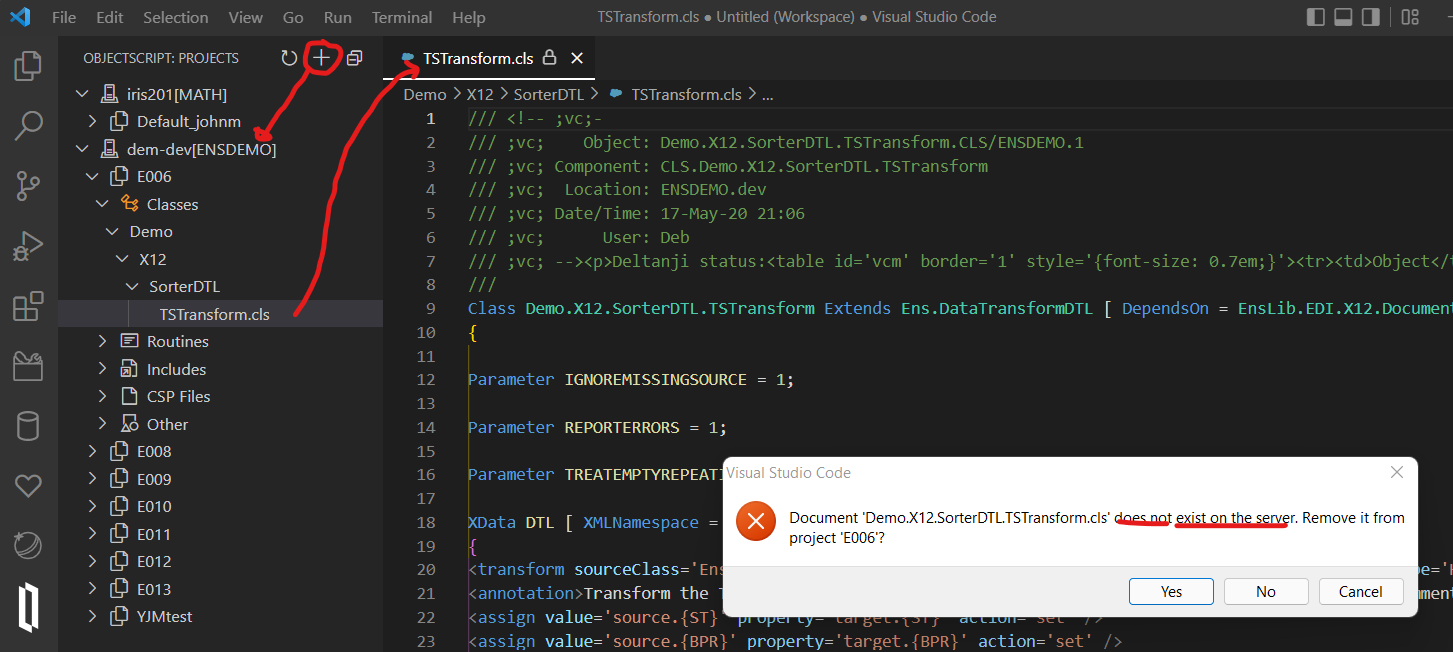
You can see that I was able to open the class from within the project, but almost immediately after it loaded I got the alert saying it didn't exist on the server.

|
@gjsjohnmurray Thanks for the feedback!
This sounds like a bug with my queries that replicate the StudioOpenDialog behavior of showing items non-flat. I may have missed testing a case where only a loose CSP file is included, and not a full DIR. I will create a project with a class and a single CSP and see if I can reproduce this. I'm not in favor of the two folders approach because I want this to work as close to the Studio behavior as possible.
I will try to reproduce this as well. The issue may be that I will commit the small suggestions after these two major issues are resolved. |
|
@gjsjohnmurray Let me know if my commit fixed your two functionality issues |

Co-authored-by: John Murray <johnm@georgejames.com>

|
New version looks good, and the 2 key issues seem to be fixed. The Expand button on a package row of the add quickpick looks like it's pointing the wrong way:
I find the "Remove from Project" menu option a bit unclear. If it's on a workspace root folder it produces a quickpick before changing the state of the project, so is really "Remove Items from Project...". Only if it performs the action immediately (e.g. from a package or class or routine does "Remove from Project" accurately describe what it'll do. |
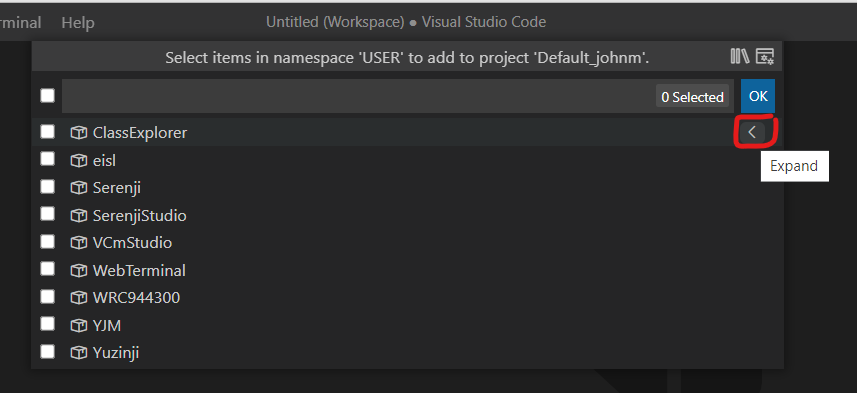
I chose to make it left facing because it's on the right side of the row so it needs to be the reverse of the regular file explorer to point to the item being expanded. I'm open to changing the icon but either way this is going to be a little confusing due to the buttons being right-aligned instead of left. I document how to use this UI in the projects page so that should help.
I fixed this in f2a94a7 so you may have an outdated VSIX. |
I repeated the artifact download, unzip, install and restart but I still get this in the context menu from my root folder:
My workspace has two roots, the first being my project, then second an isfs-readonly view of the entire namespace. |
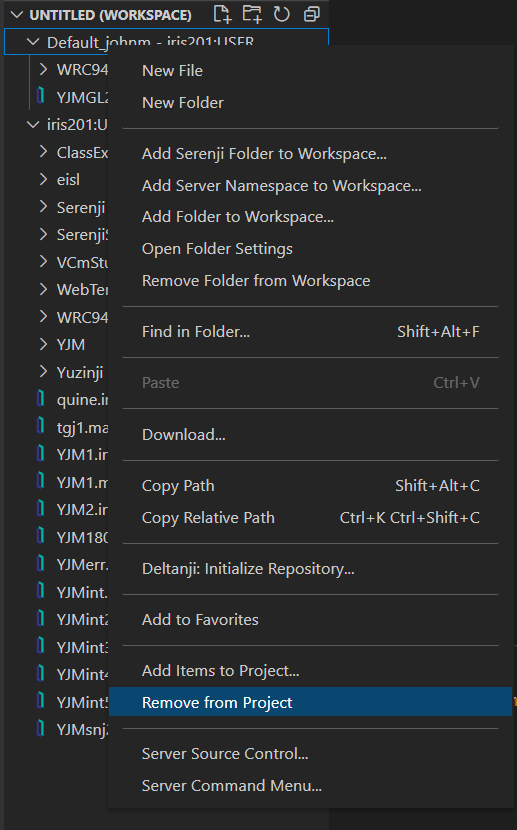
|
@gjsjohnmurray Not seeing that in my end:
What's the full URI for the project folder? EDIT: Here's the relevant section of the package.json. I use {
"command": "vscode-objectscript.removeFromProject",
"when": "vscode-objectscript.connectActive && resourceScheme =~ /^isfs(-readonly)?$/ && resource =~ /project%3D/ && resourcePath != '/'",
"group": "objectscript_prj@2"
},
{
"command": "vscode-objectscript.removeItemsFromProject",
"when": "vscode-objectscript.connectActive && resourceScheme =~ /^isfs(-readonly)?$/ && resource =~ /project%3D/ && resourcePath == '/'",
"group": "objectscript_prj@2"
}EDIT 2: I think that's the bug. I switched to using |
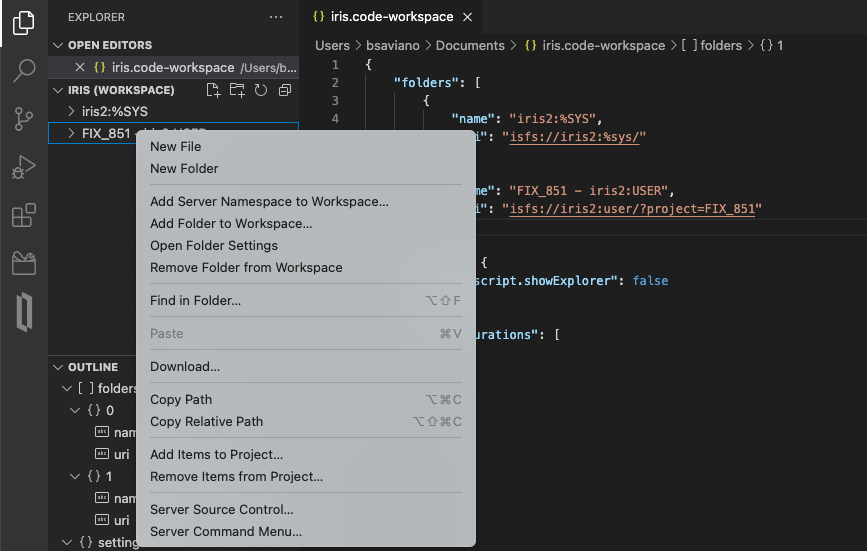
Yes, fixed. |
2 participants


This PR fixes #851
See the modified documentation pages for information on what was added. A companion PR will be opened in the servermanager repo shortly.