Hydrogen is a simple PySide6-based image browser.
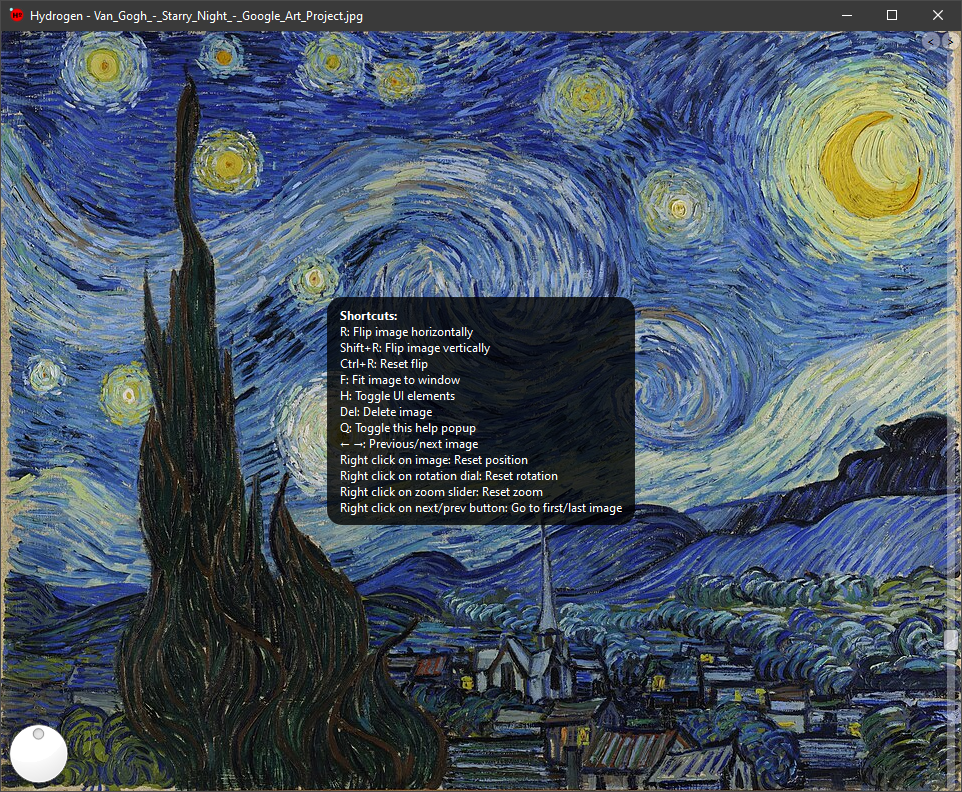

- Display an image by selecting it in a prompt, or by passing it as arguments
- Zoom in and out using a vertical slider or scroll wheel
- Rotate the image using a dial (or scroll wheel over the dial) or shift + scroll
- Move the image by dragging it around
- Reset move, zoom, rotation by just right-clicking on the element responsible for each
- Navigate between images within a folder, sorted with natsort
- More to come
-
Q: display available shortcuts
-
R: flip image horizontally
-
Shift + R: flip image vertically
-
Ctrl + R: reset flip
-
F: fit image to window
-
Delete: delete currently displayed image
-
H: toggle visibility of UI elements
-
Right click on image: reset image position
-
Right click on rotation dial: reset rotation
-
Right click on zoom slider: reset zoom
-
Right click on next/prev button: go to first/last image
- Python 3.x
- PySide6
- Pillow
- pillow-avif
- pillow-jxl
- natsort
-
Clone the repository:
git clone https://github.com/jakstein/HydrogenImageBrowser cd HydrogenImageBrowser -
Install the required packages:
pip install PySide6 Pillow pillow-avif pillow-jxl natsort
Run the application:
python Hydrogen.pywYou can also open an image directly by passing the image path as a command-line argument:
python Hydrogen.pyw path/to/image.png