
Lately version 3.0.0 is released. This release is not backward compatible with older versions, and some modification have to be done on existing codes. Please visit Migration Guide for details!
IotWebConf is an Arduino library for ESP8266/ESP32 to provide a non-blocking standalone WiFi/AP web configuration portal. For ESP8266, IotWebConf requires the esp8266 board package version 2.4.2 or later!
Please subscribe to the discussion forum, if you want to be informed on the latest news.
Also visit experimental Discord server.
HELP WANTED! If you are testing any GIT branches, please give me feedback to provide stable releases for the public.
- Manages WiFi connection settings,
- Provides a config portal user interface,
- You can extend the configuration with your own sophisticated propery structure, that is stored automatically,
- Option to configure multiple WiFi connections. (Try next when the last used one is just not available.)
- HTML customization,
- Validation support for the configuration property items,
- User code will be notified of status changes with callback methods,
- Configuration (including your custom items) stored in the EEPROM,
- Firmware OTA update support,
- Config portal remains available even after WiFi is connected,
- Automatic "Sign in to network" pop up in your browser (captive portal),
- Non-blocking - Your custom code will not be blocked in the whole process.
- Well documented header file, and examples from simple to complex levels.
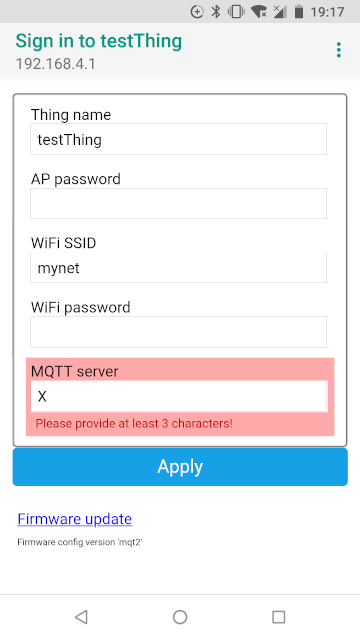
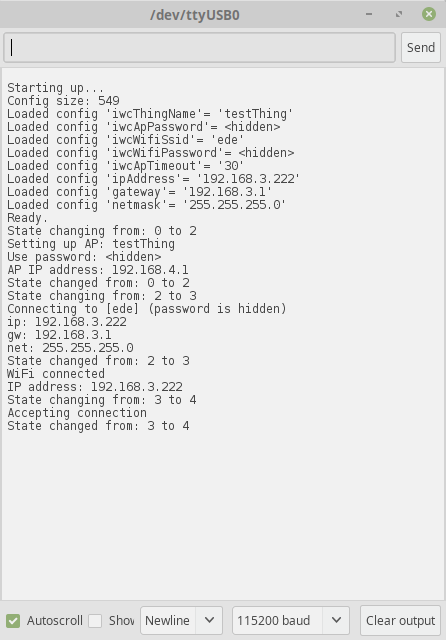
The idea is that the Thing will provide a web interface to allow modifying its configuration. E.g. for connecting to a local WiFi network, it needs the SSID and the password.
When no WiFi is configured, or the configured network is unavailable it creates its own AP (access point), and lets clients connect to it directly to make the configuration.
Furthermore there is a button (or let's say a Pin), that when pressed on startup will cause a default password to be used instead of the configured (forgotten) one. You can find the default password in the sources. :)
IotWebConf saves configuration in the "EEPROM". You can extend the config portal with your custom configuration items. Those items will be also maintained by IotWebConf.
Visit Users Manual for detailed description!
- You turn on your IoT the first time - It turns into AP (access point) mode, and waits for you on the 192.168.4.1 address with a web interface to set up your local network (and other configurations). For the first time a default password is used when you connect to the AP. When you connect to the AP, your device will likely automatically pop up the portal page. (We call this a Captive Portal.) When configuration is done, you must leave the AP. The device detects that no one is connected, and continues with normal operation.
- WiFi configuration is changed, e.g. the Thing is moved to another location - When the Thing cannot connect to the configured WiFi, it falls back to AP mode, and waits for you to change the network configuration. When no configuration was made, then it keeps trying to connect with the already configured settings. The Thing will not switch off the AP while anyone is connected to it, so you must leave the AP when finished with the configuration.
- You want to connect to the AP, but have forgotten the configured AP WiFi password you set up previously - Connect the appropriate pin on the Arduino to ground with a push button. Holding the button pressed while powering up the device causes the Thing to start the AP mode with the default password. (See Case 1. The pin is configured in the code.)
- You want to change the configuration before the Thing connects to the Internet - Fine! The Thing always starts up in AP mode and provides you a time frame to connect to it and make any modification to the configuration. Any time one is connected to the AP (provided by the device) the AP will stay on until the connection is closed. So take your time for the changes, the Thing will wait for you while you are connected to it.
- You want to change the configuration at runtime - No problem. IotWebConf keeps the config portal up and running even after the WiFi connection is finished. In this scenario you must enter username "admin" and password (already configured) to enter the config portal. Note, that the password provided for the authentication is not hidden from devices connected to the same WiFi network. You might want to force rebooting of the Thing to apply your changes.
- In the config portal you can double-tap on a password to reveal what you have typed in. (Double-tap again to hide revealed text.)
- When accessing the config portal via connected WiFi network a dialog with user-name and password will pop up. The password is the one you have configured for "AP password". The user name is "admin".
- Consult Users Manual for more details!
tzapu's WiFiManager is a great library. The features of IotWebConf may appear very similar to WiFiManager. However, IotWebConf tries to be different.
- WiFiManager does not allow you to configure mutiple WiFi connections. In IotWebConf there is a way to define more connections: if one is not available, the next is tried automatically.
WiFiManager does not manage your custom properties.IotWebConf stores your configuration in "EEPROM".- WiFiManager does not do validation. IotWebConf allow you to validate your property changes made in the config portal.
WiFiManager does not support ESP32.With WiFiManager you cannot use both startup and on-demand configuration.With IotWebConf the config portal remains available via the connected local WiFi.- WiFiManager provides list of available networks, and an information page, while these features are cool, IotWebConf tries to keep the code simple. So these features are not (yet) provided by IotWebConf.
- IotWebConf is fitted for more advanced users. You can keep control of the web server setup, configuration item input field behavior, and validation.
- The initial system password must be modified by the user, so there is no build-in password.
- When connecting in AP mode, the WiFi provides an encryption layer (WPA/WPA2), so all your communication here is known to be safe. (The exact wifi encryption depends on the used board/chipset and implementation in the related esp/arduino framework.)
- When connecting through a WiFi router (WiFi mode), the Thing will ask for authentication when someone requests the config portal. This is required as the Thing will be visible for all devices sharing the same network. But be warned by the following note...
- NOTE: When connecting through a WiFi router (WiFi mode), your communication is not hidden from devices connecting to the same network. It communicates over unencrypted HTTP. So either: Do not allow ambiguous devices connecting to your WiFi router, or configure your Thing only in AP mode!
- However IotWebConf has a detailed debug output, passwords are not shown in this log by default. You have to enable password visibility manually in the IotWebConf.h with the IOTWEBCONF_DEBUG_PWD_TO_SERIAL if it is needed.
IotWebConf is primary built for ESP8266. But meanwhile it was discovered, that the code can be adopted to ESP32. There are two major problems.
- ESP8266 uses specific naming for it's classes (e.g. ESP8266WebServer). However, ESP32 uses a more generic naming (e.g. WebServer). The idea here is to use the generic naming hoping that ESP8266 will adopt these "standards" sooner or later.
- ESP32 does not provide an HTTPUpdateServer implementation. So in this project we have implemented one. Whenever ESP32 provides an official HTTPUpdateServer, this local implementation will be removed.
IotWebConf provides various parameter types for creating configuration forms. Each parameter type is designed for specific use cases and renders appropriate HTML input fields.
Abstract base class for all configuration items. Provides core functionality for:
- EEPROM storage and loading
- HTML rendering
- Value validation
- Debug output
- JSON serialization (if enabled)
Groups related parameters together in fieldsets for better organization.
ParameterGroup group("groupId", "Group Label");Base class for all input parameters with common properties:
label- Display label in the configuration formid- Unique identifier for HTML and storagevalueBuffer- Buffer to store the parameter valuelength- Buffer lengthdefaultValue- Default value on first startuperrorMessage- Validation error messagevisible- Controls parameter visibility
Standard text input field for string values.
TextParameter textParam(
    "Parameter Label",     // label
    "paramId",            // id
    valueBuffer,          // value buffer
    32,                   // buffer length
    "default value",      // default value (optional)
    "placeholder text",   // placeholder (optional)
    "custom HTML attrs"   // custom HTML attributes (optional)
);
Properties:
placeholder- Text displayed in empty input fieldcustomHtml- Additional HTML attributes for customization
Password input field with special handling - only updates EEPROM when a new value is provided.
PasswordParameter passwordParam(
    "Password",
    "password",
    passwordBuffer,
    32,
    "defaultPass",                    // default value (optional)
    "Enter password",                 // placeholder (optional)
    "ondblclick=\"pw(this.id)\""     // custom HTML (optional)
);
Features:
- Masked input field (type="password")
- Double-click to reveal password (with default customHtml)
- Only saves to EEPROM when new value provided
- Limited to IOTWEBCONF_PASSWORD_LEN characters
Numeric input field with number validation.
NumberParameter numberParam(
    "Port Number",
    "port",
    portBuffer,
    6,
    "8080",              // default value (optional)
    "Enter port",        // placeholder (optional)
    "min='1' max='65535'" // custom HTML for validation (optional)
);
Features:
- HTML5 number input type
- Browser-native numeric validation
- Supports min/max attributes via customHtml
Checkbox input for boolean values.
CheckboxParameter checkboxParam(
    "Enable Feature",
    "enable",
    enableBuffer,
    10,
    true                 // default checked state
);
Features:
- Value is either empty or "selected"
isChecked()method returns boolean state- Special form handling (unchecked boxes don't send values)
Dropdown selection from predefined options.
// Define options
const char* optionValues = "opt1\0opt2\0opt3";
const char* optionNames = "Option 1\0Option 2\0Option 3";

SelectParameter selectParam(
    "Select Option",
    "option",
    optionBuffer,
    10,
    optionValues,        // values to store
    optionNames,         // display names
    3,                   // option count
    20,                  // max name length
    "opt1"              // default value (optional)
);
Features:
- Dropdown HTML SELECT element
- Separate values and display names
- Configurable option count and name length
HTML5 date picker input.
DateParameter dateParam(
    "Select Date",
    "date",
    dateBuffer,
    12,
    "2023-01-01"        // default value (optional)
);
Features:
- Native browser date picker
- ISO date format (YYYY-MM-DD)
- Calendar popup interface
HTML5 time picker input.
TimeParameter timeParam(
    "Select Time",
    "time",
    timeBuffer,
    8,
    "12:00"             // default value (optional)
);
Features:
- Native browser time picker
- 24-hour format (HH:MM)
- Time selection interface
ParameterGroup mainGroup("main", "Main Settings");
mainGroup.addItem(&textParam);
mainGroup.addItem(&passwordParam);
mainGroup.addItem(&numberParam);// Hide parameter conditionally
textParam.visible = false;All text-based parameters support custom HTML attributes:
TextParameter customParam(
    "Custom Field",
    "custom",
    buffer,
    32,
    nullptr,
    "placeholder",
    "required pattern='[A-Za-z]+' title='Letters only'"
);Parameters can have error messages set for validation feedback:
if (strlen(textParam.valueBuffer) < 3) {
    textParam.errorMessage = "Minimum 3 characters required";
}When IOTWEBCONF_ENABLE_JSON is defined, parameters support JSON serialization:
#ifdef IOTWEBCONF_ENABLE_JSON
    parameter.loadFromJson(jsonObject);
#endif- Buffer Management: Always ensure value buffers are large enough for expected values
- Parameter IDs: Use unique, descriptive IDs without spaces or special characters
- Default Values: Provide sensible defaults for better user experience
- Validation: Implement proper validation and error handling
- Organization: Group related parameters together using ParameterGroup
- Security: Use PasswordParameter for sensitive data
IotWebConf is ment to be developer friendly by providing lots of customization options. See HackingGuide for details.
- We might want to add a "verify password" field.
- Provide an option, where IotWebConf renders HTML-response, handles HTTP-request for a specific branch of groups.
- Separate WiFi management from the code, so config portal can also be a standalone solution without any WiFi.
- It is reported, that there might be unstable working with different lwIP variants. If you experiment serious problems, try to select another lwIP variant for your board in the Tools menu! (Tested with "v2 Lower Memory" version.)
Although IotWebConf started without being influenced by any other solutions, in the final code you can find some segments borrowed from the WiFiManager library.
Thanks to all contributors providing patches for the library!