[FEATURE] Standalone PPL streams & library #627


Description

1. Overview
1.1 Introduction
Piped Processing Language (PPL), powered by OpenSearch, enables OpenSearch users with exploration and discovery of, and finding search patterns in data stored in OpenSearch, using a set of commands delimited by pipes (|). These are essentially read-only requests to process data and return results.
PPL is an OpenSearch query language alternative to DSL. It allows user to pipe output into new PPL commands, providing an experience that’s similar to the unix command line. Users can build the query command by command gradually and check intermediate results instead of getting a complex query correct at the first run. This makes the query easy to understand and allows users to correct any mistakes early. Since PPL is a generic language and not necessarily tied to OpenSearch, it is possible to separate PPL into a standalone Java library to use in other places such as data-prepper processor.
This document will focus on the design of PPL library and its integration with data-prepper, and also explore some other possibilities of PPL library.
1.2 Possible Use Cases
1. PPL for metrics extraction at ingestion time
Currently, PPL can be used in OpenSearch to aggregate multiple log lines at query time to get metrics (e.g. sum, average, standard deviation, etc). Users construct monitoring dashboards from these metrics to identify possible anomalies in their services. When an anomaly is found in metrics, users will then go to the corresponding logs to check the specific error messages. This workflow can be simplified by computing metrics at ingestion time instead of query time, which brings some benefits such as being able to use S3 as log storage to reduce indexing and storage costs (see #595 for more details). Integrating PPL into ingestion tools to achieve this can improve the user experience.
With PPL library decoupled from OpenSearch engine and integrated with ingestion tools, PPL queries used in OpenSearch to generate metrics can be pasted directly into ingestion setup. This allows metrics to be computed at ingestion time without additional configuration and learning efforts on the ingestion side. For example, data-prepper, logstash, fluentd might have different mechanisms to extract metrics. With a PPL plugin, users don’t need to learn how to configure metrics extractions for any of them. They only need to understand PPL.
2. PPL as a general command line tool
While there are many powerful tools in the command line, it can still be difficult to work with log/events data and perform meaningful computations, especially for csv or ndjson files. By implementing an input handler in the library in front of PPL engine, PPL will be able to read from STDIN or files on disk. Similar to q which lets users run SQL on csv files, PPL CLI will allow users to do the same operations they are familiar with in OpenSearch PPL to their files for analysis (for example, analyze csv downloaded from reporting plugin). This also allows them to run PPL in shell scripts or cron jobs for real time metrics monitoring without OpenSearch.
Sample usage:
tail -n 5000 ./app.log | java -jar PPL.jar \
    "source = - \
    | parse method=json \
    | where timestamp > '$(date -d'now-15min' +'%Y-%m-%dT%H:%M:%SZ')' \
    | stats count() as ip by host, response"
3. PPL as a connector to remote data sources
Additionally, it can be possible to add clients for other data sources (e.g. OpenSearch, Prometheus, S3). This gives user a consistent experience to connect to different data sources with the same experience.
Sample usage:
java -jar PPL.jar --config=ppl.yml \
    'source = s3.apache_logs \
    | parse method=grok "%{COMMONAPACHELOG}" \
    | where response = 404 \
    | stats count() as ip by host, response'
1.3 Project Goal Summary
Make PPL into a generic and universal language that can be used in different environments, including at ingestion time, to create a consistent query language experience.
2. Requirements
2.1 Functional Requirements
PPL core
- Support more parse methods (json, grok) in addition to regex in parse command
- Support more date formats (ISO, custom) for data type casts in cast() function
- Support JSON schema for query response
PPL library
- Syntax and in-memory computations in PPL library should be the same as OpenSearch PPL
- Should allow user to define schema separately or use a default schema
- Should be able to integrate with ingestion tools (data-prepper) through plugins
PPL library for command line usage (needs discussion or out of scope for P0)
- Should be able to infer schema if input is JSON or CSV file
- Support OpenSearch, S3, Prometheus as remote sources
2.2 Non-functional Requirements
- Should be extensible: easy to integrate with other tools or add additional catalog
- Query used for ingestion should be mostly the same as the original search query
- Provide some help in UI for writing PPL queries to generate metrics from raw logs
3. High-Level Design
3.1 PPL Library
PPL Library will implement the in-memory version of the required components from the opensearch module. There will be no optimization since everything will be executed in memory and cannot be pushed down.
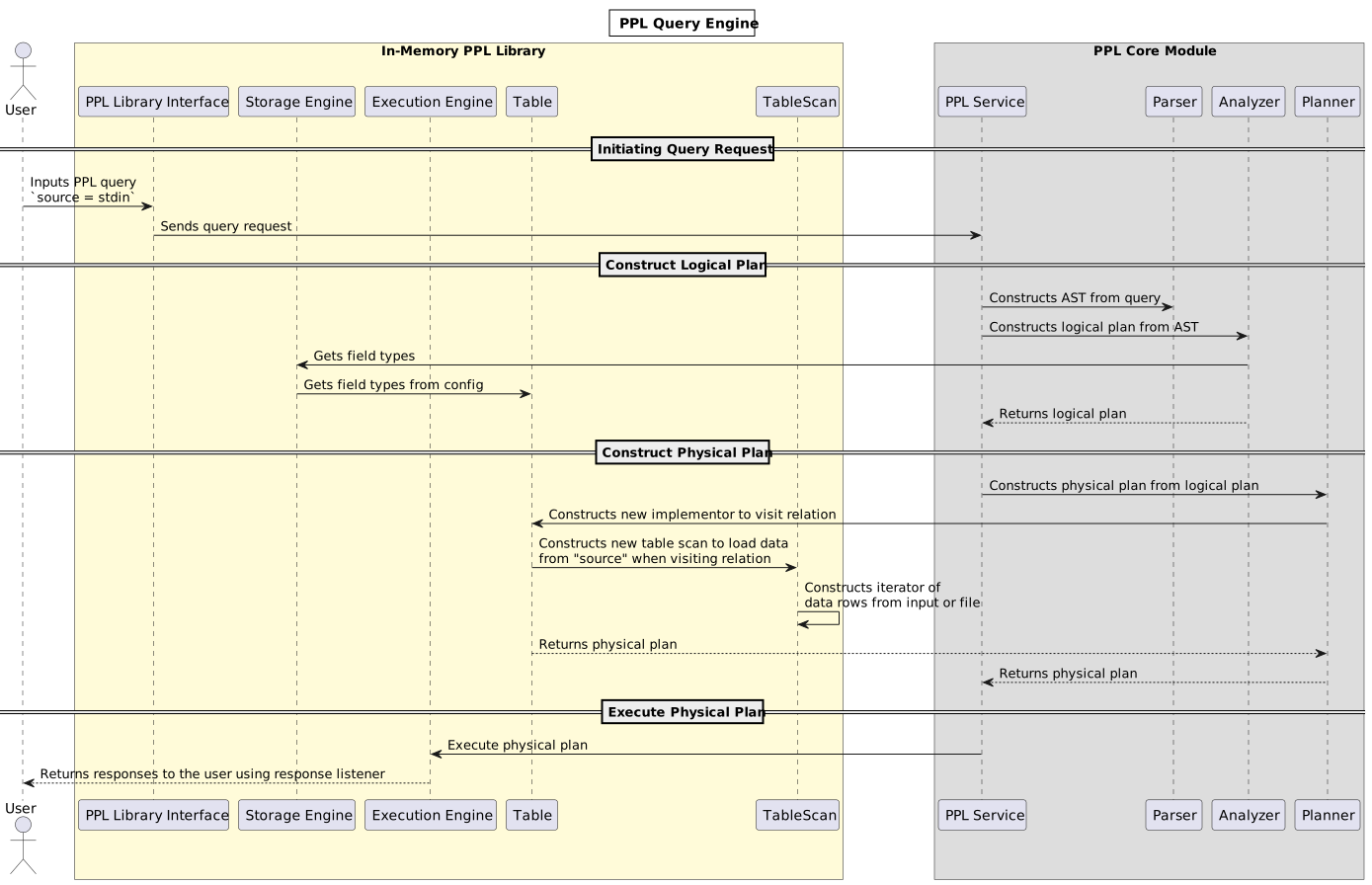
3.2 Comparison of OpenSearch PPL, PPL Library, and its integration with ingestion tools

3.2 Data-Prepper Integration
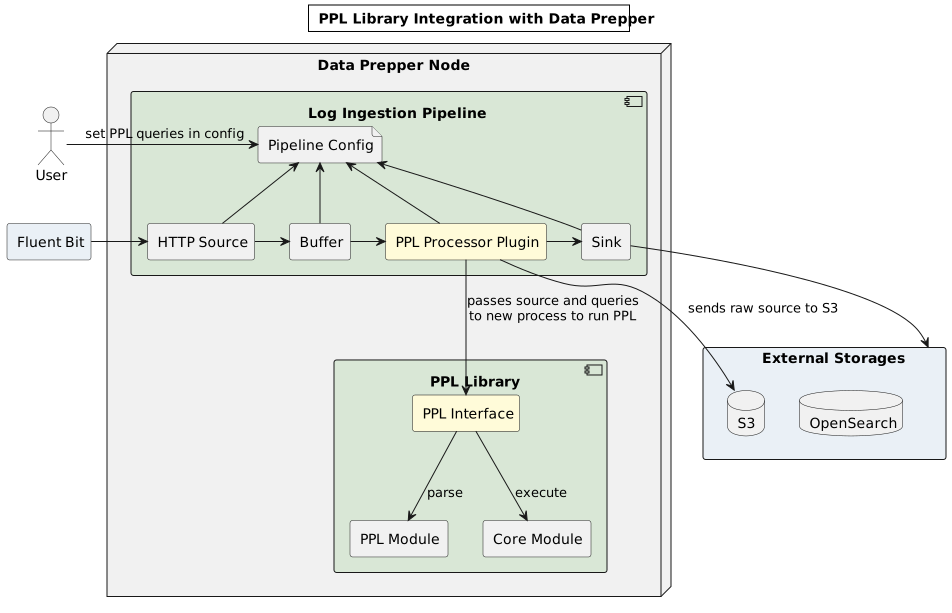
A new processor plugin will be added to data-prepper, which handles a batch of buffered logs at each time. The processor plugin will make calls to PPL library with logs and user queries. There can be two options to call PPL library:
Option 1: spawn a new process for PPL.jar
Will be used by non-Java ingestors.
ProcessBuilder builder = new ProcessBuilder("java", "-jar", "libppl.jar", configFile);
Process process = builder.start();
BufferedReader reader = new BufferedReader(new InputStreamReader(process.getInputStream()));
BufferedWriter writer = new BufferedWriter(new OutputStreamWriter(process.getOutputStream()));

// send logs to PPL
logs.forEach(logLine -> {
    writer.write(logs);
    writer.newLine();
});
writer.close();

// read PPL response
reader.lines();
Option 2: import PPL.jar as a dependency
Will be used by Java based ingestors.
public class LibPPLQueryActionFactory {
  public static LibPPLQueryAction create(Collection<Map<String, Object>> input);
}

public class LibPPLQueryAction {
  public void execute(String pplQuery);
}