PF4 Table: When using React.Node as expandable item there is an extra td element added in front of the expanded content node #3209


Description

What I describe is reproduceble with the following piece of code:
import React from 'react';
import {
  Table,
  TableHeader,
  TableBody,
  sortable,
  SortByDirection,
  headerCol,
  TableVariant,
  expandable,
  cellWidth
} from '@patternfly/react-table';

class CompactExpandableTable extends React.Component {
  constructor(props) {
    super(props);
    this.state = {
      columns: [
        {
          title: 'Header cell',
          cellFormatters: [expandable]
        },
        'Branches',
        { title: 'Pull requests' },
        '' // deliberately empty
      ],
      rows: [
        {
          isOpen: true,
          cells: ['parent - 1', 'two', 'three', 'four']
        },
        {
          parent: 0,
          fullWidth: true,
          cells: ['child - 1']
        },
        {
          isOpen: true,
          cells: ['parent - 3', 'two', 'three', 'four']
        },
        {
          parent: 2,
          noPadding: true,
          cells: [{title: <div> 'child - 3' </div> }]
        }
      ]
    };
    this.onCollapse = this.onCollapse.bind(this);
  }

  onCollapse(event, rowKey, isOpen) {
    const { rows } = this.state;
    /**
     * Please do not use rowKey as row index for more complex tables.
     * Rather use some kind of identifier like ID passed with each row.
     */
    rows[rowKey].isOpen = isOpen;
    this.setState({
      rows
    });
  }

  render() {
    const { columns, rows } = this.state;

    return (
      <Table
        caption="Compact expandable table"
        variant={TableVariant.compact}
        onCollapse={this.onCollapse}
        rows={rows}
        cells={columns}
      >
        <TableHeader />
        <TableBody />
      </Table>
    );
  }
}
This will result in the following view:
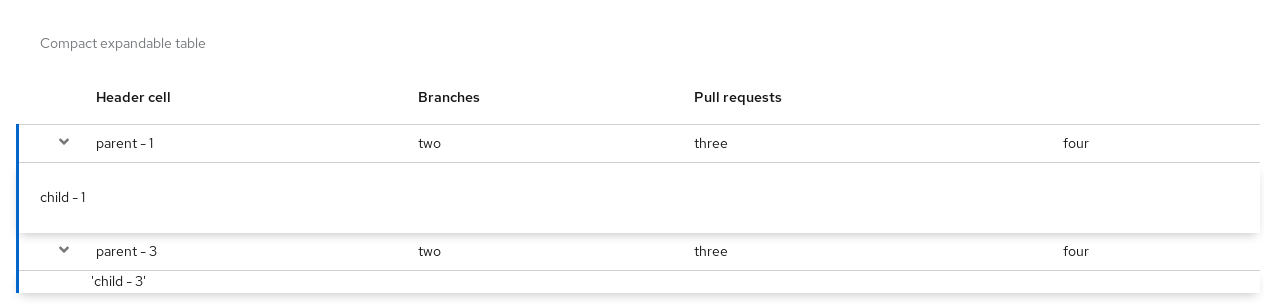
Check the visual difference between the first expanded item and the second expanded item.
When looking at the html I see two issues:
The expandable row content wrapper in the case where I am using a React.Node does not have the class="pf-c-table__expandable-row-content" which makes it get different padding. I am not sure if this is expected, but I was definitely confused.
The second expandable row, before the actual content that I supplied has a td element like:
<td data-key="0" class=""></td>Which creates this visual difference, by reserving this space on the left of the row.
Metadata
Metadata
Assignees
Labels
No labels