Datatoolbar: Support multi category filter on a single dropdown #4094

Description

Describe the issue. What is the expected and unexpected behavior?
On my datatoolbar, I have a filter component that filters on multiple categories. For instance, it could be a: Grouped checkbox input with filtering
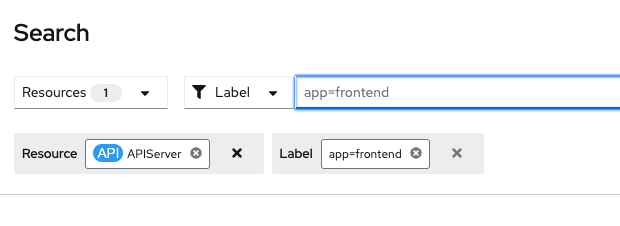
I want to be able to add the component to my datatoolbar, and provide selection state in the toolbar via a chipset. It almost works out of the box by tiering 2 DataToolbarFilters and then the component. Chips are managed and rendered correctly. Only issue is that the Clear all filters button doesn't render correctly in all cases.
<DataToolbarItem className="co-search-group__filter">
  <DataToolbarFilter
    deleteChipGroup={clearLabelFilter}
    chips={[...labelFilter]}
    deleteChip={removeLabelFilter}
    categoryName="Label"
  >
    <DataToolbarFilter
      deleteChipGroup={clearNameFilter}
      chips={typeaheadNameFilter.length > 0 && [typeaheadNameFilter]}
      deleteChip={clearNameFilter}
      categoryName="Name"
    >
      <SearchFilterDropdown
        onChange={updateSearchFilter}
        nameFilterInput={typeaheadNameFilter}
        labelFilterInput={labelFilterInput}
      />
    </DataToolbarFilter>
  </DataToolbarFilter>
</DataToolbarItem>
SearchFilterDropdown provides state for two categories in this example.
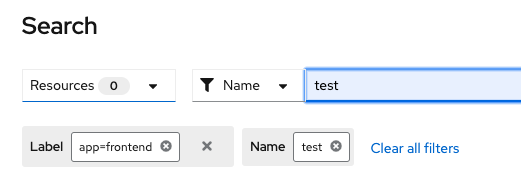
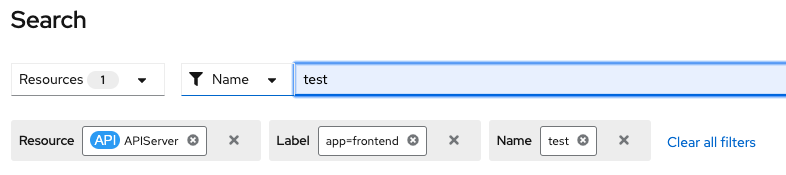
Images show clear all rendering issue image 1 shows the issue, 2 and 3 show correct render:
What is your product and what release version are you targeting?