A lightweight, ComfyUI-native preprocessing toolkit dedicated to full multi-person pose extraction rather than single-person pose. The pipeline is intentionally simple:
- YOLO detects every person in the frame (not just the largest box).
- Each detected crop is pushed through ViTPose Whole-Body to recover 133 keypoints.
- All detected skeletons for the current frame are rendered onto a single canvas and returned as a normal ComfyUI
IMAGEtensor.
Everything runs through ONNX Runtime, so it works on CUDA or CPU and integrates neatly into image/video workflows.
| Stage | Details |
|---|---|
| YOLO person detection | Default model: yolov10m.onnx @ 640×640. We run it per-frame, keep all boxes that pass confidence+NMS, and sort them by area so every person stays in the sequence. |
| ViTPose whole-body estimation | Each bbox is cropped/resized to 256×192, normalized with ImageNet stats, and fed to ViTPose (Large/Huge ONNX). Heatmaps are decoded via keypoints_from_heatmaps to obtain 133 keypoints + confidences. |
| Multi-person rendering | Keypoints become AAPoseMeta objects that store absolute coordinates/visibility. We iterate the per-frame index list and draw every skeleton on the same canvas, so group shots, dance clips, or sports footage all maintain their full pose context. |
All of this is wrapped inside a single node: input = POSEMODEL handle + IMAGE batch; output = rendered pose frames. No extra “detection node”, “pose node”, or “render node” is needed.
custom_nodes/ComfyUI-MultiPoseToolkit/
├── README.md
├── requirements.txt          # onnxruntime-gpu / opencv / tqdm / matplotlib
├── toolkit/
│   ├── models/runtime.py
│   ├── pipeline/detector.py
│   ├── utils/pose_render.py
│   └── pose_utils/*
└── workflows/Multi-pose.json
- Drop this folder into
ComfyUI/custom_nodes/. - Install the extra Python deps:
pip install -r custom_nodes/ComfyUI-MultiPoseToolkit/requirements.txt
- Download ONNX checkpoints into
ComfyUI/models/detection/:yolov10m.onnx(or another YOLO v8/v10 body detector)vitpose_*.onnx(Large or Huge). For Huge you also need the matching.binshard in the same directory.
- Restart ComfyUI. Nodes show up under the
WanMultiPosecategory.
| Node | Module | Description |
|---|---|---|
MultiPose ▸ ONNX Loader |
toolkit.models.runtime.OnnxRuntimeLoader |
Select YOLO + ViTPose checkpoints and return a cached POSEMODEL dict. |
MultiPose ▸ Pose Extraction |
toolkit.pipeline.detector.MultiPersonPoseExtraction |
Feed in the POSEMODEL + frame tensor, get back pose canvases with every detected skeleton layered together. |
MultiPose ▸ Coordinate Sampler |
toolkit.pipeline.detector.MultiPoseCoordinateSampler |
Reuse the same detector stack to output positive/negative point JSON plus per-frame bbox tuples for downstream tools. |
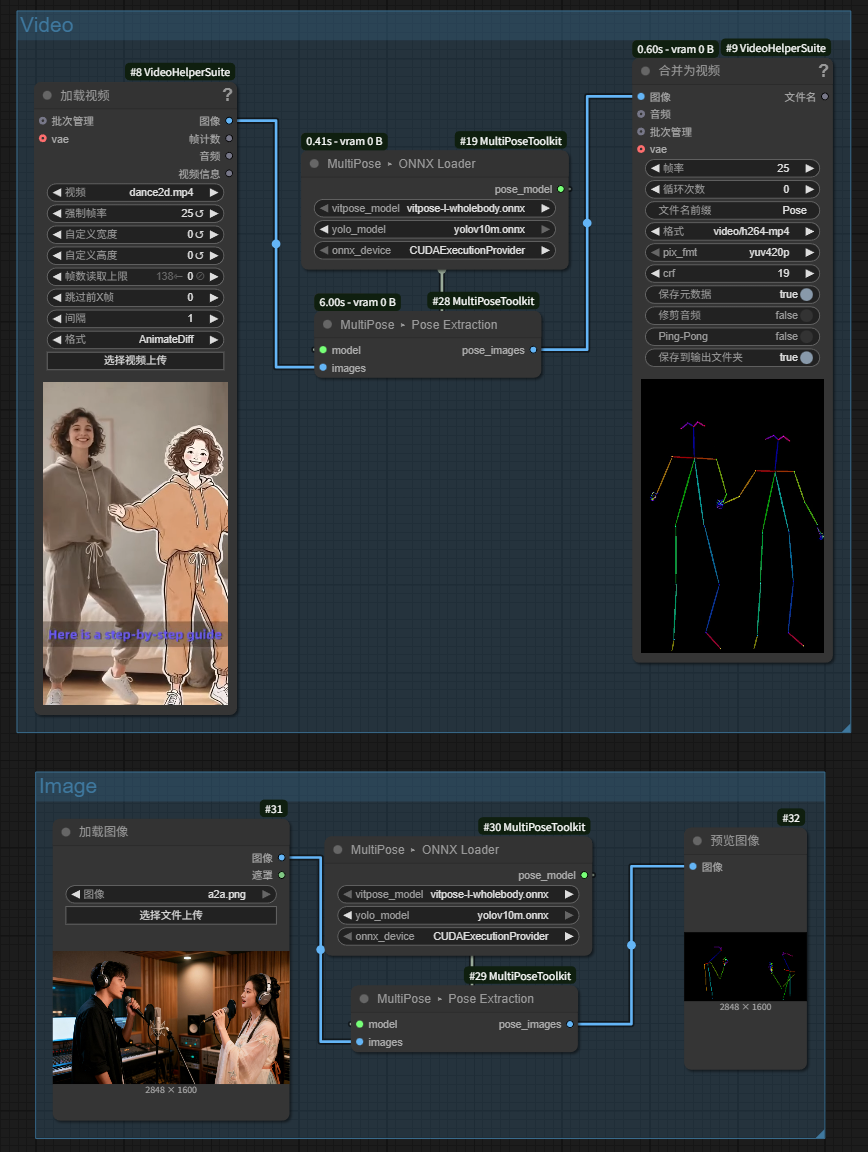
workflows/Multi-pose.json is a minimal demo (requires Video Helper Suite):
VHS_LoadVideo– emits frame tensors.MultiPose ▸ ONNX Loader– loads YOLO + ViTPose.MultiPose ▸ Pose Extraction– produces pose frames (multi-person aware).VHS_VideoCombine– stitches the frames back into a preview video.
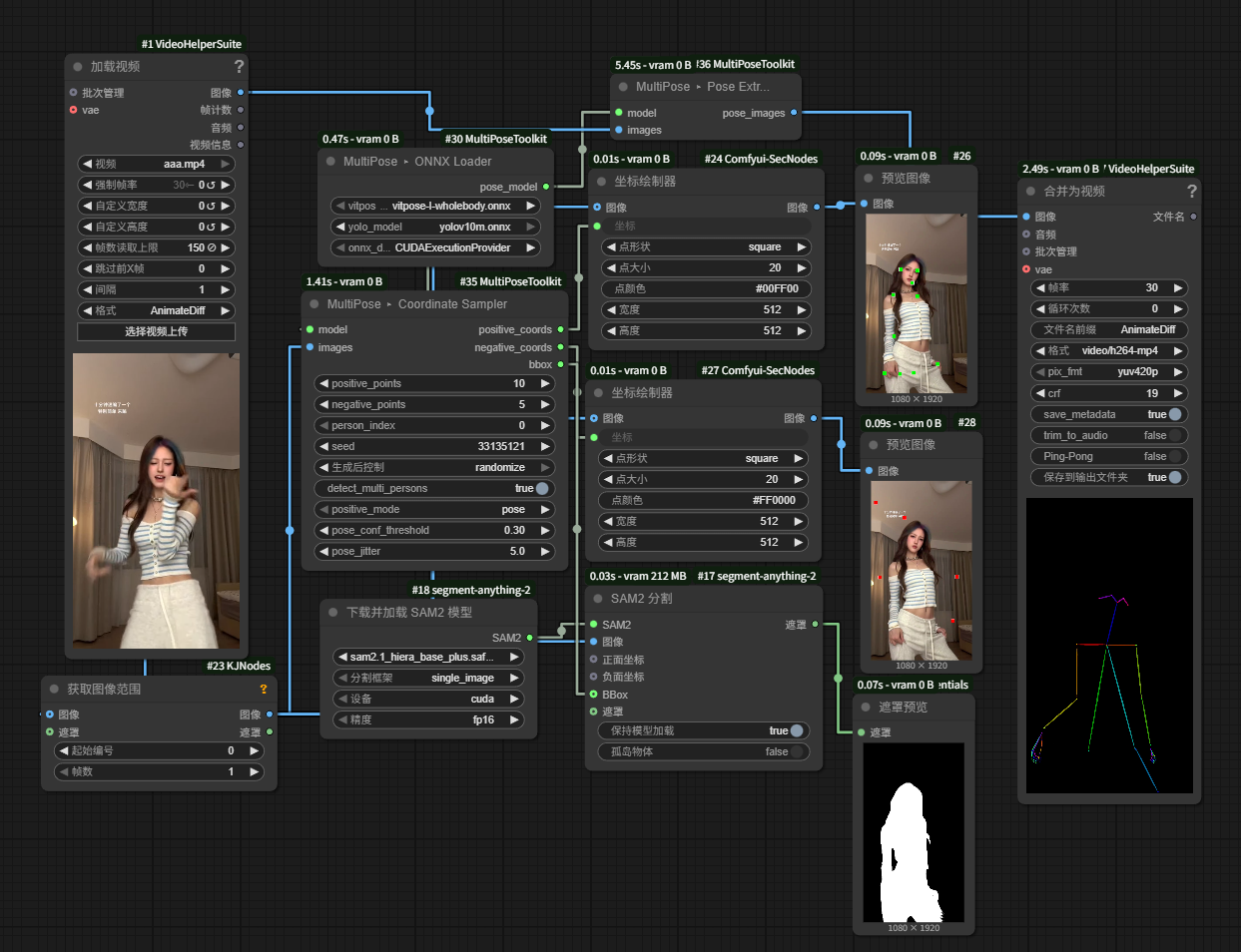
MultiPose ▸ Coordinate Sampler is designed for workflows that need textual/JSON annotations instead of rendered canvases.
- Inputs:
POSEMODEL,IMAGE, plus tuning knobs (positive_points,negative_points,person_index,seed, etc.). Setperson_index = -1(default) to emit entries for every detected person per frame; set it to a specific index to stick with a single bbox. - Positive sampling modes:
pose(default) runs ViTPose to grab confident joints, interpolates between them, and enforces a minimum spacing inside the bbox so points stay on-body and evenly spread.bboxskips ViTPose and scatters points uniformly inside the detection box for a faster but less precise result.
- Outputs:
positive_coords: JSON string. Single detection →[{"x":..,"y":..}, ...]; multi-person (person_index = -1) flattens to[{"x":..,"y":..,"person_index":p,"image_index":i}, ...]so downstream nodes that expect simple point lists still work.negative_coords: same format aspositive_coords, sampled outside every detected bbox (duplicated per person whenperson_index = -1for alignment).bboxes: per-frame list of(x0, y0, x1, y1)tuples (typed as ComfyUIBBOX), ordered to match theperson_indexvalues.
The node is deterministic per seed, so you can regenerate the same annotations when iterating on prompts or scripts.
- Before running the workflow, extract all the clean character poses required for images/videos instead of individual character poses.
- Converting real footage into pose references for ControlNet / Pose Guider style nodes.
- Visualizing motion trajectories or interactions for multi-person clips.