Docker for Windows - Container permissions issue #7928

Description

Description
I'm doing my development in VS Code on Windows and have ran into what I think is a permissions issue in the container that is specific to an ongoing issue with Docker for Windows: docker/for-win#497 combined with a pull request here: #5702 that changed the user running the container.
In Docker for Windows, if a drive is mounted and the container is not run as root, then the user running the container has permission issues with the mount. In this case, when I run ./run-in-docker.sh mvn package, it causes a folder to show up in VS Code that is a named
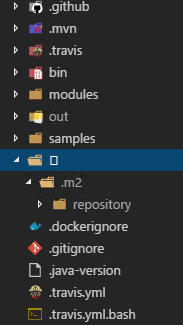
Because this folder shows up, Git tries to add it in unless I specifically add to .gitignore.
Swagger-codegen version
2.4.0
Command line used for generation
./run-in-docker.sh mvn package
Steps to reproduce
- Run Docker for Windows
- Use VS Code
- run
./run-in-docker.sh mvn package - Special character named folder may show up.
Suggest a fix/enhancement
Not sure on a fix/enhancement exactly. I can workaround the issue by doing something like this in the windows command line.
docker.exe run --rm -it -w /gen -e GEN_DIR=/gen -e MAVEN_CONFIG=/var/maven/.m2 -v "${PWD}:/gen" -v "${HOME}/.m2/repository:/var/maven/.m2/repository" --entrypoint "/gen/docker-entrypoint.sh" maven:3-jdk-7 mvn package
as you can see, i'm basically mimicking run-in-docker.sh but i'm eliminating -u "$(id -u):$(id -g)" and the container will essentially run as root.