Tensorboard options reuse_port and path_prefix not workiing together #5368


Description

Environment information (required)
Please run diagnose_tensorboard.py (link below) in the same
environment from which you normally run TensorFlow/TensorBoard, and
paste the output here:
Diagnostics:
### Diagnostics

<details>
<summary>Diagnostics output</summary>


--- check: autoidentify
INFO: diagnose_tensorboard.py version e43767ef2b648d0d5d57c00f38ccbd38390e38da

--- check: general
INFO: sys.version_info: sys.version_info(major=3, minor=7, micro=10, releaselevel='final', serial=0)
INFO: os.name: posix
INFO: os.uname(): posix.uname_result(sysname='Linux', nodename='ip-192-168-0-140.us-east-2.compute.internal', release='5.4.129-63.229.amzn2.x86_64', version='#1 SMP Tue Jul 20 21:22:08 UTC 2021', machine='x86_64')
INFO: sys.getwindowsversion(): N/A

--- check: package_management
INFO: has conda-meta: False
INFO: $VIRTUAL_ENV: None

--- check: installed_packages
INFO: installed: tensorboard==2.6.0
INFO: installed: tensorflow==2.1.0
INFO: installed: tensorflow-estimator==2.1.0
INFO: installed: tensorboard-data-server==0.6.1

--- check: tensorboard_python_version
INFO: tensorboard.version.VERSION: '2.6.0'

--- check: tensorflow_python_version
2021-10-09 00:00:37.825076: W tensorflow/stream_executor/platform/default/dso_loader.cc:55] Could not load dynamic library 'libnvinfer.so.6'; dlerror: libnvinfer.so.6: cannot open shared object file: No such file or directory
2021-10-09 00:00:37.825186: W tensorflow/stream_executor/platform/default/dso_loader.cc:55] Could not load dynamic library 'libnvinfer_plugin.so.6'; dlerror: libnvinfer_plugin.so.6: cannot open shared object file: No such file or directory
2021-10-09 00:00:37.825199: W tensorflow/compiler/tf2tensorrt/utils/py_utils.cc:30] Cannot dlopen some TensorRT libraries. If you would like to use Nvidia GPU with TensorRT, please make sure the missing libraries mentioned above are installed properly.
INFO: tensorflow.__version__: '2.1.0'
INFO: tensorflow.__git_version__: 'v2.1.0-rc2-17-ge5bf8de'

--- check: tensorboard_data_server_version
INFO: data server binary: '/home/ec2-user/.local/lib/python3.7/site-packages/tensorboard_data_server/bin/server'
INFO: data server binary version: b'rustboard 0.6.1'

--- check: tensorboard_binary_path
INFO: which tensorboard: b'/home/ec2-user/.local/bin/tensorboard\n'

--- check: addrinfos
socket.has_ipv6 = True
socket.AF_UNSPEC = <AddressFamily.AF_UNSPEC: 0>
socket.SOCK_STREAM = <SocketKind.SOCK_STREAM: 1>
socket.AI_ADDRCONFIG = <AddressInfo.AI_ADDRCONFIG: 32>
socket.AI_PASSIVE = <AddressInfo.AI_PASSIVE: 1>
Loopback flags: <AddressInfo.AI_ADDRCONFIG: 32>
Loopback infos: [(<AddressFamily.AF_INET6: 10>, <SocketKind.SOCK_STREAM: 1>, 6, '', ('::1', 0, 0, 0)), (<AddressFamily.AF_INET: 2>, <SocketKind.SOCK_STREAM: 1>, 6, '', ('127.0.0.1', 0))]
Wildcard flags: <AddressInfo.AI_PASSIVE: 1>
Wildcard infos: [(<AddressFamily.AF_INET: 2>, <SocketKind.SOCK_STREAM: 1>, 6, '', ('0.0.0.0', 0)), (<AddressFamily.AF_INET6: 10>, <SocketKind.SOCK_STREAM: 1>, 6, '', ('::', 0, 0, 0))]

--- check: readable_fqdn
INFO: socket.getfqdn(): 'ip-192-168-0-140.us-east-2.compute.internal'

--- check: stat_tensorboardinfo
INFO: directory: /tmp/.tensorboard-info
INFO: os.stat(...): os.stat_result(st_mode=16895, st_ino=13792819, st_dev=66305, st_nlink=2, st_uid=1000, st_gid=1000, st_size=48, st_atime=1633734297, st_mtime=1633737565, st_ctime=1633737565)
INFO: mode: 0o40777

--- check: source_trees_without_genfiles
INFO: tensorboard_roots (1): ['/home/ec2-user/.local/lib/python3.7/site-packages']; bad_roots (0): []

--- check: full_pip_freeze
INFO: pip freeze --all:
absl-py==0.14.1
astor==0.8.1
aws-cfn-bootstrap==2.0
cached-property==1.5.2
cachetools==4.2.4
certifi==2021.10.8
charset-normalizer==2.0.6
docutils==0.14
gast==0.2.2
google-auth==1.35.0
google-auth-oauthlib==0.4.6
google-pasta==0.2.0
grpcio==1.41.0
h5py==3.4.0
idna==3.2
importlib-metadata==4.8.1
Keras-Applications==1.0.8
Keras-Preprocessing==1.1.2
lockfile==0.11.0
Markdown==3.3.4
numpy==1.21.2
oauthlib==3.1.1
opt-einsum==3.3.0
pip @ file:///builddir/build/BUILD/pip-20.2.2/dist/pip-20.2.2-py2.py3-none-any.whl
protobuf==3.18.1
pyasn1==0.4.8
pyasn1-modules==0.2.8
pystache==0.5.4
python-daemon==2.2.3
requests==2.26.0
requests-oauthlib==1.3.0
rsa==4.7.2
scipy==1.4.1
setuptools @ file:///builddir/build/BUILD/setuptools-49.1.3/dist/setuptools-49.1.3-py3-none-any.whl
simplejson==3.2.0
six==1.16.0
tensorboard==2.6.0
tensorboard-data-server==0.6.1
tensorboard-plugin-wit==1.8.0
tensorflow==2.1.0
tensorflow-estimator==2.1.0
termcolor==1.1.0
typing-extensions==3.10.0.2
urllib3==1.26.7
Werkzeug==2.0.2
wheel==0.37.0
wrapt==1.13.1
zipp==3.6.0


### Next steps
For browser-related issues, please additionally specify:
- Browser type and version (e.g., Chrome 64.0.3282.140): Version 1.30.87 Chromium: 94.0.4606.71 (Official Build) (64-bit)
- Image:
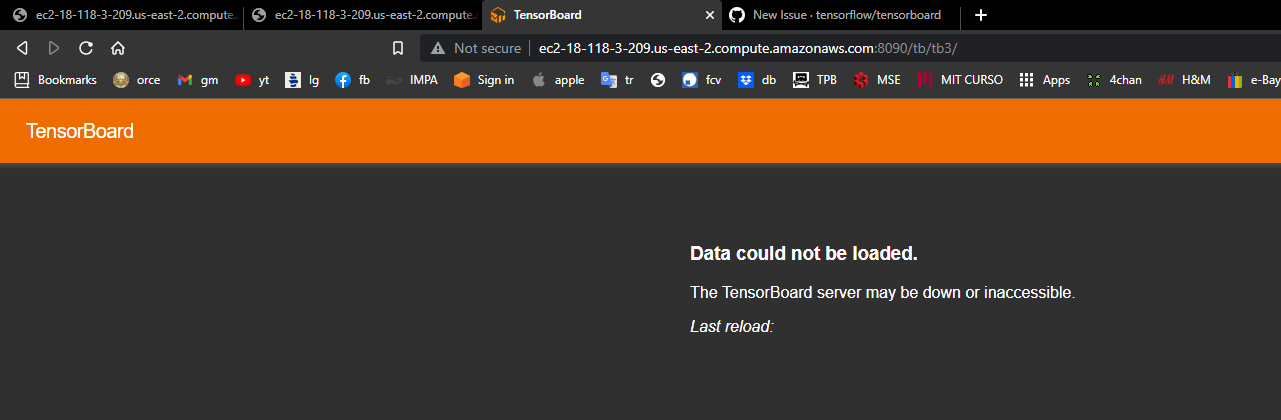
Issue description
When I try to run multiple tensorboard visualizations on the same port using the command reuse_port and path_prefix, sometimes only 1 visualization gets active on the browser or sometimes none of them.
Steps:
- download any 3 tensorboard logs and place them on the correct directory. suppose they are
modelA,modelB, andmodelC - Run the following commands in order to show then on the same port and different context:
tensorboard --logdir=/path/to/modelA --port 8090 --bind_all --reuse_port true --path_prefix='/tensorboard/modelA'
tensorboard --logdir=/path/to/modelB --port 8090 --bind_all --reuse_port true --path_prefix='/tensorboard/modelB'
tensorboard --logdir=/path/to/modelC --port 8090 --bind_all --reuse_port true --path_prefix='/tensorboard/modelC'