added images to nearest neighbors list #2543
Conversation


|
Thanks for your pull request. It looks like this may be your first contribution to a Google open source project (if not, look below for help). Before we can look at your pull request, you'll need to sign a Contributor License Agreement (CLA). 📝 Please visit https://cla.developers.google.com/ to sign. Once you've signed (or fixed any issues), please reply here with What to do if you already signed the CLAIndividual signers
Corporate signers
ℹ️ Googlers: Go here for more info. |


|
@googlebot I signed it! |
|
We found a Contributor License Agreement for you (the sender of this pull request), but were unable to find agreements for all the commit author(s) or Co-authors. If you authored these, maybe you used a different email address in the git commits than was used to sign the CLA (login here to double check)? If these were authored by someone else, then they will need to sign a CLA as well, and confirm that they're okay with these being contributed to Google. ℹ️ Googlers: Go here for more info. |

|
Thanks for the PR! Could you please add the email used for the Git You can run |
|
CLAs look good, thanks! ℹ️ Googlers: Go here for more info. |


 wchargin
left a comment
wchargin
left a comment
wchargin
left a comment
There was a problem hiding this comment.
This feature looks great and works in my testing—thanks for sending!
We typically prefer to manage pieces of state like “is image data
available?” and “show neighbor images?” as part of the Polymer component
rather than manually with event listeners and display: none CSS. For
instance, the HTML for the toggle should look something like this:
<template is="dom-if" if="[[neighborImagesAvailable]]">
  <paper-checkbox checked="{{showNeighborImages}}">
    …
  </paper-checkbox>
</template>
You’ll want to define neighborImagesAvailable as a Polymer property
(possibly a computed property?), and similarly for showNeighborImages.
Then, whenever the checkbox state changes, showNeighborImages will be
updated. You can register a Polymer observer such that changes to the
showNeighborImages and neighborImagesAvailable properties cause the
updateNeighborsList function to be invoked.
The purpose of this refactoring is to ensure that each piece of state
has a single source of truth, so that the JS state and the DOM are
automatically kept in sync.
You can look at other components for examples, or consult the Polymer
docs for a reference. (We use Polymer 2.x.) And, of course, feel free to
ask any questions.
A couple minor implementation notes inline.
not yet supported for Internet Explorer 8
No problem; we target latest Chrome and Firefox.
Sometimes it takes a second to show the images […] One solution could
be lazy loading the divs
Let’s hold off on that for now, unless and until the performance starts
to be a real concern. Lazy loading is likely a good approach, but is
complexity that I’d like to avoid if possible.
provide "full scale" image links in the case where the sprites are too
small
If I understand correctly, there’s only one image file (a sprite sheet),
right? so this would need some image processing (probably on the server)
to extract the correct sprite and serve it as a standalone image file?
I also fixed a bug where the nearest neighbors list wasn't scrolling
(that was a problem before I started) - I just added flex params to
the containers that needed it.
Thanks! If possible, could you open a separate PR for this? This both
makes it easier to understand the Git history and makes rollbacks safer
(in case we need to roll back the feature for any reason, we can keep
the bug fix).
tensorboard/plugins/projector/vz_projector/vz-projector-inspector-panel.ts
Outdated
Show resolved
Hide resolved
tensorboard/plugins/projector/vz_projector/vz-projector-inspector-panel.html
Outdated
Show resolved
Hide resolved
tensorboard/plugins/projector/vz_projector/vz-projector-inspector-panel.ts
Outdated
Show resolved
Hide resolved
tensorboard/plugins/projector/vz_projector/vz-projector-inspector-panel.ts
Outdated
Show resolved
Hide resolved
tensorboard/plugins/projector/vz_projector/vz-projector-inspector-panel.ts
Outdated
Show resolved
Hide resolved
tensorboard/plugins/projector/vz_projector/vz-projector-inspector-panel.ts
Outdated
Show resolved
Hide resolved
|
I just got a chance to run through and make the requested changes. Let me know if there's anything else. I couldn't get
Yeah I just figured if someone wanted to serve up arbitrary static images (or spin up a flask server 😉) we could use a metadata column as urls to populate those images. It wouldn't have to be anything that tensorboard backend would have to handle. My use case would be to expand the temporal context of the frames, but it's not too crucial and is probably pretty niche. The other reason is that the sprite sheet has a maximum size, so I guess we'll see what happens when I play around with larger test sets !! |
wchargin
left a comment
wchargin
left a comment
There was a problem hiding this comment.
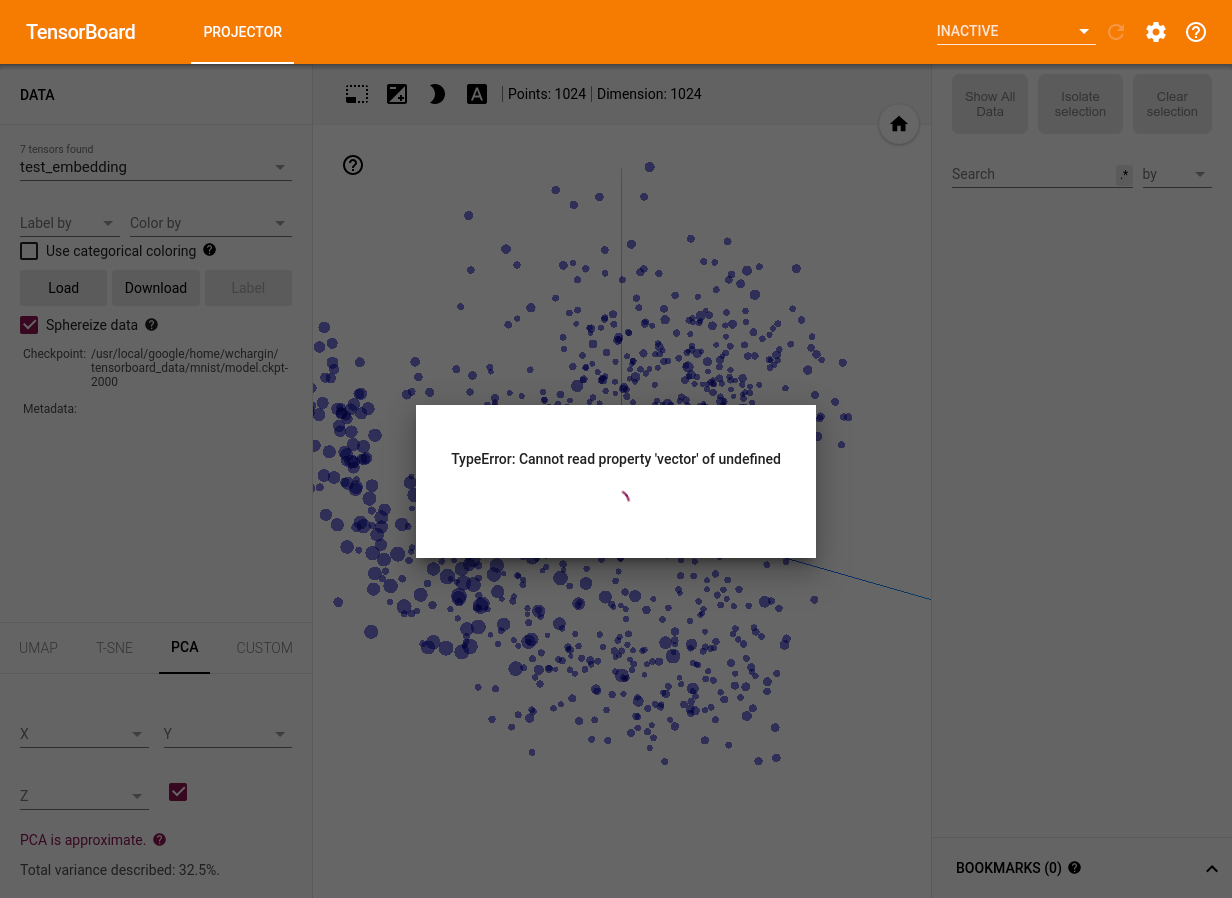
When I run this commit (b56995b) on a dataset that doesn’t have images,
the embeddings start to render, but the modal stays visible with a
message, “TypeError: Cannot read property 'vector' of undefined”.
(Screenshot.) I can’t reproduce that prior to these changes; could
you take a look?
tensorboard/plugins/projector/vz_projector/vz-projector-inspector-panel.ts
Outdated
Show resolved
Hide resolved
tensorboard/plugins/projector/vz_projector/vz-projector-inspector-panel.ts
Show resolved
Hide resolved
tensorboard/plugins/projector/vz_projector/vz-projector-inspector-panel.ts
Outdated
Show resolved
Hide resolved
tensorboard/plugins/projector/vz_projector/vz-projector-inspector-panel.ts
Outdated
Show resolved
Hide resolved
tensorboard/plugins/projector/vz_projector/vz-projector-inspector-panel.ts
Outdated
Show resolved
Hide resolved
tensorboard/plugins/projector/vz_projector/vz-projector-inspector-panel.ts
Outdated
Show resolved
Hide resolved
tensorboard/plugins/projector/vz_projector/vz-projector-inspector-panel.html
Outdated
Show resolved
Hide resolved
That was happening because I was calling findNeighbors in the observer function, but I guess that was getting called before neighbors were initialized (or something) so I removed the added findNeighbors call. Instead, I'm caching the last neighbors value, and reusing it if |
removed recalculation of neighbors
factored out image rendering
|
Question: is there a reason why the neighbors list is being rendered with vanilla javascript and not polymer elements? I realize there's a bit of logic needed beforehand so I can see how it might be tricky, but I feel like the element definitions could be offloaded. This is my first time with polymer/typescript, I'm more React/Redux folk. |
wchargin
left a comment
wchargin
left a comment
There was a problem hiding this comment.
This looks lovely; thanks! Everything looks good on my end; just a few
minor comments and this should be good to merge.
Question: is there a reason why the neighbors list is being rendered
with vanilla javascript and not polymer elements? I realize there's a
bit of logic needed beforehand so I can see how it might be tricky,
but I feel like the element definitions could be offloaded.
They could, yes, and that might well be easier to follow. I didn’t write
the original code, so I can only speculate, but perhaps part of it was
that setting all the inline styles would be much more of a pain (it’s
not like React where the style prop is a normal JS object; in Polymer,
you’d have to actually build up a computed style="…" string). Maybe
performance or just personal preference were also factors. ¯\_(ツ)_/¯
This is my first time with polymer/typescript, I'm more React/Redux
folk.
We are, too, actually, but the existing code is what it is. :-)
tensorboard/plugins/projector/vz_projector/vz-projector-inspector-panel.ts
Outdated
Show resolved
Hide resolved
tensorboard/plugins/projector/vz_projector/vz-projector-inspector-panel.ts
Show resolved
Hide resolved
tensorboard/plugins/projector/vz_projector/vz-projector-inspector-panel.ts
Outdated
Show resolved
Hide resolved
| this.updateNeighborsList(); | ||
| } | ||
|
|
||
| checkSpriteImagesAvailable() { |
There was a problem hiding this comment.
(looks like this didn’t make it into the patch?)
| this.enableResetFilterButton(false); | ||
| } | ||
|
|
||
| _updateNeighborsList() { |
There was a problem hiding this comment.
Wait I'm not totally sure what you mean inlined.
This?
      showNeighborImages: {
        type: Boolean,
        value: true,
        observer: () => {
          this.updateNeighborsList();
        },
      },
this? (I bet prettier would say something abt this)
_updateNeighborsList() { this.updateNeighborsList(); }Doing this doesn't work because it's not bound to this anymore:
      showNeighborImages: {
        type: Boolean,
        value: true,
        observer: 'updateNeighborsList',
},There was a problem hiding this comment.
Ah, I see what’s happening. By “inlined” I meant “remove the function
_updateNeighborsList and replace all calls with updateNeighborsList,
which should ‘obviously’ be equivalent”. But the reason that this
doesn’t work is that Polymer invokes observers with the value of the
property, which for showNeighborImages is a boolean—so, when the
checkbox is clicked, Polymer calls _updateNeighborsList(true), which
then calls updateNeighborsList(). After inlining, Polymer will instead
pass that argument to updateNeighborsList directly, but then it’s
interpreted as the value of neighbors?: knn.NearestEntry[] instead of
being ignored, which leads to errors.
(edit: to clarify, I meant as in the last code block in your comment above)
The implementation is fine, but the above is confusing enough that the
function should have a comment and probably a rename—something like
_refreshNeighborsList, with a comment indicating that it specifically
drops all arguments before calling updateNeighborsList.
|
Merged! Thanks very much—this is a great feature. 🎉 |
3 participants


This is in reference to something in #2492. I'm working with image data (audio spectrograms, tbe) and I'm trying to visualize them with the embedding projector, but due to the transparency in the sprite textures and them just being small, it makes it difficult to actually make sense of and visualize neighboring points. So I wanted to add some view that allows us to see the images larger, more organized, without the shaders.
I added the sprite images over each item in the nearest neighbor list (that pops up when you select a point).
I also added a checkbox to toggle this feature which will only be shown if a sprite image file is available.
It uses css background-image/position to load the image, and uses the singleImageDim to calculate and give the div the proper aspect ratio.
Sometimes it takes a second to show the images. I would have thought it would be cached from when it was loaded for THREE.js, but it's only a second so it's not too bad.
One solution could be lazy loading the divs (see IntersectionObserver), which I considered doing. It's not yet supported for Internet Explorer 8, (which like, why haven't ppl downloaded chrome or firefox or something, anything else.. 😝) so I figured I'd hold off before tying in the polyfill and all that.
I also fixed a bug where the nearest neighbors list wasn't scrolling (that was a problem before I started) - I just added flex params to the containers that needed it.
Create a tensorboard run where you send your embeddings to the projector. My
projector_config.pbtxtlooks like this:Open the embedding projector and click on a point. This should open up the nearest neighbors panel, where you should see your sprites visible 🌈
I still find it difficult to browse the images without zooming out far because they are all vertical and you can only look at a couple at a time, so having some way to expanding to multiple columns would be helpful. The two ways that I could see it working would be:
- have the panel be expandable (drag the edge)
- add a modal popup that shows some 6/8/12 column grid which could give us 20-50 on a page depending on how you like your zoom.
There are a few more things that I think we could do:
metadata-infois a very similar panel, but I haven't duplicated the code to have it handle both. Seeing as they are very similar, I think a good move could be to combineupdateNeighborsListandmetadataEditorContextusing more general class names, because they are almost the same interface.