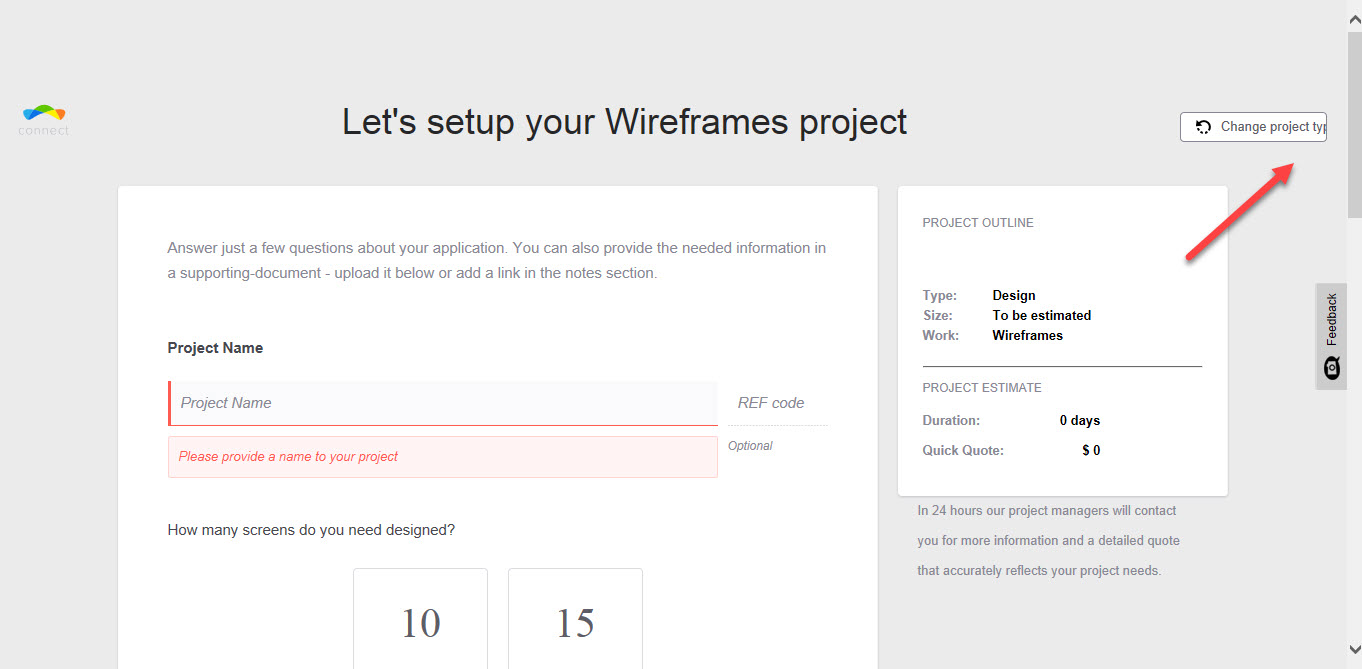
[Layout] 'Change Project type' button text is half hidden #989

Description

Steps to Reproduce
-
Open the URL https://connect.topcoder-dev.com
-
Click 'Start a Project'
-
Click on 'Create Project' button from one of the items in the Dashboard ("Select your project type")
-
Check the top left corner 'Change Project type' button text
Actual Result(s)
- 'Change Project type' button text is half hidden
Expected Result(s)
- 'Change Project type' button text must fully displayed
URL where the Bug Appears
https://connect.topcoder-dev.com/new-project
Image/Video/JS Log/Console Log (If not attached here, Please check the comments section)
Environment
-
Device(s): Laptop
-
Operating System: Windows 7 Pro (64bit)
-
Browser: IE11
-
User role (client, copilot or manager): Not logged in
-
Account used: N/A