JavaScript Class 语法 #4

Description

总结一下 JS Class 的语法
Class 只是语法糖
ES6 之前,没有 Class 语法,类的任务是由构造函数完成的
function Point(x, y) {
  this.x = x
  this.y = y
}

// 这里不要用箭头函数, 否则会绑定外部的 this
Point.prototype.printPosition = function() {
  console.log(`(${this.x}, ${this.y})`)
}

const p = new Point(1, 2)
console.dir(Point)
console.dir(p)

p.printPosition()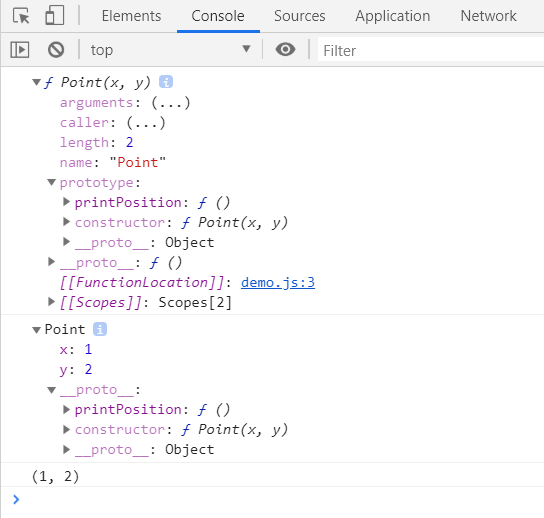
ES6 增加了 Class 语法,但其实只是一个语法糖,并没有多任何的功能,这里的 Class 本质上仍然是构造函数
Class 语法使属性方法放在一起,看得更清楚一点,个人认为最主要的其实还是讨好了 Java,C# 等程序员
用 Class 语法改写上述代码,如下
class Point {
  constructor(x, y) {
    this.x = x
    this.y = y
  }

  printPosition() {
    console.log(`(${this.x}, ${this.y})`)
  }
}

const p = new Point(1, 2)
console.dir(Point)
console.dir(p)

p.printPosition()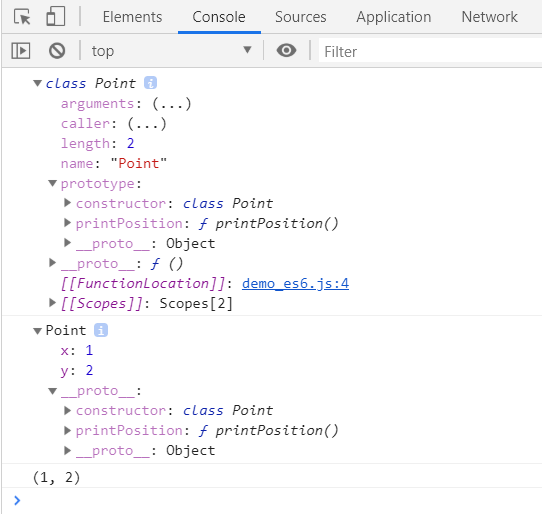
可以看出,不管是构造函数/类对象,还是实例对象,都是一模一样的
属性初始化
💡:如果你还学过 Python,不要搞混了,Python 中这样写是类属性
class Point {

  color = 'red'             // 属性初始化

  constructor(x, y) {
    console.log(this.color) // color 的初始化在构造函数之前
    this.x = x
    this.y = y
  }

  // ......
}
基本上等同于
class Point {
  constructor(x, y) {
     this.color = 'red'
     this.x = x
     this.y = y
  }

  // ......
}
这种方式有两个好处:
- 可以将所有实例属性都列在类的开头,更加清晰,上面代码就可以这样写
class Point {

  x = 0
  y = 0
  color = 'red'

  constructor(x, y) {
    this.x = x
    this.y = y
  }

  // ......
}- 很多时候,使用这种方式可以省去构造函数
下面是一个 React 组件的代码,通常要这样写
import React, { Component } from "react";
import Joke from './Joke'

class RandomJoke extends Component {
  constructor() {
    super(...arguments)
    this.state = {
      joke: null
    }
  }

  render() {
    const { joke } = this.state
    return <Joke value={joke} />
  }

  // ......
}

export default RandomJoke
使用属性初始化的方法后
import React, { Component } from "react";
import Joke from './Joke'

class RandomJoke extends Component {
  state = {
    joke: null
  }

  render() {
    const { joke } = this.state
    return <Joke value={joke} />
  }

  // ......
}

export default RandomJoke
方法中的 this
写 React 时,经常会写下面这样的代码
constructor() {
  this.onClick = this.onClick.bind(this)
}
使用 属性初始化 + 箭头函数 可以完美解决 (方法其实就是属性)
class Button {
  onClick = () => {
    this.setState()
  }
}
我们也改写一下上面的代码
class Point {
  x = 0
  y = 0
  color = 'blue'

  constructor(x, y) {
    this.x = x
    this.y = y
  }

  printPosition = () => {
    console.log(`(${this.x}, ${this.y})`)
  }
}

const p = new Point(1, 2)
p.printPosition()

printPosition = p.printPosition
printPosition()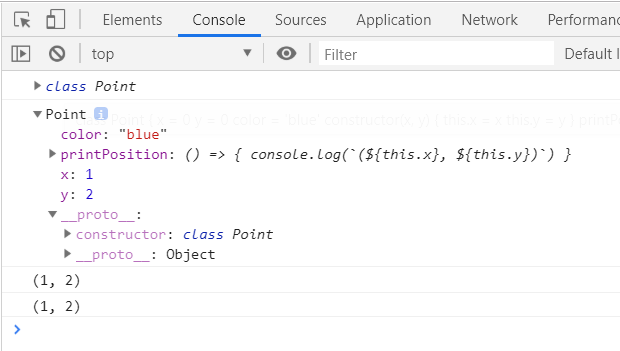
类属性和类方法
在前面加 static 关键字就可以了