Use Atom as a Markdown blogging editor. Great for Jekyll, Hexo and other static blogs.
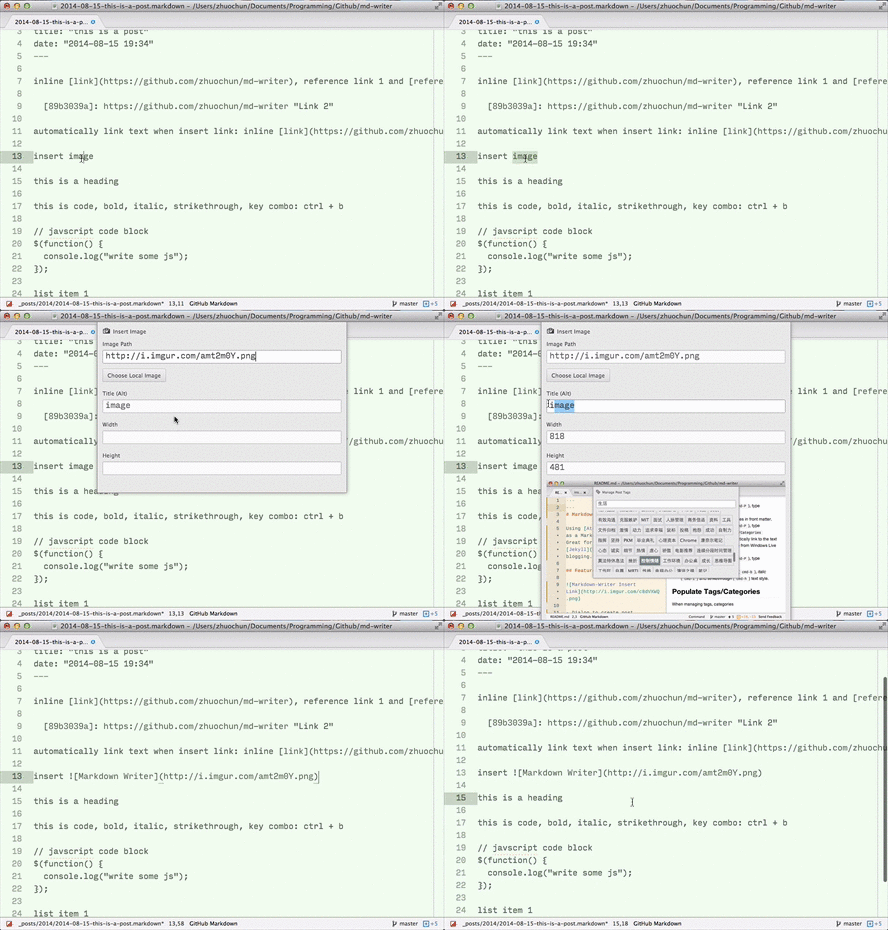
More GIFs Here:
- Dialog to create new post.
In Command Palette (
shift-cmd-P), typeMarkdown Writer: New Post. - Dialog to create new draft.
In Command Palette (
shift-cmd-P), typeMarkdown Writer: New Draft. - Publish draft moves current draft to
postsdirectory. It updatesdateand rename the post usingtitlein front matter. In Command Palette (shift-cmd-P), typeMarkdown Writer: Publish Draft. - Dialog to manage tags/categories in front matter.
In Command Palette (
shift-cmd-P), typeMarkdown Writer: Manage Post Tags/Categories - Dialog to insert link (
shift-cmd-k) and automatically link to the text next time (my favorite feature from Windows Live Writer).- Insert inline link by default
- Insert reference link if title is specified
- Remove link (and its reference) after URL is deleted
- Dialog to insert image (
shift-cmd-i), with width/height auto-detected. In Command Palette (shift-cmd-P), typeMarkdown Writer: Insert Image - Toggle text styles:
code(cmd-')- bold (
cmd-b) - italic (
cmd-i) strikethrough(cmd-h)'''codeblock'''(shift-cmd-")<kbd>key</kbd>(cmd + k)- unordered list(shift-cmd-U)0. ordered list(shift-cmd-O) shift-cmd-I> blockquote(shift-cmd->)
- Toggle headings:
alt-[1-5]to switch amongH1toH5.
You need to config markdown-writer to use most of the features.
Go to Preferences (cmd-,), search markdown writer package.
- siteLocalDir: The root directory of blog/jekyll
- siteDraftsDir: The directory of drafts from the root of
siteLocalDir. Default is_draft/. - sitePostsDir: The directory of posts from the root of
siteLocalDir. Default is_posts/{year}. You can also use{year},{month}and{day}. - urlForTags: The URL to tags
JSONfile. Refer to next section. - urlForPosts: The URL to posts
JSONfile. Refer to next section. - urlForCategories: The URL to categories
JSONfile. Refer to next section.
To change these settings, open your Atom config file, find markdown-writer entry.
- siteLinkPath: Define path (string) to a
.csonfile that stores all links added for automatic linking next time. Default usesmarkdown-writer-links.csonin Atom's config directory. - frontMatter: Define front matter (string) used when create new post/draft.
- publishRenameBasedOnTitle: Determine whether publish rename filename based on title in front matter. Default is
false(boolean). - publishKeepFileExtname: Determine whether publish keep draft's extname used. Default is
false(boolean). - codeblock: Define fenced code block (object). Default uses GitHub's fenced code block.
- imageTag: Define image tag inserted (string). Default uses
.
This is an example of advance setting's configuration:
'markdown-writer':
  # sync the links in dropbox
  'siteLinkPath': '/Users/zhuochun/Dropbox/blog/links.cson'
  # use Hexo front matter format
  'frontMatter': """
  layout: <layout>
  title: "<title>"
  date: "<date>"
  ---
  """
  # use jekyll highlight code block, change this requires reload
  'codeblock':
    'before': '{% highlight %}\n'
    'after': '\n{% endhighlight %}'
    'regexBefore': '{% highlight(?: .+)? %}\n'
    'regexAfter': '\n{% endhighlight %}'
  # use img html tag
  'imageTag': '<img alt="<alt>" src="<src>" width="<width>" height="<height>" class="aligncenter" />'


To manage tags/categories in front matter, you need to provide JSON files that list existing tags/categories/posts in your blog.
The JSON files contain following information of your blog:
{
  "tags": ["tag a", "tag b", "..."],
  "categories": ["category a", "category b", "..."],
  "posts": [{"title": "title", "url": "url"}]
}
For Jekyll users, you can add these scripts to your Jekyll directory and upload the generated JSON files.
For Hexo users, you can install hexo-generator-atom-markdown-writer-meta (Thanks to @timnew).
- Insert table
- Insert footnote
- Support multiple blog directories
View CHANGELOG 📔.
If you found any bug, please submit an issue here  .
.
License in MIT 🔓.
- Jumping among your posts:
Cmd-torCmd-p. - Markdown Preview: markdown-preview package.