-
-
Notifications
You must be signed in to change notification settings - Fork 1.3k
add a Chinese version readme #887
New issue
Have a question about this project? Sign up for a free GitHub account to open an issue and contact its maintainers and the community.
By clicking “Sign up for GitHub”, you agree to our terms of service and privacy statement. We’ll occasionally send you account related emails.
Already on GitHub? Sign in to your account
Closed
Closed
Changes from all commits
Commits
Show all changes
3 commits
Select commit
Hold shift + click to select a range
File filter
Filter by extension
Conversations
Failed to load comments.
Loading
Jump to
Jump to file
Failed to load files.
Loading
Diff view
Diff view
There are no files selected for viewing
This file contains hidden or bidirectional Unicode text that may be interpreted or compiled differently than what appears below. To review, open the file in an editor that reveals hidden Unicode characters.
Learn more about bidirectional Unicode characters
| Original file line number | Diff line number | Diff line change |
|---|---|---|
| @@ -0,0 +1,276 @@ | ||
| <p align="center"> | ||
| <picture> | ||
| <source srcset="apps/mail/public/white-icon.svg" media="(prefers-color-scheme: dark)"> | ||
| <img src="apps/mail/public/black-icon.svg" alt="Zero Logo" width="64" style="background-color: #000; padding: 10px;"/> | ||
| </picture> | ||
| </p> | ||
|
|
||
| # Zero | ||
|
|
||
| [](https://vercel.com/new/clone?repository-url=https%3A%2F%2Fgithub.com%2Fnizzyabi%2FMail0&env=DATABASE_URL,BETTER_AUTH_SECRET,BETTER_AUTH_URL,BETTER_AUTH_TRUSTED_ORIGINS,GOOGLE_CLIENT_ID,GOOGLE_CLIENT_SECRET,GOOGLE_REDIRECT_URI,GITHUB_CLIENT_ID,GITHUB_CLIENT_SECRET,GITHUB_REDIRECT_URI&envDescription=For%20more%20info%20on%20setting%20up%20your%20API%20keys%2C%20checkout%20the%20Readme%20below&envLink=https%3A%2F%2Fgithub.com%2Fnizzyabi%2FMail0%2Fblob%2Fmain%2FREADME.md&project-name=0&repository-name=0&redirect-url=0.email&demo-title=0&demo-description=An%20open%20source%20email%20app&demo-url=0.email) | ||
|
|
||
| 面向未来的开源 Gmail 替代方案 | ||
|
|
||
| ## 什么是 Zero? | ||
|
|
||
| Zero 是一个开源的 AI 邮件解决方案,允许用户**自托管**自己的邮件应用,并支持与 Gmail 等其他邮件服务的集成。我们的目标是借助 AI 代理来改进电子邮件,使其真正实现现代化。 | ||
|
|
||
| ## 为什么用 Zero? | ||
|
|
||
| 当今大多数邮件服务要么是**闭源**的、**数据贪婪**的,要么就是**自托管过于复杂**。 | ||
| 0.email 则与众不同: | ||
|
|
||
| - ✅ **开源** – 没有隐藏的动机,完全透明。 | ||
| - 🦾 **AI驱动** - 通过 Agents 和 LLMs 增强你的电子邮件。 | ||
| - 🔒 **数据隐私优先** – 你的邮件,你的数据。Zero 不会以任何方式追踪、收集或出售你的数据。请注意:尽管我们集成了一些外部服务,但通过这些服务传递的数据不在我们的控制范围内,并且遵循它们各自的隐私政策和服务条款。 | ||
| - ⚙️ **自主托管的自由** – 轻松运行你自己的邮件应用。 | ||
| - 📬 **统一的收件箱** – 可连接多个邮件提供商,如 Gmail、Outlook 等。 | ||
| - 🎨 **可定制的界面和功能** – 按照你希望的方式定制你的邮件体验。 | ||
| - 🚀 **开发友好** – 构建时充分考虑了可扩展性和集成需求。 | ||
|
|
||
| ## 技术栈 | ||
|
|
||
| Zero 基于现代且可靠的技术构建: | ||
|
|
||
| - **前端**: Next.js, React, TypeScript, TailwindCSS, Shadcn UI | ||
| - **后端**: Node.js, Drizzle ORM | ||
| - **数据库**: PostgreSQL | ||
| - **认证**: Better Auth, Google OAuth | ||
| <!-- - **Testing**: Jest, React Testing Library --> | ||
|
|
||
| ## 入门 | ||
|
|
||
| ### 环境要求 | ||
|
|
||
| **所需版本:** | ||
|
|
||
| - [Node.js](https://nodejs.org/en/download) (v18 或更高) | ||
| - [Bun](https://bun.sh) (v1.2 或更高) | ||
| - [Docker](https://docs.docker.com/engine/install/) (v20 或更高) | ||
|
|
||
| 在运行应用程序之前,您需要设置服务并配置环境变量。有关环境变量的更多详细信息,请参阅 [环境变量](#环境变量) 部分. | ||
|
|
||
| ### 启动方式 | ||
|
|
||
| 您可以通过两种方式启动Zero: | ||
|
|
||
| <details open> | ||
| <summary><b>Option 1: 标准启动 (推荐)</b></summary> | ||
|
|
||
| #### 快速启动指南 | ||
|
|
||
| 1. **克隆和安装** | ||
|
|
||
| ```bash | ||
| # 克隆储存库 | ||
| git clone https://github.com/Mail-0/Zero.git | ||
| cd Zero | ||
|
|
||
| # 安装依赖 | ||
| bun install | ||
|
|
||
| # 本地启动数据库 | ||
| bun docker:up | ||
| ``` | ||
|
|
||
| 2. **设置环境** | ||
|
|
||
| - 复制 `.env.example` 成 `.env` 到项目根目录 | ||
| ```bash | ||
| cp .env.example .env | ||
| ``` | ||
| - 确认你的环境变量(见下) | ||
| - 使用提供的 Docker Compose 设置启动数据库: `bun docker:up` | ||
| - 初始化数据库: `bun db:push` | ||
|
|
||
| 3. **启动App** | ||
|
|
||
| ```bash | ||
| bun dev | ||
| ``` | ||
|
|
||
| 4. **在浏览器中打开** | ||
|
|
||
| Visit [http://localhost:3000](http://localhost:3000) | ||
| </details> | ||
|
|
||
| <details> | ||
| <summary><b>Option 2: 开发容器设置(适用于 VS Code 用户)</b></summary> | ||
|
|
||
| 这个选项使用VS Code的Dev Containers特性来提供一个预先安装了所有依赖项的完整配置的开发环境。这对于确保团队中的每个人都有相同的设置是很好的。 | ||
|
|
||
| 1. **先决条件** | ||
|
|
||
| - [Docker](https://docs.docker.com/get-docker/) | ||
| - [VS Code](https://code.visualstudio.com/) 或兼容编辑器 | ||
| - [Dev Containers extension](https://marketplace.visualstudio.com/items?itemName=ms-vscode-remote.remote-containers) | ||
|
|
||
| 2. **在开发容器中打开** | ||
|
|
||
| - 克隆存储库: `git clone https://github.com/Mail-0/Zero.git` | ||
| - 在VS Code中打开文件夹 | ||
| - 当出现提示时,单击“Open in Container”或运行“Dev Containers: Open Folder in Container”命令 | ||
| - VS Code将构建并启动开发容器(第一次可能需要几分钟) | ||
|
|
||
| 3. **访问应用程序** | ||
|
|
||
| - 该应用程序将在 [http://localhost:3000](http://localhost:3000) | ||
|
|
||
| 4. **故障排除** | ||
| - 如果您遇到容器问题,请尝试使用“Dev Containers: Rebuild container”命令重建它 | ||
| - 对于容器内部的依赖问题: | ||
| `bash | ||
| rm -rf node_modules | ||
| rm bun.lockb | ||
| bun install | ||
| ` | ||
| </details> | ||
imnotnoahhh marked this conversation as resolved.
Show resolved
Hide resolved
|
||
|
|
||
| ### 环境设置 | ||
|
|
||
| 1. **Better Auth 设置** | ||
|
|
||
| - 打开 `.env` 文件然后把 BETTER_AUTH_SECRET 写成随机的字符串. (用 `openssl rand -hex 32` 生成一个32个字符的字符串) | ||
|
|
||
| ```env | ||
| BETTER_AUTH_SECRET=your_secret_key | ||
| ``` | ||
|
|
||
| 2. **Google OAuth 设置** (需要 Gmail integration) | ||
|
|
||
| - 前往 [Google Cloud Console](https://console.cloud.google.com) | ||
| - 创建一个新项目 | ||
| - 在谷歌Cloud项目中添加以下api: [People API](https://console.cloud.google.com/apis/library/people.googleapis.com), [Gmail API](https://console.cloud.google.com/apis/library/gmail.googleapis.com) | ||
| - 使用上面的链接并点击“启用”或 | ||
| - 前往 'APIs and Services' > 'Enable APIs and Services' > 搜索 'Google People API' 并且点击 'Enable' | ||
| - 前往 'APIs and Services' > 'Enable APIs and Services' > 搜索 'Gmail API' 并且点击 'Enable' | ||
| - 开启 Google OAuth2 API | ||
| - 创建 OAuth 2.0 凭据 (Web application type) | ||
| - 添加授权的重定向uri: | ||
| - 开发环境: | ||
| - `http://localhost:3000/api/auth/callback/google` | ||
| - 生产环境: | ||
| - `https://your-production-url/api/auth/callback/google` | ||
| - 添加到 `.env`: | ||
|
|
||
| ```env | ||
| GOOGLE_CLIENT_ID=your_client_id | ||
| GOOGLE_CLIENT_SECRET=your_client_secret | ||
| ``` | ||
|
|
||
| - 添加你自己成为测试用户: | ||
|
|
||
| - 前往 [`Audience`](https://console.cloud.google.com/auth/audience) | ||
| - 在“测试用户”下,点击“添加用户” | ||
| - 添加你的用户并点击 '保存' | ||
|
|
||
| > [!WARNING] | ||
| > 谷歌Cloud Console中授权的重定向uri必须与您在'。Env ',包括协议(http/https)、域和路径——这些都在上面提供。 | ||
|
|
||
| ### 环境变量 | ||
|
|
||
| 复制 `.env.example` 成 `.env` 到项目目录并配置以下变量: | ||
|
|
||
| ```env | ||
| # Auth | ||
| BETTER_AUTH_SECRET= # 需要用于身份验证的密钥 | ||
|
|
||
| # Google OAuth (需要Gmail集成) | ||
| GOOGLE_CLIENT_ID= # 需要Gmail集成 | ||
| GOOGLE_CLIENT_SECRET= # 需要Gmail集成 | ||
|
|
||
imnotnoahhh marked this conversation as resolved.
Show resolved
Hide resolved
|
||
| # Database | ||
| DATABASE_URL= # 需要:PostgreSQL连接字符串用于后端连接 | ||
|
|
||
| # Redis | ||
| REDIS_URL= # Redis URL用于缓存(http://localhost:8079用于本地开发) | ||
| REDIS_TOKEN= # Redis令牌(upstash-local-token用于本地开发) | ||
| ``` | ||
imnotnoahhh marked this conversation as resolved.
Show resolved
Hide resolved
|
||
|
|
||
| 在本地开发中一个链接字符串示例在`.env.example`文件中显示在数据库同一文件中. | ||
|
|
||
| ### 数据库设置 | ||
|
|
||
| Zero 使用 PostgreSQL 用于存储数据. 以下是如何启动: | ||
|
|
||
| 1. **启动数据库** | ||
|
|
||
| 运行这个代码去运行本地数据库 PostgreSQL 实例: | ||
|
|
||
| ```bash | ||
| bun docker:up | ||
| ``` | ||
|
|
||
| 创建了一个数据库: | ||
|
|
||
| - Name: `zerodotemail` | ||
| - Username: `postgres` | ||
| - Password: `postgres` | ||
| - Port: `5432` | ||
|
|
||
| 2. **设置数据库连接** | ||
|
|
||
| 确保你的数据库连接字符在 `.env`文件中. | ||
|
|
||
| 对于本地开发用户: | ||
|
|
||
| ``` | ||
| DATABASE_URL="postgresql://postgres:postgres@localhost:5432/zerodotemail" | ||
| ``` | ||
imnotnoahhh marked this conversation as resolved.
Show resolved
Hide resolved
|
||
|
|
||
| 3. **数据库命令** | ||
|
|
||
| - **设置数据库表**: | ||
|
|
||
| ```bash | ||
| bun db:push | ||
| ``` | ||
|
|
||
| - **创建迁移文件** (模式更改后): | ||
|
|
||
| ```bash | ||
| bun db:generate | ||
| ``` | ||
|
|
||
| - **请求迁移**: | ||
|
|
||
| ```bash | ||
| bun db:migrate | ||
| ``` | ||
|
|
||
| - **查看数据库内容**: | ||
| ```bash | ||
| bun db:studio | ||
| ``` | ||
| > 如果你运行 `bun dev` 在你的终端里, studio命令应该与应用程序一起自动运行。 | ||
|
|
||
| ## 贡献 | ||
|
|
||
| 请参阅 [contributing guide](.github/CONTRIBUTING.md). | ||
|
|
||
| 如果您想帮助将Zero翻译成其他语言,请查看我们的 [translation guide](.github/TRANSLATION.md). | ||
|
|
||
| ## Star History | ||
|
|
||
| [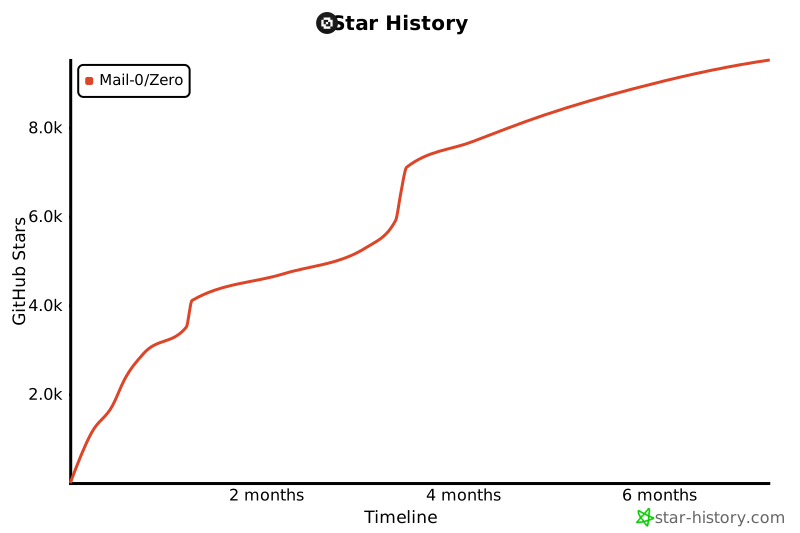](https://star-history.com/#Mail-0/Zero&Timeline) | ||
|
|
||
| ## 如果没有这些优秀的公司,这个项目是不可能实现的 | ||
|
|
||
| <div style="display: flex; justify-content: center;"> | ||
| <a href="https://vercel.com" style="text-decoration: none;"> | ||
| <img src="public/vercel.png" alt="Vercel" width="96"/> | ||
| </a> | ||
| <a href="https://better-auth.com" style="text-decoration: none;"> | ||
| <img src="public/better-auth.png" alt="Better Auth" width="96"/> | ||
| </a> | ||
| <a href="https://orm.drizzle.team" style="text-decoration: none;"> | ||
| <img src="public/drizzle-orm.png" alt="Drizzle ORM" width="96"/> | ||
| </a> | ||
| <a href="https://coderabbit.com" style="text-decoration: none;"> | ||
| <img src="public/coderabbit.png" alt="Coderabbit AI" width="96"/> | ||
| </a> | ||
| </div> | ||
|
|
||
| ## 🤍 The team | ||
|
|
||
| Curious who makes Zero? Here are our [contributors and maintainers](https://0.email/contributors) | ||
Add this suggestion to a batch that can be applied as a single commit.
This suggestion is invalid because no changes were made to the code.
Suggestions cannot be applied while the pull request is closed.
Suggestions cannot be applied while viewing a subset of changes.
Only one suggestion per line can be applied in a batch.
Add this suggestion to a batch that can be applied as a single commit.
Applying suggestions on deleted lines is not supported.
You must change the existing code in this line in order to create a valid suggestion.
Outdated suggestions cannot be applied.
This suggestion has been applied or marked resolved.
Suggestions cannot be applied from pending reviews.
Suggestions cannot be applied on multi-line comments.
Suggestions cannot be applied while the pull request is queued to merge.
Suggestion cannot be applied right now. Please check back later.
Uh oh!
There was an error while loading. Please reload this page.