Document Field Tooltips #2706

Description

Where
There are a couple of options:
- Create a Fields API page that could describe APIs available for all field types. It looks like there was a plan to add one, but it maybe got scrapped because tooltips would be the only API included (which is reasonable).
- The Fields overview page.
- The Anatomy of a field page.
- The Built-in fields page.
What
- Text
- Image or Gif
- Other
Old content
Nada
Suggested content
By default a field will show the tooltip of its source block, but they can be given a custom tooltip as well.
JSON
{
    "type": "tooltip_static",
    "message0": "%1",
    "args0": [
      {
        "type": "field_input",
        "name": "TOOLTIP",
        "text": "default",
        "tooltip": "This field has a tooltip."
      }
    ],
  }
JavaScript
Blockly.Blocks['tooltip_static'] = {
  init: function() {
    var field = new Blockly.FieldTextInput('default', /* opt_validator */ null, {
      tooltip: 'This field has a tooltip.'
     });
    this.appendDummyInput()
        .appendField(field, 'TOOLTIP');
  },
};
or
Blockly.Blocks['tooltip_static'] = {
  init: function() {
    var field = new Blockly.FieldTextInput('default');
    field.setTooltip('This field has a tooltip.');
    this.appendDummyInput()
        .appendField(field, 'TOOLTIP');
  },
};
In the JavaScript API, tooltips can also be defined as a function instead of a static string. This allows for dynamic help.
Blockly.Blocks['tooltip_dynamic'] = {
  init: function() {
    var field = new Blockly.FieldTextInput('default', /* opt_validator*/ null, {
      // By default tooltip functions are called in a null context. We want it
      // to be called in the context of the block, so we use bind.
      tooltip: this.doTooltip.bind(this)
    });
    this.appendDummyInput()
      .appendField(field, 'TOOLTIP');
  },

  doTooltip: function() {
    return this.getFieldValue('TOOLTIP')
  }
};
or
Blockly.Blocks['tooltip_dynamic'] = {
  init: function() {
    var field = new Blockly.FieldTextInput('default');
    // By default tooltip functions are called in a null context. We want it
    // to be called in the context of the block, so we use bind.
    field.setTooltip(this.doTooltip.bind(this));
    this.appendDummyInput()
      .appendField(field, 'TOOLTIP');
  },

  doTooltip: function() {
    return this.getFieldValue('TOOLTIP')
  }
};
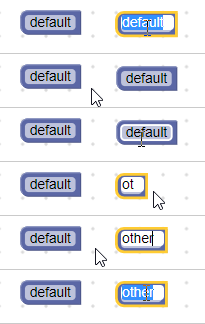
If your block is defined in JSON but you want a field to have a dynamic tooltip, you can use an extension to accomplish this.
Additional context