Skip to content

Conversation

@wenwj0
Copy link
Contributor

@wenwj0 wenwj0 commented Sep 4, 2023

What changes were proposed in this pull request?

  • Upgrade ambari from python2 to python3 on trunk branch.
  • More changes details can be found in Ambari-support-python3.md in AMBARI-26000

How was this patch tested?

  • All unit tests
  • Manual deploy tests on centos7

image_20230904135912
image_20230904135916
image_20230904135917

Please review Ambari Contributing Guide before opening a pull request.

Co-authored-by: jialiang <2510095164@qq.com>
@wenwj0
Copy link
Contributor Author

wenwj0 commented Sep 4, 2023

Python3 rely on distro module and it is not installed on the current machine, thus continuous-integration test failed.

Phenomenon: ModuleNotFoundError: No module named 'distro'
UT command: mvn -Dmaven.test.failure.ignore=true -am test -pl ambari-agent -Dmaven.artifact.threads=10 -Drat.skip

Please install distro module by using command: pip3 install distro

@brahmareddybattula @virajjasani

wenwj0 and others added 2 commits September 6, 2023 21:22
2.fix sudo encoding error
3.remove redunant get_encoded_string
@JiaLiangC
Copy link
Contributor

@brahmareddybattula @virajjasani
Could you please help check CI/CD environment about the python3 dependency problem?

@virajjasani
Copy link
Contributor

Sorry I couldn't take a look. @arshadmohammad you think you can take a look at CI pipeline for python 3 installation?

@arshadmohammad
Copy link
Contributor

Sorry I couldn't take a look. @arshadmohammad you think you can take a look at CI pipeline for python 3 installation?

no idea how to access the CI Vms, but let me run distro installation as part of the test execution script itself. lets see whether it works

@JiaLiangC
Copy link
Contributor

Sorry I couldn't take a look. @arshadmohammad you think you can take a look at CI pipeline for python 3 installation?

no idea how to access the CI Vms, but let me run distro installation as part of the test execution script itself. lets see whether it works

thanks man

@arshadmohammad
Copy link
Contributor

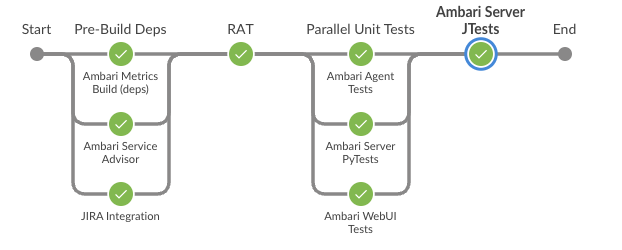
installing distro package, as part of the test execution script, does not work. https://ci-hadoop.apache.org/blue/organizations/jenkins/Ambari%2FAmbari-PreCommit-GitHub-PR/detail/PR-3754/1/pipeline

@JiaLiangC
Copy link
Contributor

JiaLiangC commented Sep 22, 2023

@arshadmohammad it seems your change in jenkinsfile not working fine ,maybe you can try this
stage('Some Stage') {
steps {
// Other steps here
sh 'pip3 install distro'
// Other steps here
}
}

@arshadmohammad
Copy link
Contributor

Thanks @JiaLiangC, it worked.
https://ci-hadoop.apache.org/blue/organizations/jenkins/Ambari%2FAmbari-PreCommit-GitHub-PR/detail/PR-3754/2/pipeline/
image

@JiaLiangC
Copy link
Contributor

@wenwj0 wenwj0 changed the title AMBARI-26000: Ambari supports Python3 environment AMBARI-26000: Ambari supports Python3 environment. Sep 22, 2023
@wenwj0 wenwj0 changed the title AMBARI-26000: Ambari supports Python3 environment. Ambari supports Python3 environment Sep 22, 2023
@wenwj0 wenwj0 changed the title Ambari supports Python3 environment AMBARI-26000: Ambari supports python3 environment Sep 22, 2023
@wenwj0 wenwj0 changed the title AMBARI-26000: Ambari supports python3 environment AMBARI-26000: Make Ambari supports Python3 environment Sep 22, 2023
@JiaLiangC
Copy link
Contributor

@arshadmohammad Could you help trigger the CI/CD process of this PR again?

@arshadmohammad
Copy link
Contributor

@arshadmohammad Could you help trigger the CI/CD process of this PR again?
CI got triggered with the new commit by @wenwj0. CI is passed for this PR.

@JiaLiangC
Copy link
Contributor

@virajjasani @arshadmohammad @brahmareddybattula
Can you help review and push the merge of this PR? Detailed explanations for all the changes in the PR are available in the documentation within the issue.

I've already reviewed this PR and tested multiple times. Once this PR is merged, it will greatly simplify support for multiple operating systems and different architectures.

@MacChen01
Copy link

@guyuqi please help to review the code, thanks.

print server_hostname()
print(hostname())
print(public_hostname())
print(server_hostname())
Copy link
Contributor

Choose a reason for hiding this comment

The reason will be displayed to describe this comment to others. Learn more.

server_hostname => server_hostnames
image

Copy link
Contributor Author

Choose a reason for hiding this comment

The reason will be displayed to describe this comment to others. Learn more.

thanks for finding this, I will fix it later.

@eubnara
Copy link
Contributor

eubnara commented Sep 28, 2023

There are some import rpm lines. But rpm module is not preinstalled in python3.

e.g. yum_manager.py

def rpm_check_package_available(self, name):
  import rpm # this is faster then calling 'rpm'-binary externally.

from urllib.error import HTTPError

from tempfile import gettempdir
from alerts.base_alert import BaseAlert
Copy link
Contributor

Choose a reason for hiding this comment

The reason will be displayed to describe this comment to others. Learn more.

alerts.base_alert => ambari_agent.alerts.base_alert
Maybe it should be also changed?

Copy link
Contributor Author

Choose a reason for hiding this comment

The reason will be displayed to describe this comment to others. Learn more.

both these two way are work.

@wenwj0
Copy link
Contributor Author

wenwj0 commented Sep 30, 2023

There are some import rpm lines. But rpm module is not preinstalled in python3.

e.g. yum_manager.py

def rpm_check_package_available(self, name):
  import rpm # this is faster then calling 'rpm'-binary externally.

Yes, rpm module is needed and that isn't preinstalled. We install python36-rpm in centos 7 and it works.

@arshadmohammad
Copy link
Contributor

I will review this PR.

@arshadmohammad
Copy link
Contributor

I was trying to build this PR(also applied #3758 changes) on rocky linux 8.8 but build failed with following error
[INFO] error: Bad exit status from /var/tmp/rpm-tmp.HcNglV (%install) [INFO] Bad exit status from /var/tmp/rpm-tmp.HcNglV (%install) [INFO] [INFO] [INFO] RPM build errors: [INFO] ------------------------------------------------------------------------ [INFO] Reactor Summary for Ambari Server 3.0.0.0-SNAPSHOT: [INFO] [INFO] Ambari Server ...................................... FAILURE [02:10 min] [INFO] Ambari Functional Tests ............................ SKIPPED [INFO] Ambari Agent ....................................... SKIPPED [INFO] ------------------------------------------------------------------------ [INFO] BUILD FAILURE [INFO] ------------------------------------------------------------------------ [INFO] Total time: 02:10 min [INFO] Finished at: 2023-10-21T15:03:07+05:30 [INFO] ------------------------------------------------------------------------ [ERROR] Failed to execute goal org.codehaus.mojo:rpm-maven-plugin:2.1.4:rpm (default-cli) on project ambari-server: RPM build execution returned: '1' executing '/bin/sh -c cd '/home/code/non-forked/ambari/ambari-server/target/rpm/ambari-server/SPECS' && 'rpmbuild' '-bb' '--target' 'x86_64-redhat-linux' '--buildroot' '/home/code/non-forked/ambari/ambari-server/target/rpm/ambari-server/buildroot' '--define' '_topdir /home/code/non-forked/ambari/ambari-server/target/rpm/ambari-server' '--define' '_build_name_fmt %%{ARCH}/%%{NAME}-%%{VERSION}-%%{RELEASE}.%%{ARCH}.rpm' '--define' '_builddir %{_topdir}/BUILD' '--define' '_rpmdir %{_topdir}/RPMS' '--define' '_sourcedir %{_topdir}/SOURCES' '--define' '_specdir %{_topdir}/SPECS' '--define' '_srcrpmdir %{_topdir}/SRPMS' 'ambari-server.spec'' -> [Help 1]
@wenwj0 any idea what changes to be done to make it build on rocky linux 8 also. It will be easy for me to review this PR if this can be build and tested on rocky linux 8 also.

@JiaLiangC
Copy link
Contributor

@arshadmohammad

I was trying to build this PR(also applied #3758 changes) on rocky linux 8.8 but build failed with following error [INFO] error: Bad exit status from /var/tmp/rpm-tmp.HcNglV (%install) [INFO] Bad exit status from /var/tmp/rpm-tmp.HcNglV (%install) [INFO] [INFO] [INFO] RPM build errors: [INFO] ------------------------------------------------------------------------ [INFO] Reactor Summary for Ambari Server 3.0.0.0-SNAPSHOT: [INFO] [INFO] Ambari Server ...................................... FAILURE [02:10 min] [INFO] Ambari Functional Tests ............................ SKIPPED [INFO] Ambari Agent ....................................... SKIPPED [INFO] ------------------------------------------------------------------------ [INFO] BUILD FAILURE [INFO] ------------------------------------------------------------------------ [INFO] Total time: 02:10 min [INFO] Finished at: 2023-10-21T15:03:07+05:30 [INFO] ------------------------------------------------------------------------ [ERROR] Failed to execute goal org.codehaus.mojo:rpm-maven-plugin:2.1.4:rpm (default-cli) on project ambari-server: RPM build execution returned: '1' executing '/bin/sh -c cd '/home/code/non-forked/ambari/ambari-server/target/rpm/ambari-server/SPECS' && 'rpmbuild' '-bb' '--target' 'x86_64-redhat-linux' '--buildroot' '/home/code/non-forked/ambari/ambari-server/target/rpm/ambari-server/buildroot' '--define' '_topdir /home/code/non-forked/ambari/ambari-server/target/rpm/ambari-server' '--define' '_build_name_fmt %%{ARCH}/%%{NAME}-%%{VERSION}-%%{RELEASE}.%%{ARCH}.rpm' '--define' '_builddir %{_topdir}/BUILD' '--define' '_rpmdir %{_topdir}/RPMS' '--define' '_sourcedir %{_topdir}/SOURCES' '--define' '_specdir %{_topdir}/SPECS' '--define' '_srcrpmdir %{_topdir}/SRPMS' 'ambari-server.spec'' -> [Help 1] @wenwj0 any idea what changes to be done to make it build on rocky linux 8 also. It will be easy for me to review this PR if this can be build and tested on rocky linux 8 also.

Things to note when compiling on Rocky8:
The maven-rpm-plugin used for rpm compilation will, by default, perform python compilation, and it uses /usr/bin/python for the compilation, which cannot be configured to use python3.
Therefore, on Rocky8, the old python2 soft link needs to be deleted, and create a new one using ln -s /usr/bin/python3 /usr/bin/python.

@wenwj0 wenwj0 force-pushed the AMBARI-26000-trunk branch from f06a089 to 25f64c2 Compare January 28, 2024 11:38
@wenwj0 wenwj0 force-pushed the AMBARI-26000-trunk branch from 25f64c2 to 3d7e900 Compare January 28, 2024 12:43

Choose a reason for hiding this comment

The reason will be displayed to describe this comment to others. Learn more.

seems like it should be 'w' rather than 'wb' in line 278,it's work when I using ambari-agent setup x, but if 'wb', it will clean the .ini file and raise error like: "a bytes-like object is required, not 'str'"

@arshadmohammad
Copy link
Contributor

@wenwj0 @JiaLiangC any idea why CI is failing?

@wenwj0
Copy link
Contributor Author

wenwj0 commented Feb 3, 2024

@wenwj0 @JiaLiangC any idea why CI is failing?

The log shows that there is an error in org.codehaus.mojo:exec-maven-plugin:1.2.1:exec (ambari-web unit tests) on project ambari-web. In the ambari-web unit tests part, I see that it executed command npm run.

The only error I found in this part is ERROR [launcher]: No binary for ChromeHeadless browser on your platform. Please, set "CHROME_BIN" env variable.

@JiaLiangC
Copy link
Contributor

@arshadmohammad
Conclusion: This CI error is not related to PR AMBARI-26000; it's an issue with the trunk branch.

The error can be reproduced in the trunk branch code due to PR #3760.

Cause:
PR #3760 introduced chromium-browser, which caused the error during test execution because of the chromium-browser settings in our CI environment. This needs to be fixed in CI.

How to reproduce:
Operating System: Rocky Linux 8

  1. Install chromium:
    yum install -y chromium

  2. Change directory to ambari:
    cd ambari

  3. Start compilation:
    mvn -X -T 2C -am test -pl ambari-web -Dmaven.artifact.threads=10 -Drat.skip

image

As shown above, the error message is the same as in CI, confirming the reproduction of the issue!

Below is the error from CI:
image

How to solve:

  1. The error message indicates that CHROME_BIN is not set, so let's set it:

export CHROME_BIN=/usr/bin/chromium-browser

Continue execution:
mvn -X -T 2C -am test -pl ambari-web -Dmaven.artifact.threads=10 -Drat.skip
image

  1. Error message:
    ERROR:zygote_host_impl_linux.cc(100)] Running as root without --no-sandbox is not supported. See https://crbug.com/638180.

How to solve:
Edit /usr/bin/chromium-browser:

vim /usr/bin/chromium-browser

Add --no-sandbox at the end of the file.
image

Then the compilation succeeds.

image

@arshadmohammad
Copy link
Contributor

Thanks @JiaLiangC for detailed information on CI. We will address CI issue separate PR.

@arshadmohammad
Copy link
Contributor

As discussed in mailing thread https://lists.apache.org/thread/htsfrt0zh89ql9covz721j696tskwqx3, I am going to merge this PR.

Copy link
Contributor

@arshadmohammad arshadmohammad left a comment

Choose a reason for hiding this comment

The reason will be displayed to describe this comment to others. Learn more.

LGTM +1

@arshadmohammad arshadmohammad merged commit 5f95ec6 into apache:trunk Feb 9, 2024
@wenwj0
Copy link
Contributor Author

wenwj0 commented Feb 10, 2024

Thank @arshadmohammad very much for reviewing and merging the code, and also thank @Jetiaime and @eubnara for reviewing the code.

@JiaLiangC
Copy link
Contributor

@vanshuhassija

@arshadmohammad Conclusion: This CI error is not related to PR AMBARI-26000; it's an issue with the trunk branch.

The error can be reproduced in the trunk branch code due to PR #3760.

Cause: PR #3760 introduced chromium-browser, which caused the error during test execution because of the chromium-browser settings in our CI environment. This needs to be fixed in CI.

How to reproduce: Operating System: Rocky Linux 8

  1. Install chromium:
    yum install -y chromium
  2. Change directory to ambari:
    cd ambari
  3. Start compilation:
    mvn -X -T 2C -am test -pl ambari-web -Dmaven.artifact.threads=10 -Drat.skip

image

As shown above, the error message is the same as in CI, confirming the reproduction of the issue!

Below is the error from CI: image

How to solve:

  1. The error message indicates that CHROME_BIN is not set, so let's set it:

export CHROME_BIN=/usr/bin/chromium-browser

Continue execution: mvn -X -T 2C -am test -pl ambari-web -Dmaven.artifact.threads=10 -Drat.skip image

  1. Error message:
    ERROR:zygote_host_impl_linux.cc(100)] Running as root without --no-sandbox is not supported. See https://crbug.com/638180.

How to solve: Edit /usr/bin/chromium-browser:

vim /usr/bin/chromium-browser

Add --no-sandbox at the end of the file. image

Then the compilation succeeds.

image

as mentioned above, the CI failed because your PR #3760
Could you help check and solve the problem? it blocked all other PR.

@JiaLiangC
Copy link
Contributor

@arshadmohammad
#3760
It looks like this PR is causing disruption to the CI. Can we revert it first until this PR resolves the CI issue?

@MacChen01
Copy link

MacChen01 commented Feb 18, 2024

Thank @arshadmohammad very much for reviewing and merging the code, and also thank @Jetiaime and @eubnara for reviewing the code.

Thank @arshadmohammad @Jetiaime @eubnara @JiaLiangC @wenwj0

@Jati-Jostar
Copy link

Selection_1068
hello i got this error how to fix it

@minixar
Copy link

minixar commented Mar 9, 2025

Selection_1068 hello i got this error how to fix it

Hi!
I've the same issue using: rocky linux 9 + java 17 + python3.
I was able to work around the issue avoiding the rpm build.
mvn -B clean install package -DskipRpm -Drat.skip=true -DskipTests -Dmaven.test.skip=true
Then just use the .tar.gz in the target dir.
I suggest avoiding the trunk branch. I used the merge [5262967] with rockylinux 8 + java 1.8 + python3 and worked great.
Hope this help.

@JiaLiangC
Copy link
Contributor

@Jati-Jostar @minixar Apologies for the lack of community manpower and missing relevant documentation. The 3.0 version is set to be released this month, which will include detailed compilation, deployment, and installation documentation, supporting both rocky8 and rocky9.

@minixar
Copy link

minixar commented Mar 10, 2025

Thank @JiaLiangC for sharing the news about the release of the 3.0 version.
Is there a jira issue or epic for this task?

@Jati-Jostar
Copy link

Jati-Jostar commented Mar 10, 2025 via email

@JiaLiangC
Copy link
Contributor

@Jati-Jostar @minixar The issue with the RPM packaging failure was caused by the system's handling of the shebang, and it has been resolved. The relevant fixes and compilation commands are in this PR: #3952

@simonj217
Copy link

hi @JiaLiangC

Hello,
I was able to successfully build Ambari on RHEL 8 without any issues but i can not install ambari server .
log ---------------------------
/usr/jdk64/bin/java -version
openjdk version "17.0.14" 2025-01-21 LTS
OpenJDK Runtime Environment (Red_Hat-17.0.14.0.7-1) (build 17.0.14+7-LTS)
OpenJDK 64-Bit Server VM (Red_Hat-17.0.14.0.7-1) (build 17.0.14+7-LTS, mixed mode, sharing)
[root@m1 ~]# ambari-server setup ^C
[root@m1 ~]# ambari-server setup
bash: /usr/sbin/ambari-server: No such file or directory
[root@m1 ~]# yum install ambari-server
Last metadata expiration check: 1:32:51 ago on Wed 12 Mar 2025 01:47:47 PM +0330.
Dependencies resolved.

Package Architecture Version Repository Size

Installing:
ambari-server x86_64 3.0.0.0-SNAPSHOT ambari 134 M
Installing dependencies:
libpq x86_64 13.20-1.el8_10 appstream 198 k
postgresql x86_64 10.23-4.module+el8.9.0+1734+74bd286c appstream 1.5 M
postgresql-server x86_64 10.23-4.module+el8.9.0+1734+74bd286c appstream 5.1 M

Transaction Summary

Install 4 Packages

Total download size: 141 M
Installed size: 207 M
Is this ok [y/N]: y
Downloading Packages:
(1/4): libpq-13.20-1.el8_10.x86_64.rpm 53 kB/s | 198 kB 00:03
(2/4): postgresql-server-10.23-4.module+el8.9.0+1734+74bd286c.x86_64.rpm 1.3 MB/s | 5.1 MB 00:03
(3/4): postgresql-10.23-4.module+el8.9.0+1734+74bd286c.x86_64.rpm 404 kB/s | 1.5 MB 00:03
(4/4): ambari-server-3.0.0.0-SNAPSHOT.x86_64.rpm 346 MB/s | 134 MB 00:00

Total 33 MB/s | 141 MB 00:04
Running transaction check
Transaction check succeeded.
Running transaction test
Transaction test succeeded.
Running transaction
Preparing : 1/1
Installing : libpq-13.20-1.el8_10.x86_64 1/4
Installing : postgresql-10.23-4.module+el8.9.0+1734+74bd286c.x86_64 2/4
Running scriptlet: postgresql-server-10.23-4.module+el8.9.0+1734+74bd286c.x86_64 3/4
Installing : postgresql-server-10.23-4.module+el8.9.0+1734+74bd286c.x86_64 3/4
Running scriptlet: postgresql-server-10.23-4.module+el8.9.0+1734+74bd286c.x86_64 3/4
Running scriptlet: ambari-server-3.0.0.0-SNAPSHOT.x86_64 4/4
Backing up configs: /etc/ambari-server/conf.save -> /etc/ambari-server/conf_12_03_25_15_20.save

Installing : ambari-server-3.0.0.0-SNAPSHOT.x86_64 4/4
Running scriptlet: ambari-server-3.0.0.0-SNAPSHOT.x86_64 4/4
Verifying : libpq-13.20-1.el8_10.x86_64 1/4
Verifying : postgresql-10.23-4.module+el8.9.0+1734+74bd286c.x86_64 2/4
Verifying : postgresql-server-10.23-4.module+el8.9.0+1734+74bd286c.x86_64 3/4
Verifying : ambari-server-3.0.0.0-SNAPSHOT.x86_64 4/4

Installed:
ambari-server-3.0.0.0-SNAPSHOT.x86_64 libpq-13.20-1.el8_10.x86_64 postgresql-10.23-4.module+el8.9.0+1734+74bd286c.x86_64
postgresql-server-10.23-4.module+el8.9.0+1734+74bd286c.x86_64

Complete!
[root@m1 ~]# ambari-server setup
Using python /usr/bin/python3
Setup ambari-server
Checking SELinux...
SELinux status is 'disabled'
Customize user account for ambari-server daemon [y/n] (n)?
Adjusting ambari-server permissions and ownership...
Checking firewall status...
Checking JDK...
[1] Oracle JDK 1.8 + Java Cryptography Extension (JCE) Policy Files 8
[2] Custom JDK

Enter choice (1): 2
WARNING: JDK must be installed on all hosts and JAVA_HOME must be valid on all hosts.
WARNING: JCE Policy files are required for configuring Kerberos security. If you plan to use Kerberos,please make sure JCE Unlimited Strength Jurisdiction Policy Files are valid on all hosts.
Path to JAVA_HOME: /usr/jdk64/
Validating JDK on Ambari Server...done.
Checking GPL software agreement...
GPL License for LZO: https://www.gnu.org/licenses/old-licenses/gpl-2.0.en.html
Enable Ambari Server to download and install GPL Licensed LZO packages [y/n] (n)?
Completing setup...
Configuring database...
Enter advanced database configuration [y/n] (n)? n
Configuring database...
Default properties detected. Using built-in database.
Configuring ambari database...
Checking PostgreSQL...
Running initdb: This may take up to a minute.
About to start PostgreSQL
Configuring local database...
Configuring PostgreSQL...
Backup for pg_hba found, reconfiguration not required
Creating schema and user...
done.
Creating tables...
done.
Extracting system views...
INFO: Looking for available JDKs at /usr/jdk64
ERROR: No JDK found, please run the "setup" command to install a JDK automatically or install any JDK manually to /usr/jdk64
ERROR: Exiting with exit code 1.
REASON: Error while extracting system views. Exiting

@aghazeh
Copy link

aghazeh commented Mar 12, 2025

hi @arshadmohammad @JiaLiangC
vi ambari-server-command.log

INFO 2025-03-12 14:02:52,509 ambari-server.py:1804 - loglevel=logging.INFO
INFO 2025-03-12 14:02:52,509 serverSetup.py:1391 - Setup ambari-server.
ERROR 2025-03-12 14:03:27,753 ambari-server.py:1921 - 'Fatal exception: Error while extracting system views. Exiting, exit code 1'
Traceback (most recent call last):
File "/usr/sbin/ambari-server.py", line 1902, in main
action_obj.execute()
File "/usr/sbin/ambari-server.py", line 131, in execute
self.fn(*self.args, **self.kwargs)
File "/usr/lib/ambari-server/lib/ambari_server/serverSetup.py", line 1455, in setup
raise FatalException(retcode, err)
ambari_commons.exceptions.FatalException: 'Fatal exception: Error while extracting system views. Exiting, exit code 1'
INFO 2025-03-12 14:05:11,710 ambari-server.py:1804 - loglevel=logging.INFO
INFO 2025-03-12 14:05:11,710 serverSetup.py:1391 - Setup ambari-server.
ERROR 2025-03-12 14:05:39,730 ambari-server.py:1921 - 'Fatal exception: Error while extracting system views. Exiting, exit code 1'
Traceback (most recent call last):
File "/usr/sbin/ambari-server.py", line 1902, in main
action_obj.execute()
File "/usr/sbin/ambari-server.py", line 131, in execute
self.fn(*self.args, **self.kwargs)
File "/usr/lib/ambari-server/lib/ambari_server/serverSetup.py", line 1455, in setup
raise FatalException(retcode, err)
ambari_commons.exceptions.FatalException: 'Fatal exception: Error while extracting system views. Exiting, exit code 1'
INFO 2025-03-12 14:08:37,834 ambari-server.py:1804 - loglevel=logging.INFO
INFO 2025-03-12 14:08:37,835 serverSetup.py:1391 - Setup ambari-server.
ERROR 2025-03-12 14:09:01,036 ambari-server.py:1921 - 'Fatal exception: Error while extracting system views. Exiting, exit code 1'
Traceback (most recent call last):
File "/usr/sbin/ambari-server.py", line 1902, in main
action_obj.execute()
File "/usr/sbin/ambari-server.py", line 131, in execute
self.fn(*self.args, **self.kwargs)
File "/usr/lib/ambari-server/lib/ambari_server/serverSetup.py", line 1455, in setup
raise FatalException(retcode, err)
ambari_commons.exceptions.FatalException: 'Fatal exception: Error while extracting system views. Exiting, exit code 1'
INFO 2025-03-12 14:09:31,253 ambari-server.py:1804 - loglevel=logging.INFO
INFO 2025-03-12 14:09:31,253 serverSetup.py:1391 - Setup ambari-server.
ERROR 2025-03-12 14:09:41,388 ambari-server.py:1921 - "Fatal exception: Downloading or installing JDK failed: 'Fatal exception: Failed to download JDK: <urlopen error [Errno -2] Name or service not known>. Please check that the JDK is available at http://public-repo-1.hortonworks.com/ARTIFACTS/jdk-8u112-linux-x64.tar.gz. Also you may specify JDK file location in local filesystem using --jdk-location command line argument., exit code 1'. Exiting., exit code 1"
Traceback (most recent call last):
File "/usr/lib64/python3.6/urllib/request.py", line 1349, in do_open
encode_chunked=req.has_header('Transfer-encoding'))
File "/usr/lib64/python3.6/http/client.py", line 1273, in request
self._send_request(method, url, body, headers, encode_chunked)
File "/usr/lib64/python3.6/http/client.py", line 1319, in _send_request
self.endheaders(body, encode_chunked=encode_chunked)
File "/usr/lib64/python3.6/http/client.py", line 1268, in endheaders
self._send_output(message_body, encode_chunked=encode_chunked)
File "/usr/lib64/python3.6/http/client.py", line 1044, in _send_output
self.send(msg)

@Jati-Jostar
Copy link

image
im sorry but im still got the same error, i think its about os architecture mine is x86_64 rocky9 , and on the log is showing that 2 file is not recognizeable because the format of the file is ppc64le

@simonj217
Copy link

Hello,

I was able to build Apache Ambari successfully. Now, I want to install BigTop 3.3 services using Ambari.

I have two questions for you:

1 - Do I need to build BigTop from scratch so that its packages are like zookeeper_3_3_3 instead of just zookeeper? Because I use the -PpkgSuffix option during the build process. Can Ambari use the packages that were built by you and published on the Apache website directly, or do I need to build them myself?

2 - And my last question is that bigtop-select uses Python 2, but the version of Ambari I have uses Python 3, and most of the time this causes problems. What is your solution for installing BigTop 3.3 with Ambari that is running on Python 3?

@minixar
Copy link

minixar commented May 5, 2025

Hi @simonj217
I think you can find here: https://ambari.apache.org/docs/3.0.0/ambari-dev/bigtop-guide/ the answer to your questions.
Bye

Sign up for free to join this conversation on GitHub. Already have an account? Sign in to comment

Labels

None yet

Projects

None yet

Development

Successfully merging this pull request may close these issues.